Protecting websites from malicious bots is a top priority for site owners. Two popular tools—Cloudways Bot Protection and Wordfence—offer strong security solutions.
Cloudways Bot Protection Vs Wordfence: But how do they differ, and which one suits your needs? Choosing the right security tool can feel overwhelming, especially with so many options available. Cloudways Bot Protection and Wordfence are both well-known for their effectiveness, but they take different approaches to safeguarding websites.
This comparison will help you understand their unique features, strengths, and use cases. By the end, you’ll have a clearer picture of which tool aligns better with your site’s security goals. Whether you manage a small blog or a large e-commerce store, this guide will simplify your decision-making process. Let’s dive into the details!
Introduction To Cloud Security
Protecting cloud environments requires robust security tools. Cloudways Bot Protection focuses on server-level security, blocking malicious traffic automatically. Wordfence, a WordPress plugin, provides detailed site-level protection, including malware scans and login security.
Have you ever worried about your website getting hacked or your data being exposed? If you’re running a website, especially on the cloud, you need to think about security. Cyberattacks are more common than ever, and protecting your site isn’t just an option—it’s a necessity.
Cloud security ensures your website, data, and users are safe from cyber threats. It’s not just about installing a plugin or following a checklist. It’s about choosing the right tools that actively defend your site around the clock.
Let’s dive into why website protection matters and why modern threats call for smarter solutions.
Importance Of Website Protection
Your website is your online storefront. If it’s compromised, your reputation—and possibly your business—takes a hit. Imagine someone visiting your site and being greeted by a phishing scam or malware. Would they trust your brand again? Likely not.
Website protection isn’t just about keeping hackers out. It’s about safeguarding your data and your customers’ trust. A secure site also gets better rankings on search engines. Google prioritizes safety, and a hacked site will likely get penalized.
Tools like Cloudways Bot Protection and Wordfence are designed to protect your site from common and advanced threats. But the key is understanding which one fits your needs better.
Rising Threats In The Digital Age
Every day, hackers get smarter. Automated bots scan websites for vulnerabilities. They don’t care if you’re running a small blog or a large e-commerce site. If there’s a way in, they’ll find it.
DDoS attacks, brute force login attempts, and malware injections are becoming more frequent. For example, WordPress sites alone face millions of brute force attacks daily. These attacks can slow down your site, cause downtime, or even steal sensitive data.
You might think, “I’m not a big company—why would anyone target me?” But hackers often target smaller sites because they assume security measures are weak. It’s better to be proactive than reactive when it comes to website protection.
By choosing the right security tool, you’re not just defending against today’s threats. You’re future-proofing your website. So, how do Cloudways Bot Protection and Wordfence compare in tackling these challenges? Let’s explore that further.
What Is Cloudways Bot Protection?
Cloudways Bot Protection is a security feature designed to safeguard websites from malicious bot traffic. It helps prevent bots from overwhelming your server resources and protects your site from potential security breaches. Bots can pose a serious threat by executing automated attacks, such as brute force attempts or spam. Cloudways Bot Protection ensures your site stays secure and performs smoothly.
This tool works in the background, monitoring incoming traffic and identifying harmful activity. It blocks suspicious bots while allowing legitimate visitors to access your website. This ensures your site remains accessible to users while staying protected from threats.
Features Of Cloudways Bot Protection
Cloudways Bot Protection comes with advanced features to enhance website security. It integrates seamlessly with Cloudways hosting, ensuring efficient management of bot traffic. The system uses AI-powered algorithms to detect and block malicious bots effectively.
It includes an intuitive dashboard for monitoring blocked bots and traffic patterns. This allows users to track security metrics and make informed decisions. Cloudways Bot Protection also offers customizable settings to tailor protection based on your website’s needs.
The feature is lightweight and doesn’t slow down your website. It ensures security without compromising speed and performance. Regular updates keep it ahead of evolving bot tactics, safeguarding your site against new threats.
How It Combats Bot Attacks
Cloudways Bot Protection identifies malicious bots by analyzing their behavior. It uses advanced algorithms to detect unusual patterns in traffic. Suspicious bots are immediately flagged and blocked, preventing them from accessing your site.
The system filters out harmful requests without disrupting genuine users. This protects your server resources and prevents downtime caused by bot overload. It also blocks IPs known for malicious activities, ensuring your site remains secure.
Cloudways Bot Protection keeps track of blocked bots through detailed logs. These logs help you understand security risks and adjust settings accordingly. The system ensures your site remains safe from brute force attacks, spam, and other bot-driven threats.
What Is Wordfence?
Wordfence is a popular WordPress security plugin designed to protect websites from malware, hackers, and other cyber threats. It offers features like firewall protection, malware scanning, and login security, ensuring website safety.
Wordfence is a popular security plugin designed exclusively for WordPress websites. It helps protect your site from cyber threats such as malware, hackers, and brute force attacks. With over four million active installations, it’s trusted by website owners worldwide to keep their WordPress sites safe.
What makes Wordfence unique is its all-in-one approach to security. It combines malware scanning, firewall protection, and login security to provide robust defense. If your site runs on WordPress, Wordfence can act as your digital watchdog.
Let’s break down its core functionalities to see how it works.
Core Functionalities Of Wordfence
Wordfence offers a range of features tailored for WordPress security. These aren’t just random tools; they work together to create a layered security approach.
– Firewall Protection: Wordfence includes a Web Application Firewall (WAF) that blocks malicious traffic before it reaches your site. It continuously updates its rules to stay ahead of new threats.
– Malware Scanner: The scanner checks your files, themes, and plugins for malware, suspicious code, and backdoors. It compares them with the official WordPress repository to detect changes.
– Login Security: Features like two-factor authentication (2FA) and CAPTCHA ensure only legitimate users can access your WordPress dashboard. This minimizes the risk of brute force attacks.
– Real-time Threat Intelligence: Wordfence uses a global database of known threats to provide real-time updates. This means your site is protected from the latest vulnerabilities.
Each functionality works seamlessly to keep your site secure. You don’t need to be a tech expert to use it effectively. The plugin provides actionable insights through its dashboard, so you know exactly what’s happening.
Would you feel confident knowing your site is being actively monitored and protected 24/7? That’s the kind of assurance Wordfence delivers.
Focus On Malware Detection
Malware detection is at the heart of Wordfence’s offering. Its scanner carefully analyzes your WordPress files, themes, and plugins for suspicious activity. If it finds anything unusual, you’ll receive an alert immediately.
For example, let’s say a plugin you installed contains hidden malicious code. Wordfence’s scanner will flag it for you, so you can take action before it causes damage. This protects your site from slow loading times, data breaches, or even a complete shutdown.
What’s great is that Wordfence doesn’t just stop at detection. It also provides recommendations to fix the issue. You can restore affected files with a single click or delete harmful plugins entirely.
Malware threats evolve rapidly, but Wordfence updates its threat database in real time. This ensures your site is always one step ahead. It’s like having a security guard who doesn’t sleep—ever.
When was the last time you checked if your website was malware-free? If you haven’t, Wordfence makes it easy to stay on top of this critical task.

Ease Of Use Comparison
Choosing the right security tool for your website is important. Ease of use is a key factor that can impact your experience. Both Cloudways Bot Protection and Wordfence offer robust security features. But how do they compare in terms of simplicity and accessibility? Let’s break it down.
User Interface Differences
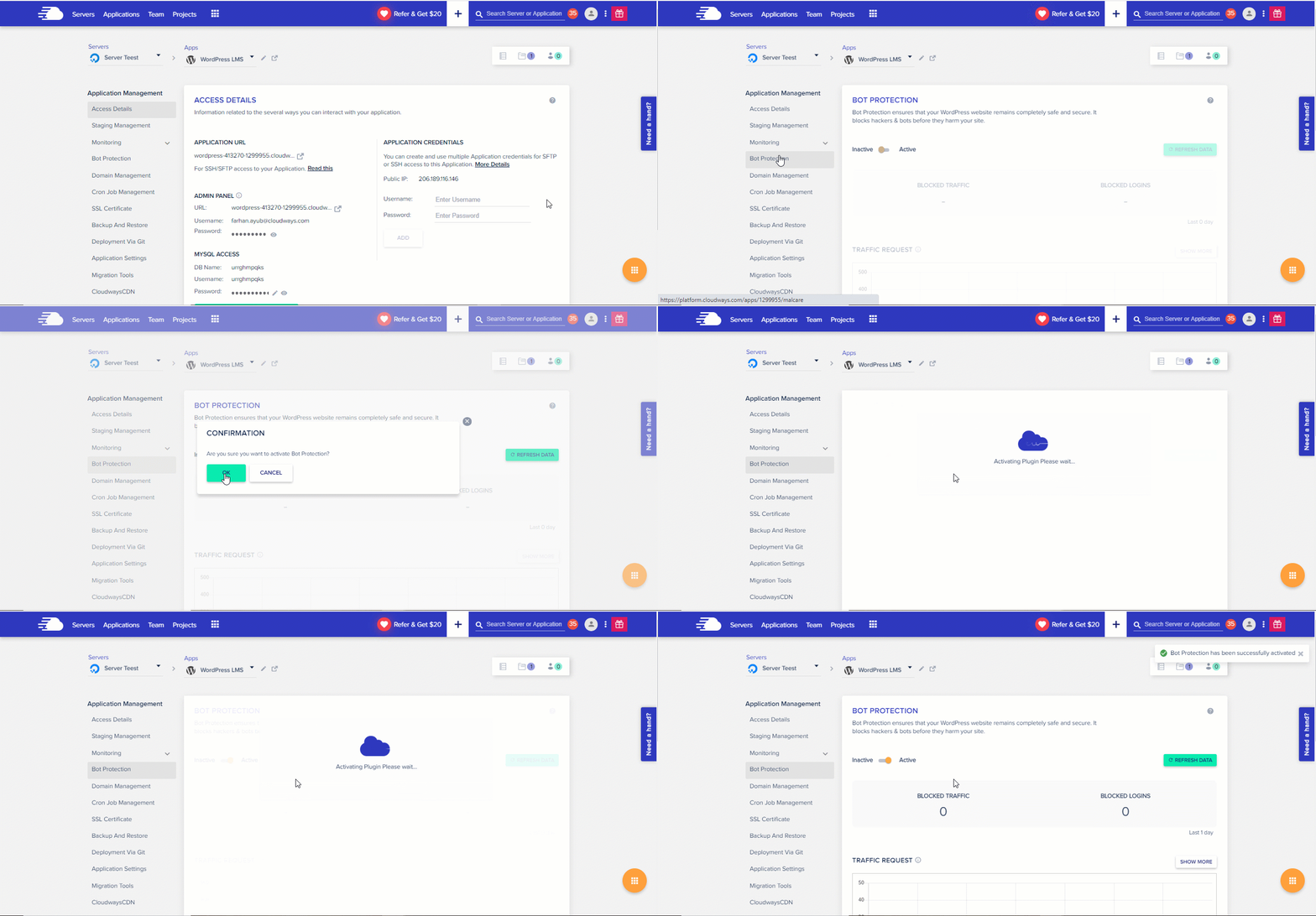
Cloudways Bot Protection has a minimalist and clean interface. It integrates seamlessly into the Cloudways dashboard. Users can access its settings without navigating through multiple menus. The layout is straightforward, making it easy for beginners to understand.
Wordfence, on the other hand, has a more feature-rich interface. It displays detailed metrics and options across multiple tabs. While this is helpful for advanced users, it can feel overwhelming. Beginners might need time to familiarize themselves with the layout.
Setup And Configuration Process
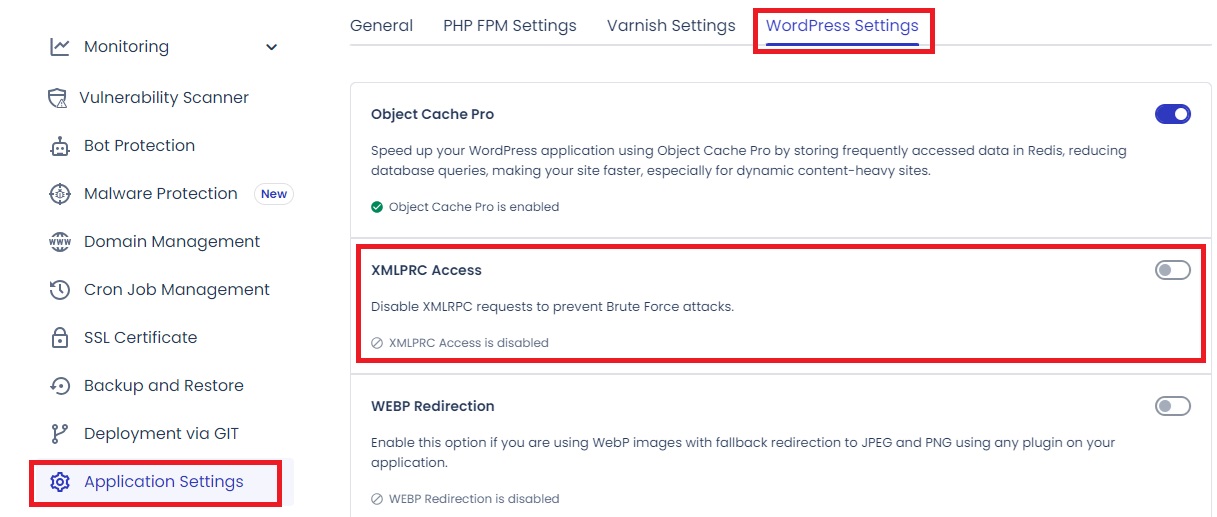
Cloudways Bot Protection requires minimal setup. It is activated directly from the Cloudways dashboard. Users only need to toggle a few options to get started. This streamlined process saves time and reduces complexity.
Wordfence involves a more detailed configuration process. Users need to install and activate the plugin manually. After that, they must adjust settings and run an initial scan. This can be time-consuming for those unfamiliar with security plugins.
Overall, Cloudways Bot Protection focuses on simplicity. Wordfence, while powerful, may require more effort to configure and manage.
Performance And Speed Impact
Website security tools can affect performance and loading speed. They often perform scans, monitor traffic, and block threats. These processes may create server load or slow down a website. It’s crucial to understand how Cloudways Bot Protection and Wordfence impact performance.
Server Load During Scans
Wordfence runs regular scans to detect malware and vulnerabilities. These scans can increase server load, especially on shared hosting. The more detailed the scan, the higher the resource consumption. Websites with heavy traffic may experience slower performance during scans.
Cloudways Bot Protection uses a server-side approach to block malicious bots. It doesn’t perform deep scans like Wordfence. This reduces server strain and ensures consistent performance. It’s optimized to handle high traffic without impacting server resources.
Impact On Website Speed
Wordfence can slow down websites during real-time threat monitoring. Its extensive features require more memory and processing power. This may cause delays in page loading times, especially for large websites.
Cloudways Bot Protection focuses on efficient bot filtering without slowing down speed. Its lightweight design ensures quick response times. Websites maintain fast loading speeds, even during high traffic or attacks.
Cost And Pricing Models
Choosing the right security tool often comes down to pricing. Both Cloudways Bot Protection and Wordfence offer distinct cost structures. Understanding their pricing helps make a well-informed decision. Let’s explore how their free and premium options compare, followed by a value-for-money analysis.
Free Vs Premium Features
Cloudways Bot Protection is included in all Cloudways hosting plans. There’s no separate cost for basic bot protection. It covers essential features like blocking suspicious bots and monitoring traffic. However, it lacks advanced customization or detailed reporting options.
Wordfence offers a free version with strong basic features. It includes firewall protection, malware scanning, and limited rate-limiting rules. The premium version unlocks advanced features like real-time updates, country blocking, and priority support. The cost of the premium plan starts at $119 per year for one site.
The main difference lies in the pricing model. Cloudways Bot Protection is bundled, while Wordfence requires additional investment for full features.
Value For Money Analysis
Cloudways Bot Protection offers good value for users already on Cloudways. It doesn’t require extra payment, making it cost-effective for small businesses. For those with basic needs, its performance aligns well with its cost.
Wordfence provides extensive features for its price. The premium plan is ideal for larger websites with high traffic. Its real-time updates and advanced threat detection justify the expense. However, for smaller sites, the free version might suffice.
Deciding between them depends on your hosting choice and security needs.
Effectiveness Against Real Threats
When it comes to protecting your website from real threats, effectiveness is everything. Whether you’re worried about brute force attacks or subtle hacking attempts, both Cloudways Bot Protection and Wordfence promise to keep your site safe. But how well do they handle actual risks? Let’s dive into their performance under real-world conditions.
Handling Brute Force Attacks
Brute force attacks are one of the most common methods hackers use to break into websites. These attacks flood login pages with endless username and password guesses until they hit the right combination. If you’ve ever had a site bogged down by suspicious login attempts, you know how frustrating it can be.
Cloudways Bot Protection excels in blocking brute force attempts at the server level. It identifies suspicious login patterns early and prevents them from even reaching your WordPress installation. This proactive approach reduces server strain and ensures faster site performance.
Wordfence, on the other hand, operates directly within WordPress. It monitors login activity and can block IP addresses after detecting repeated failed login attempts. While effective, it may consume more server resources since it processes threats inside your WordPress environment.
Which approach works better for you? If you prioritize speed and server efficiency, Cloudways Bot Protection might edge ahead. But if you want granular control and detailed reporting, Wordfence could be the better fit.
Accuracy In Threat Detection
Threat detection accuracy can make or break your security setup. False positives can block legitimate users, while missed threats leave your site vulnerable. How do these tools fare in separating true risks from harmless activity?
Cloudways Bot Protection uses AI-driven algorithms to analyze behavior and identify bots. It’s particularly skilled at spotting unusual traffic patterns, like a sudden spike in login attempts or access requests from known malicious networks. This automated approach minimizes errors and ensures real threats are blocked quickly.
Wordfence relies on its extensive threat intelligence database. It scans your site’s files, themes, and plugins for malware, and even checks your traffic for suspicious activity. Its detailed threat reports let you manually review flagged items, which is great for those who want to stay hands-on with their website security.
Do you prefer automation or manual oversight? If you’d rather let technology handle decisions, Cloudways Bot Protection delivers a seamless experience. But if reviewing threats yourself gives you peace of mind, Wordfence offers the tools to do so.
Which Is Right For You?
Which is Right for You?
Choosing the right website security tool can feel overwhelming. Cloudways Bot Protection and Wordfence are popular options, but they’re built for different needs. To make the right choice, you need to understand your website’s size, audience, and specific security concerns.
Small Businesses Vs Large Enterprises
Small businesses often focus on simplicity and cost-effectiveness. Cloudways Bot Protection shines here because it’s integrated directly into the Cloudways hosting platform. If you’re already using Cloudways, it’s a seamless solution that won’t stretch your budget. Plus, it’s designed to provide basic bot protection without requiring much technical know-how.
On the other hand, large enterprises often need deeper control and advanced features. Wordfence might be better suited for these demands. It offers detailed firewall settings, malware scans, and login protection that can handle the complexities of larger websites. For example, if you’re managing multiple domains or handling sensitive customer data, Wordfence’s granular controls can be a lifesaver.
Think about your team size too. If you have an IT team, Wordfence’s advanced tools can be a valuable asset. But if you’re a solopreneur, Cloudways Bot Protection’s simplicity might be more practical.
Factors To Consider Before Choosing
Before making your decision, consider a few key factors. First, what platform does your website run on? Wordfence is specifically built for WordPress sites. If your site isn’t on WordPress, Wordfence isn’t even an option, and Cloudways Bot Protection might be your go-to.
Second, evaluate your site’s traffic. Are you facing frequent bot attacks or suspicious login attempts? Wordfence’s detailed reports can help you monitor and act swiftly. However, if your traffic is moderate and you just need basic protection, Cloudways Bot Protection can handle it without overwhelming you with data.
Lastly, think about scalability. Will your website grow significantly in the next year? If yes, Wordfence’s premium features might be worth the investment. But if you’re staying small, Cloudways Bot Protection could save you time and money.
Ask yourself: Do you need simplicity or depth? Small businesses and low-tech users often lean toward ease, while larger organizations favor comprehensive tools. Identifying your priorities can guide you to the right choice.
Final Thoughts
Choosing the right security tool for your website is vital. Both Cloudways Bot Protection and Wordfence offer robust solutions. Each has unique strengths, catering to different needs. Understanding their features helps you maintain a secure, optimized website.
Strengths Of Each Tool
Cloudways Bot Protection excels in simplicity and performance. It focuses on blocking malicious bots efficiently. This reduces server load and ensures faster site performance. It integrates seamlessly with the Cloudways platform, making it user-friendly.
Wordfence stands out for its comprehensive features. It provides a firewall, malware scanning, and login protection. These features enhance overall website security. Wordfence also offers detailed analytics and reporting for better threat management.
Balancing Security And Performance
Website security should not compromise performance. Cloudways Bot Protection prioritizes speed alongside security. It prevents bot attacks while keeping server resources optimized.
Wordfence, while feature-rich, can impact performance if not configured properly. It offers granular settings to balance protection and speed. Site owners can adjust these settings to suit their needs.
Both tools aim to protect your website effectively. The choice depends on your platform and specific requirements. Prioritize ease of use, performance, and security features when deciding.
Frequently Asked Questions
How Do I Enable Malware Protection On Cloudways?
To enable malware protection on Cloudways, activate the Cloudways Advanced Support add-on and request the Malware Protection service.
How Do I Block Bot Traffic In WordPress?
Block bot traffic in WordPress by using security plugins like Wordfence or Sucuri. Configure robots. txt to restrict bots. Use Cloudflare to filter malicious traffic. Regularly monitor logs for unusual activity and block offending IPs. Enable reCAPTCHA on forms to prevent automated spam submissions.
What Is Cloudways Bot Protection?
Cloudways Bot Protection is a security feature designed to block malicious bots. It prevents unauthorized access and safeguards websites from attacks.
How Does Wordfence Protect Websites From Bots?
Wordfence uses a Web Application Firewall (WAF) and malware scanner. It identifies and blocks harmful bots to ensure website security.
Conclusion
Choosing the right security tool is essential for website protection. Cloudways Bot Protection and Wordfence both offer strong features. Cloudways focuses on automated bot defense, keeping attacks at bay. Wordfence provides detailed controls and advanced scanning for deeper insights. Each has strengths depending on your website’s needs.
Consider your budget, technical skills, and specific security goals. Both options can enhance your site’s safety and performance. Assess your requirements carefully before deciding. A secure website ensures trust and smooth user experiences. Make the choice that aligns best with your goals.