

Setting up a WordPress website can feel overwhelming, especially when you want to get your site live quickly and look professional. But what if you could cut through all the confusion and build a stunning site in no time?
That’s exactly what you’ll discover here. Whether you’re starting a blog, portfolio, or business site, this guide will show you how to set up your WordPress website fast, without needing to be a tech expert. Plus, you’ll learn about a powerful tool called Nexter that makes building beautiful, functional websites easier than ever with its 90+ ready-to-use blocks, templates, and extensions. Ready to save time and avoid headaches? Keep reading to unlock the secrets of quick WordPress website setup.
Introduction To Quick WordPress Website Setup
Quick WordPress website setup lets you launch a professional site in no time. Speed matters in today’s online world. A fast website launch helps capture visitors’ attention and grow your presence instantly.
Nexter is a tool designed for fast WordPress website building. It offers over 90 blocks, templates, and extensions in one kit. This makes creating stunning websites easy, even without coding skills. Quick setup saves time and effort while delivering quality results.
Understanding The Purpose And Benefits Of A Fast Website Launch
The main goal of a quick website setup is to reduce wait time. You can start sharing your business, ideas, or portfolio immediately.
- Save Time: Build and launch your site within hours, not days.
- Cost-Effective: Less time spent means lower development costs.
- Stay Competitive: Enter the market faster than competitors.
- Easy Updates: Use ready-made blocks and templates to update content smoothly.
- Professional Look: Templates and extensions ensure a sleek design.
Fast launches help maintain momentum and keep visitors engaged. They also reduce the stress of long development processes.
Who Can Benefit From Instant WordPress Setup
Many groups can gain from quick WordPress website setup:
- Small Business Owners: Start online quickly to reach more customers.
- Freelancers and Creatives: Showcase portfolios with minimal setup time.
- Bloggers and Content Creators: Share content without technical delays.
- Event Organizers: Launch event sites fast to boost registrations.
- Startups: Present ideas and products early to attract investors and clients.
Nexter’s all-in-one toolkit suits beginners and experienced users alike. It simplifies the entire setup process and supports quick site launches.
Credit: blog.hubspot.com
Essential Preparations Before Starting Your WordPress Setup
Setting up a WordPress website quickly requires solid preparation. These preparations save time and prevent common issues during setup. Focus on three key areas: hosting, domain name, and content readiness. Preparing these elements ensures a smooth, fast website launch with fewer technical hurdles.
Choosing The Right Hosting Provider For Speed And Reliability
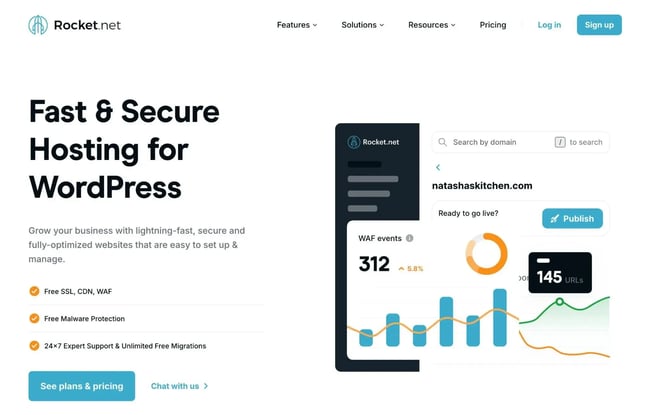
Pick a hosting provider that offers fast load times and high uptime. Speed affects user experience and search engine ranking. Reliability keeps your site online without interruptions.
- Speed: Look for SSD storage and optimized servers.
- Reliability: Choose providers with 99.9% uptime guarantees.
- Support: 24/7 customer support helps solve issues fast.
- Scalability: Ensure your host can handle traffic growth.
Popular hosts often integrate well with WordPress and include easy setup tools.
Selecting A Domain Name That Supports Your Brand Identity
Your domain name is your website’s address and brand image. Choose a name that is short, memorable, and easy to spell. It should reflect your business or niche clearly.
- Brand Alignment: The domain should match your brand or business name.
- Extension Choice: Use
.comor region-specific extensions for credibility. - Avoid Numbers and Hyphens: These can confuse visitors.
- Check Availability: Make sure it’s not taken or trademarked.
A strong domain name helps users remember your site and improves SEO.
Gathering Key Content And Assets For A Smooth Setup
Collect all important content before starting your WordPress setup. This includes text, images, logos, and videos.
- Text Content: Prepare homepage, about, and service descriptions.
- Images: Use high-quality, optimized photos for faster loading.
- Brand Assets: Have your logo and color codes ready.
- Media Files: Include videos or graphics you plan to use.
Having content ready helps build your site quickly without interruptions.
Step-by-step Guide To Setting Up Your WordPress Website Quickly
Setting up a WordPress website can be simple and fast. Follow clear steps to launch your site without hassle. This guide covers key actions for a smooth setup, from installing WordPress to customizing your site’s look.
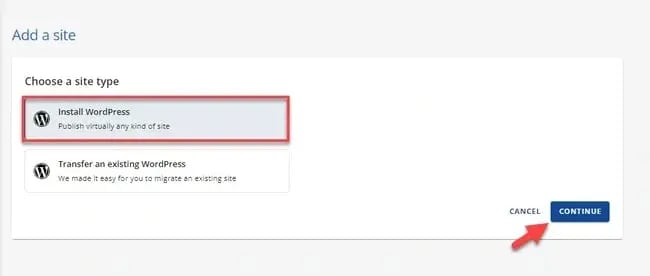
Installing WordPress With One-click Installers: Simplifying The Process
One-click installers make WordPress setup quick and easy. Most hosting providers include this feature in their control panel.
- Log in to your hosting account.
- Find the WordPress one-click installer tool.
- Enter your site details like name and admin info.
- Click install and wait a few moments.
This method removes complex steps and gets WordPress ready fast.
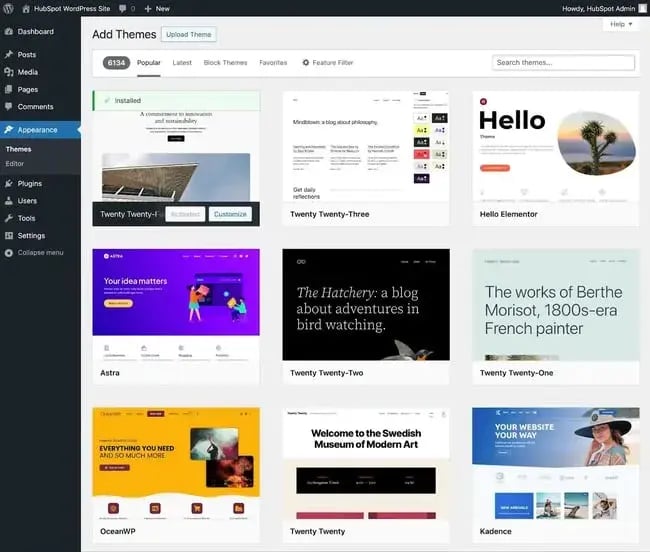
Selecting And Installing A Fast, User-friendly Theme
Choose a theme that loads quickly and is easy to use. This improves visitor experience and SEO.
- Go to WordPress dashboard > Appearance > Themes.
- Search for themes with good ratings and fast speed.
- Preview the theme to see how it looks on your site.
- Click “Install” and then “Activate” to apply the theme.
Look for themes with simple layouts and mobile-friendly designs.
Configuring Essential Plugins To Enhance Functionality
Plugins add important features to your website. Install only essential plugins for speed and security.
- SEO plugin: Helps optimize your content for search engines.
- Security plugin: Protects your site from threats.
- Backup plugin: Saves your data regularly.
- Cache plugin: Speeds up your website loading time.
Install and activate plugins through the WordPress dashboard under Plugins > Add New.
Customizing Your Website’s Appearance And Layout Efficiently
Make your site unique with simple customization options.
- Go to Appearance > Customize in the WordPress dashboard.
- Change site title, tagline, and colors.
- Adjust menus and widget areas for easy navigation.
- Add your logo and header image to build brand identity.
Use drag-and-drop builders or block editors to arrange content quickly.
Key Features That Accelerate Your WordPress Website Launch
Launching a WordPress website quickly requires tools that simplify design, customization, and security. Nexter offers essential features that speed up the entire process. These features reduce setup time and help you build a professional site without hassle.
Pre-built Templates And Demo Content For Instant Design
Nexter includes over 90 ready-made templates and blocks. These templates cover various niches and styles.
- Choose a template that fits your website’s purpose.
- Import demo content with a single click.
- Instantly get a complete website layout with text and images.
This saves hours of design work. You get a polished design instantly and can start customizing right away.
Drag-and-drop Builders: Simplifying Customization Without Coding
Nexter’s drag-and-drop builder lets you create pages easily. You do not need any coding skills.
- Move elements like text, images, and buttons anywhere on the page.
- Customize colors, fonts, and layouts visually.
- See changes live as you edit.
This approach makes website setup faster and more enjoyable. You focus on creativity, not technical details.
Automated Backup And Security Features For Peace Of Mind
Protecting your website is critical. Nexter offers automated backups and built-in security tools.
- Regular backups keep your data safe from loss.
- Security extensions help block threats and malware.
- Easy recovery options restore your site quickly if needed.
These features let you focus on your content without worrying about technical risks.
Pricing And Affordability Of Quick WordPress Setup Solutions
Setting up a WordPress website quickly can fit many budgets. Choosing the right plan and tools affects the total cost. Balancing price and features helps build a site that looks great and works well without overspending. Understanding hosting, themes, plugins, and services is key to affordable website setup.
Comparing Costs Of Hosting Plans And Premium Themes
Hosting plans vary widely in price and features. Shared hosting starts as low as $3 to $10 monthly. Managed WordPress hosting costs more, around $20 to $50 per month, but offers better speed and support.
| Hosting Type | Price Range (Monthly) | Key Features |
|---|---|---|
| Shared Hosting | $3 – $10 | Basic speed, limited support |
| Managed WordPress Hosting | $20 – $50 | Optimized speed, automatic updates, expert support |
Premium themes cost $30 to $100 one-time or yearly. They offer better design, customization, and support than free themes. For quick setups, premium themes save time and look professional.
Free Vs. Paid Plugins: Balancing Budget And Functionality
Free plugins cover basic needs and help save money. Many popular plugins have free versions with limited features. Paid plugins unlock advanced tools and better support.
- Free plugins offer simple features with no cost
- Paid plugins range from $20 to $100 or more
- Premium plugins improve website security, SEO, and speed
Using free plugins works for small sites. Paid plugins fit growing sites needing more functions. Balance budget and needs for the best setup.
Value Of Investing In Professional Setup Services
Professional setup services cost extra but save time and stress. Experts ensure fast, secure, and well-designed websites. Prices vary from $100 to $500+ depending on complexity.
Benefits include:
- Quick installation of themes and plugins
- Custom design aligned with brand
- Optimization for speed and SEO
- Technical support during launch
Investing in professionals can avoid costly mistakes. It helps launch a polished website faster.
Credit: blog.hubspot.com
Pros And Cons Of Rapid WordPress Website Setup
Setting up a WordPress website quickly offers clear benefits and some challenges. Rapid setup tools like Nexter help launch websites fast using ready-made blocks and templates. This approach suits users who want a fast, functional site without deep technical skills. Yet, rushing setup can limit design choices and miss key details.
Advantages: Time Efficiency, Ease Of Use, And Immediate Online Presence
- Time Efficiency: Rapid setup cuts website launch time drastically. With Nexter’s 90+ blocks and templates, building pages is fast and smooth.
- Ease of Use: No coding needed. Drag-and-drop editors and ready-made elements make site creation simple for beginners.
- Immediate Online Presence: You get a live website quickly. Perfect for businesses or projects needing instant visibility.
Potential Drawbacks: Limited Customization And Overlooked Details
- Limited Customization: Rapid tools may restrict design freedom. Prebuilt templates could look generic if not customized carefully.
- Overlooked Details: Speed can cause missed SEO settings or important plugin configurations. This affects site performance and ranking.
Recommendations For Ideal Users And Scenarios
Quick WordPress website setup suits certain users best. Knowing who benefits most helps save time and effort. Nexter, a toolkit with over 90 blocks, templates, and extensions, makes fast site building easier. It fits well for users needing speed and simplicity.
Small Business Owners And Entrepreneurs Needing A Quick Online Launch
Small business owners want a fast, professional website to start selling or showcasing services. Entrepreneurs often need to launch sites quickly to test ideas or attract customers.
- Nexter offers ready-made templates that reduce design time.
- Drag-and-drop blocks simplify adding features without coding.
- Built-in extensions cover basic needs like contact forms and galleries.
- Allows focus on business rather than technical setup.
This toolkit suits those who want a clean site fast, with minimal hassle.
Bloggers And Creators Looking For Simple And Fast Website Solutions
Bloggers and creators need easy tools to publish content quickly. They want their site to look good but not spend hours on setup.
- Pre-designed blocks help create posts, galleries, and portfolios smoothly.
- Templates offer stylish layouts that save time.
- Fast setup means more time for content creation.
- No coding skills required; intuitive interface helps beginners.
Nexter fits creators seeking a quick, attractive platform for their work.
When To Consider Professional Help For Complex Website Needs
Complex websites need more than quick setup tools. Features like custom integrations, advanced e-commerce, or unique designs may require expert skills.
| Scenario | Reason for Professional Help |
|---|---|
| Custom Functionality | Unique features or plugins beyond standard blocks |
| High Traffic Sites | Optimization for speed and server handling |
| Brand-Specific Design | Fully tailored visuals and user experience |
| Complex E-commerce | Advanced payment, inventory, and shipping setups |
In these cases, professionals ensure stability, security, and custom solutions.
Conclusion: Making The Most Of Your Quick WordPress Website Setup
Setting up a WordPress website quickly is just the beginning. Using tools like Nexter helps you launch stunning sites fast with ready blocks, templates, and extensions. After launch, focus on keeping your site fresh and growing your audience. A strong start and steady care make your site successful over time.
Recap Of Key Steps For Instant Launch Success
- Choose a reliable hosting provider for fast loading and uptime.
- Install WordPress with one-click options or automated setups.
- Use Nexter’s toolkit to access 90+ blocks, templates, and extensions.
- Customize your design quickly without coding knowledge.
- Optimize for mobile devices to reach more visitors.
- Set up essential plugins for SEO, security, and speed.
- Test your website on different browsers and devices before launch.
Tips To Maintain And Grow Your Website Post-launch
- Update WordPress, themes, and plugins regularly to stay secure.
- Create fresh content often to attract visitors and improve SEO.
- Monitor website speed and optimize images and scripts.
- Back up your site frequently to avoid data loss.
- Engage with visitors via comments or contact forms.
- Analyze traffic data with tools like Google Analytics.
- Use social media to promote your site and content.
Credit: blog.hubspot.com
Frequently Asked Questions
How Do I Quickly Set Up A WordPress Website?
Choose a reliable hosting provider and install WordPress with one click. Select a theme and customize it. Add essential plugins to enhance functionality. Publish your content and launch your site within minutes.
What Are The Best Plugins For WordPress Setup?
Use plugins like Yoast SEO for optimization, Elementor for design, and Akismet for spam protection. These plugins improve site performance, SEO, and security during the initial setup.
Can I Set Up WordPress Without Coding Skills?
Yes, WordPress is user-friendly and requires no coding knowledge. Use drag-and-drop builders and pre-designed themes to create a professional website easily.
How To Choose A WordPress Theme Quickly?
Pick a lightweight, responsive theme that matches your website’s purpose. Check user reviews and ensure it supports popular plugins for smooth functionality.
Conclusion
Setting up a WordPress website can be simple and quick. Using the right tools saves time and effort. Nexter offers over 90 blocks, templates, and extensions to build sites fast. It helps create stunning pages without coding. You can focus on your content, not technical details. Try Nexter to speed up your website setup process. Check it out here: Nexter. Start building your WordPress site with ease today.






