Thinking about setting up an online school or training program? It can feel like a big task, right? Well, I’ve been looking into Rocket LMS, and it seems like a pretty solid option for getting your e-learning venture off the ground. It’s designed to handle everything from putting your courses online to getting paid and keeping track of your students. It’s not just for big companies, either; individuals and smaller groups can use it too. Let’s break down what Rocket LMS is all about in this Rocket LMS Review.
Key Takeaways
- Rocket LMS is a flexible system for creating and managing online courses, suitable for individuals and institutions.
- It supports various content types like videos, live sessions, and text-based lessons.
- Monetization is straightforward with multiple payment gateway integrations and subscription options.
- User access is simplified through social media and SMS login features.
- Customization allows you to brand the platform to your specific needs.
- Tracking student progress and performance is made easy with built-in reporting tools.
- Customer support and resources are available to help users get started and resolve issues.
- The platform is designed for scalability, allowing your e-learning business to grow.
Understanding Rocket LMS: A Comprehensive Overview

What is Rocket LMS?
Rocket LMS is a learning management system built to help you get your online courses up and running. Think of it as a digital classroom where you can put all your learning materials, manage who’s taking the courses, and even handle payments. It’s designed to be a complete package for anyone wanting to get into online education, whether you’re a single teacher or a whole institution. It aims to make the whole process of creating and sharing knowledge much simpler.
Core Purpose of Rocket LMS
The main goal of Rocket LMS is to provide a solid foundation for your online learning ventures. It’s about giving you the tools to not just host your courses, but to manage them effectively, track student progress, and make money from your educational content. It’s built to support different ways of teaching, from one-on-one sessions to large group classes, and it handles the technical side so you can focus on teaching.
Rocket LMS for Modern Education
In today’s world, online learning is a big deal, and Rocket LMS is built for that. It supports various ways of presenting information, like videos, live sessions, and written materials, which is pretty standard for how people learn now. It also makes it easy for students to access courses from different devices, which is a must-have for modern learners who are always on the go. You can even use it to manage training for companies.
Key Functionality of Rocket LMS
This system comes with a lot of built-in features. You can upload different types of course content, manage whether it’s a single instructor or multiple people teaching, and even set up ways for people to book meetings or consultations. It also handles payments through various gateways and makes logging in easier with social media or SMS options. Plus, it connects with things like Google Calendar to help with scheduling.
Rocket LMS as a Complete Solution
Rocket LMS is presented as an all-in-one solution. This means it’s not just about hosting videos or documents; it’s about managing the entire learning process from start to finish. This includes everything from creating the courses and enrolling students to processing payments and providing certificates. The idea is that you shouldn’t need a bunch of different tools to run your online academy; Rocket LMS aims to do it all.
The Vision Behind Rocket LMS
The people behind Rocket LMS seem to want to make online education accessible and manageable for everyone. Their vision appears to be about creating a flexible platform that can adapt to different needs, whether that’s a small business selling a single course or a larger organization handling employee training. They want to simplify the technology so educators can concentrate on sharing their knowledge and building their learning communities.
Rocket LMS: Beyond Basic Software
What sets Rocket LMS apart is its focus on being more than just a place to store course files. It includes tools for marketing, like affiliate programs, and ways to generate recurring income through subscriptions. It also has features for community building and engagement, like forums or discussion boards, which are important for keeping students involved. The system is designed to grow with your business, offering scalability and customization options to fit your specific brand and operational needs. You can check out the Rocket LMS mobile app for a taste of its accessibility.

Why Choose Rocket LMS for Your Online Academy
So, you’re thinking about setting up an online academy, huh? It’s a big step, and picking the right system can feel like a lot. I’ve looked at a bunch of these platforms, and honestly, Rocket LMS really does seem to tick a lot of boxes for people serious about online education. It’s not just another piece of software; it’s built to actually help your business grow, not just sit there.
Rocket LMS: A Flexible Choice
When you’re building an online academy, flexibility is key. You might start with just yourself, but what if you want to bring on other instructors later? Or maybe you want to offer different types of courses – some video-based, some live sessions. Rocket LMS handles this pretty well. It can work for a single instructor or a whole marketplace of teachers.
- Supports single or multiple instructor models.
- Accommodates various course formats like video, live sessions, and text.
- Adapts to different business structures, from solo ventures to larger academies.
Reliability in E-Learning Delivery
Nobody wants their platform to crash during a live class or when a student is trying to access course materials. Rocket LMS focuses on making sure your content gets to your students reliably. It’s designed to keep things running smoothly, which is pretty important when you’re trying to build a reputation.
Scalability for Growth
What happens when your online academy starts getting popular? You need a system that can grow with you. Rocket LMS is built with scalability in mind. This means you shouldn’t have to worry about switching platforms if your student numbers or course offerings expand significantly. It’s about having a system that can keep up.
Empowering Your E-Learning Business
This platform gives you a lot of control over how you run your business. You can set up different pricing, manage subscriptions, and even integrate payment gateways that work for your audience. It’s about giving you the tools to actually make money from your courses and manage that process without too much hassle.
Tailored Solutions for Your Needs
One thing that stands out is how much you can customize Rocket LMS. You can change the look and feel to match your brand, which makes it feel like your academy, not just a generic template. This branding aspect is important for making a good impression.
Streamlining Operations
Managing an online academy involves a lot of moving parts – student sign-ups, payments, course updates, and communication. Rocket LMS tries to simplify these tasks. Features like social login and Google Calendar integration are small things, but they can make a big difference in day-to-day operations.
Delivering High-Quality Learning
Ultimately, it’s about the learning experience. Rocket LMS supports different ways to present content, including video and live sessions, and allows for quizzes and certifications. This variety helps keep students engaged and provides a more complete learning experience, which is what people are paying for.
Choosing the right LMS is a big decision for any online academy. It affects everything from how you present your courses to how you get paid and how your students experience the learning process. Rocket LMS aims to be a solid, adaptable choice for many different types of online educators.
Rocket LMS is definitely one of the top LMS platforms for education that you should consider if you’re serious about your online academy.
Key Features Driving Rocket LMS Success
Rocket LMS really packs a punch when it comes to features. It’s not just another basic system; it’s built to handle pretty much anything you throw at it for your online courses. Whether you’re a solo instructor or running a whole academy, the tools here are designed to make your life easier and your business grow.
Versatile Content Support Options
One of the standout things about Rocket LMS is how flexible it is with content. You aren’t stuck with just one way to present your material. You can mix and match different formats to keep things interesting for your students.
- Video Courses: Upload and host your video lessons directly.
- Live Sessions: Schedule and conduct live webinars or classes right through the platform.
- Text-Based Courses: Create detailed lessons using text, perfect for in-depth explanations.
- SCORM Compatibility: If you use SCORM packages, Rocket LMS can handle them, which is great for corporate training or institutions with existing content.
- Article Content: Simple, article-style lessons are also supported.
Single Versus Multiple Instructor Models
This is a big one for scalability. Rocket LMS doesn’t force you into one business model. You can start small as a single instructor, selling your own courses. But if you have plans to build a marketplace with multiple instructors contributing and selling their courses, the platform is built to support that too. It handles the complexities of revenue splitting and managing different instructors, which is pretty neat.
Managing Organizational Learning
For businesses or larger educational bodies, managing learning across different departments or groups is key. Rocket LMS has features that let you group students and instructors into specific organizations. This means you can set up custom pricing for different groups or manage training programs more effectively for a company. It’s a way to keep things organized and tailored for institutional needs.
Facilitating Online Meetings and Consultations
Beyond just courses, Rocket LMS lets you monetize your time and knowledge through direct interactions. You can set up booking systems for one-on-one consultations or group meetings. This is a fantastic way to add value for your students and create another income stream, whether it’s for personalized coaching or group Q&A sessions.
Advanced Payment Gateway Integrations
Getting paid should be simple, and Rocket LMS makes it that way. It comes with several payment gateways already included, like PayPal, Razorpay, and PayU. But that’s just the start. There’s a huge list of other popular gateways supported, meaning you can likely connect with whatever payment processor your customers prefer, no matter where they are. This broad support helps you reach a wider audience and makes transactions smooth.
Simplified Social and SMS Login
Nobody likes creating yet another username and password. Rocket LMS makes it easy for users to sign up and log in using their existing social media accounts like Google or Facebook. There’s also an option for SMS-based login, which adds another layer of convenience and security. This reduces friction for new users and makes accessing the platform much quicker.
Google Calendar Integration for Scheduling
Keeping track of live sessions, webinars, or one-on-one meetings can get messy. The integration with Google Calendar is a real time-saver. When you schedule an event in Rocket LMS, it can automatically sync with your Google Calendar. This means you get reminders, and your schedule is always up-to-date, reducing the chance of missed appointments or double bookings.
Customizable Design for Branding
Your online academy should look like yours. Rocket LMS understands this and provides extensive options for customizing the platform’s appearance. You can tweak the design and layout to match your brand’s colors, logos, and overall style. This helps create a professional and cohesive experience for your students, making your platform instantly recognizable.
The ability to adapt the platform’s look and feel is more than just aesthetics; it’s about building trust and a consistent brand identity for your educational venture.

Enhancing Learning with Rocket LMS Features
When evaluating Rocket LMS features, it’s clear this system is built to make online education more dynamic. You can present your courses in a few different ways, which is pretty neat.
- Video Courses: Upload your pre-recorded video lessons.
- Live Sessions: Schedule and host live webinars or classes directly through the platform.
- Text-Based Content: For those who prefer reading, you can also deliver lessons in an article format.
This flexibility means you can cater to different learning styles, which is a big plus for any of the best learning management systems 2025. It’s not just about the format, though. Rocket LMS also handles how your academy is set up. You can run it as a solo operation with just you as the instructor, or you can open it up as a marketplace where multiple instructors can join and sell their courses. This adaptability is a major reason why people consider Rocket LMS for their online academy.
The platform also makes it easy to offer more than just courses. You can set up one-on-one consultations or group meetings, allowing students to book time with instructors directly. This adds another layer of interaction and potential revenue.
For payments, Rocket LMS supports a bunch of different gateways, so you can accept payments from pretty much anywhere. Plus, they’ve made it simple for users to sign up and log in using their social media accounts or even SMS, cutting down on friction for new students. And if you use Google Calendar, you can sync your class schedules right into it, which helps with organization. It’s these kinds of details that really make a difference when you’re trying to manage everything smoothly.
Monetization and Engagement Tools in Rocket LMS
Rocket LMS really gives you a lot of ways to make money from your courses and keep students interested. It’s not just about putting content online; it’s about building a business around it. You can sell courses one time, or set up subscriptions for ongoing access, which is great for recurring income. Plus, they’ve got tools for booking meetings, which is a smart way to add another revenue stream, especially for one-on-one coaching or consultations.
The platform supports a wide array of payment gateways, making it easy for students from different regions to pay. This flexibility is a big deal when you’re trying to reach a global audience. You can even set up revenue splitting if you’re running a marketplace with multiple instructors. It’s all about giving you the control to monetize your knowledge effectively.
Here’s a quick look at some of the tools available:
- Quizzes and Certification: Award certificates upon course completion to boost student motivation and provide tangible proof of learning. This adds a professional touch to your programs.
- Affiliate and Referral Marketing: Encourage your students and partners to spread the word by offering them commissions for bringing in new learners. It’s a cost-effective way to grow your reach.
- Subscription System: Create recurring revenue by offering access to your content through monthly or annual subscription plans. This provides predictable income and keeps students engaged over time.
- Meeting Booking: Allow instructors to sell time slots for live sessions, whether they’re one-on-one coaching calls or group workshops. This directly monetizes direct interaction.
Rocket LMS makes it simple to integrate various payment methods, from popular options like PayPal to more localized gateways, catering to a diverse student base. This broad compatibility helps reduce friction in the purchasing process, ultimately leading to more sales.
They also make it easy to embed videos from platforms like YouTube and Vimeo, which is pretty standard these days. For larger video files, you can use S3 storage, which is a good way to handle lots of content without breaking the bank on hosting. And for getting people signed up, the social and SMS login options are super convenient. It really cuts down on the hassle for new users trying to access your courses, which is important for keeping people engaged. It’s all designed to make the process smoother for everyone involved.
Rocket LMS: Strengths and Potential Weaknesses
So, let’s talk about Rocket LMS. Like any tool, it’s got its good points and a few things you might want to keep an eye on. It’s not perfect, but then again, what is? We’ve looked at a lot of these systems, and Rocket LMS really does try to cover a lot of ground.
User-Friendly Interface Advantages
One of the first things people notice is how straightforward the interface is. It’s not overly complicated, which is a big plus. You can get around pretty easily without needing a degree in computer science. This means less time figuring out the software and more time actually teaching or managing your courses. It’s designed so you can jump in and start building without too much fuss.
Versatility in Content Delivery
This is where Rocket LMS really shines. You’re not stuck with just one way to present your material. You can upload videos, run live sessions, or post text-based lessons. They even support things like SCORM courses if you’re coming from a more traditional e-learning background. This flexibility means you can mix and match to create a learning experience that really works for your students and your content.
Extensive Customization Capabilities
If you want your learning platform to look and feel like your brand, Rocket LMS gives you a good amount of control. You can tweak the design, change layouts, and adjust various elements to match your company’s colors and style. It’s not just about functionality; it’s about making the platform your own.
Robust Reporting and Analytics
Knowing how your students are doing is pretty important, right? Rocket LMS has tools to help with that. You can track progress, see who’s completing what, and check quiz scores. This data can be really helpful for figuring out if your courses are hitting the mark or if students need more help in certain areas.
Potential Learning Curve for New Users
While the interface is generally user-friendly, there’s still a lot packed into this system. If you’re completely new to learning management systems or online course creation, there might be a bit of a learning curve. Some of the more advanced features, especially those that require plugins, might take a little time to get the hang of. It’s not a steep climb, but be prepared to spend a bit of time exploring.
Considerations for Offline Functionality
Most of the magic happens online, which is typical for these platforms. If you have a strong need for students to access content or complete activities entirely offline without any internet connection, you might find Rocket LMS a bit limited in that specific area without looking into additional plugins or workarounds. It’s built for the connected world.
Overall Assessment of Rocket LMS
Rocket LMS is a solid choice, especially if you value flexibility and customization. It’s got a lot of features that can help you build a professional-looking online academy. The ability to support different business models, from single instructors to marketplaces, is a big plus.
Balancing Features and Ease of Use
Ultimately, Rocket LMS strikes a decent balance. It offers a wide array of tools without becoming completely overwhelming for the average user. You get a lot of power under the hood, but it’s presented in a way that’s mostly accessible. It’s a system that can grow with you, but be ready to invest a little time upfront to really make it work best for your specific needs.
Who Benefits Most from Rocket LMS

So, who really gets the most out of using Rocket LMS? Honestly, it’s a pretty broad group. If you’re running an educational institution, like a school or a university, this system can really help organize things. Think about managing all your different courses, keeping track of instructors, and making sure students have access to what they need. It just makes that whole process less of a headache.
Then there are businesses that need to train their employees. Instead of trying to coordinate in-person sessions or sending out a bunch of different materials, Rocket LMS can centralize all that training. It’s good for keeping everyone on the same page, especially with compliance stuff or new skill development.
Individual instructors, too, can find a lot of use here. If you’ve got knowledge to share, whether it’s about cooking, coding, or anything else, this platform gives you a way to package it up, sell it, and manage your students. It’s a way to turn your skills into a business without needing a whole IT department.
- Educational Institutions: Streamline course management and student tracking.
- Corporate Training: Centralize employee development and compliance programs.
- Individual Instructors: Monetize expertise and manage online courses efficiently.
- Various Industries: Adaptable for sectors like healthcare, real estate, and more.
Rocket LMS is designed to be flexible, meaning it can adapt to different ways people want to teach and learn. It’s not just for one type of user; it’s built to support a variety of educational models and business needs, making it a solid choice for many different kinds of organizations and individuals.
It’s also pretty good for smaller businesses that might not have a huge budget for complex software. The system is designed to be user-friendly, so you don’t need to be a tech wizard to get it up and running. Plus, with features like integrated payment gateways, you can start selling your courses pretty quickly. It’s about making online education accessible and manageable for a wide range of users, no matter their technical background or the size of their operation.
Key Benefits of Implementing Rocket LMS
So, you’re thinking about getting a learning management system, huh? It’s a big decision, and honestly, there are a lot of options out there. When we looked at Rocket LMS, a few things really stood out as major pluses for anyone trying to get an online academy off the ground or just improve an existing one. It’s not just about having a place to put your courses; it’s about making the whole process smoother for you and your students.
Ensuring Continuity of Learning
One of the biggest headaches with online education can be keeping everything organized. Rocket LMS helps by keeping all your course materials in one spot. This means students always have access to the latest versions of lessons, videos, or any other resources you provide. No more students asking for that one file you posted three months ago. It really helps maintain a consistent learning path for everyone involved.
Simplified Progress Tracking and Reporting
Keeping tabs on how your students are doing can be a real chore. Rocket LMS makes this much easier. You can see who’s completed what, who’s struggling with a particular module, and how they’re performing on quizzes. This kind of data is super helpful for figuring out where you might need to adjust your teaching or offer extra help. It’s a big step up from just guessing if your students are getting it.
Creating Engaging, Multimedia-Rich Content
Let’s face it, people learn better when they’re not just staring at walls of text. Rocket LMS lets you mix things up with videos, live sessions, and text-based lessons. This variety helps keep students interested and caters to different learning styles. It’s a good way to make your courses more dynamic and less like a textbook.
Effortless Content Distribution
Getting your course materials out to students shouldn’t be complicated. Rocket LMS simplifies how you share your lessons and any updates. You can send out new content or announcements easily, making sure everyone is on the same page. This is a big plus when you compare it to other systems, especially if you’re looking at a general learning management system comparison.
Centralizing All Course Materials
Think of Rocket LMS as your central hub for everything related to your courses. All your videos, documents, quizzes, and assignments live in one place. This organization is a lifesaver for managing your content and makes it simple for students to find what they need without digging through emails or old folders. It’s a key part of what makes this a solid choice.
Measuring Student Success Metrics
Beyond just tracking progress, Rocket LMS helps you measure actual success. You can see completion rates, quiz scores, and how students interact with the material. This information is gold for understanding what’s working and what’s not in your courses. It gives you concrete data to improve your teaching methods.
Capturing Student Attention
With the ability to use various media types, Rocket LMS helps you create courses that actually grab and hold a student’s attention. Interactive elements and multimedia can make learning more enjoyable and effective. It’s a smart way to make sure your students are engaged with the material you’re presenting.
Distributing Updates Seamlessly
When you need to update a lesson or add new information, Rocket LMS makes it easy to push those changes out to your students. This ensures everyone is working with the most current material, which is pretty important for any educational program. It’s one of the many pros and cons of Rocket LMS that lean heavily in its favor.
Implementing a system like Rocket LMS can really change how you manage your online education. It’s about making things more organized, easier to track, and more engaging for your students. While there might be a bit of a learning curve, the benefits for continuity, engagement, and overall management are pretty significant for any online academy.
For those looking to get a handle on customer onboarding or employee education, a flexible learning management system like Rocket LMS can be a great fit. You can explore customization options for organizations to see how it might work for your specific needs.
Successfully Launching Rocket LMS in Your Organization
Getting Rocket LMS up and running in your organization might seem like a big task, but with a clear plan, it’s totally doable. Think of it like setting up a new office – you need the right people, the right tools, and a good process. It’s not just about installing software; it’s about making sure everyone can use it effectively to teach and learn.
Forming an Effective LMS Implementation Team
First off, you’ll want to put together a small group to manage this whole thing. This team should have people from different departments, maybe someone from management, someone from IT who knows the tech side, and perhaps someone from HR or training who understands the educational content. This way, you get different perspectives and make sure all bases are covered. This team will be your go-to for making decisions and keeping things on track.
Mastering the Rocket LMS System
Once you’ve got the team, the next step is to actually learn how the system works. Rocket LMS usually comes with training materials, and it’s a good idea to use them. You don’t need to be a tech wizard, but knowing the basics of how to upload courses, manage users, and check progress will make a huge difference. Think of it as learning the ropes before you start sailing. You can find helpful guides and tutorials to get you started with Rocket LMS features.
Integrating with Existing Business Systems
Most organizations already use other software for things like customer relationships (CRM) or managing employee development. Rocket LMS is designed to play nice with these systems. Connecting it means you won’t have to enter the same information twice, and everything works together more smoothly. This integration is key to making your workflow efficient.
Preparing and Uploading Educational Content
This is where the actual learning materials come in. Before you go live, you need to get all your courses, videos, documents, and quizzes ready. Organize them logically, maybe by department or topic. Then, upload them into Rocket LMS. It’s a good idea to test a few courses yourself to see how they look and function from a student’s point of view.
Ensuring Smooth Platform Implementation
- Pilot Testing: Before rolling it out to everyone, try it with a small group of users. Get their feedback on what’s working and what could be better.
- Communication: Keep everyone informed about the launch, what to expect, and where to get help.
- Phased Rollout: If you have a large organization, consider launching it department by department rather than all at once.
Leveraging Vendor Training and Support
Don’t forget that the people who made Rocket LMS are there to help. They often have support teams, knowledge bases, and even direct assistance available. If your team gets stuck or has questions, reaching out to them is a smart move. They can help troubleshoot issues and provide guidance.
Connecting with CRM and Talent Management
This is part of the integration step, but it’s worth highlighting. Linking your LMS to your CRM or talent management software helps create a unified view of your employees or customers. You can track training alongside other important data, which is super useful for understanding overall development and performance.
Organizing and Uploading Course Materials
| Content Type | Preparation Steps |
|---|---|
| Video Lectures | Convert to compatible format (e.g., MP4), compress. |
| Quizzes | Finalize questions, set scoring and feedback. |
| Documents | Ensure PDFs or Word docs are clean and readable. |
| Interactive Modules | Test SCORM packages for proper functionality. |
Getting your content organized and uploaded correctly is a big part of making the launch successful. It sets the stage for how students will interact with the material and how easy it will be for instructors to manage.
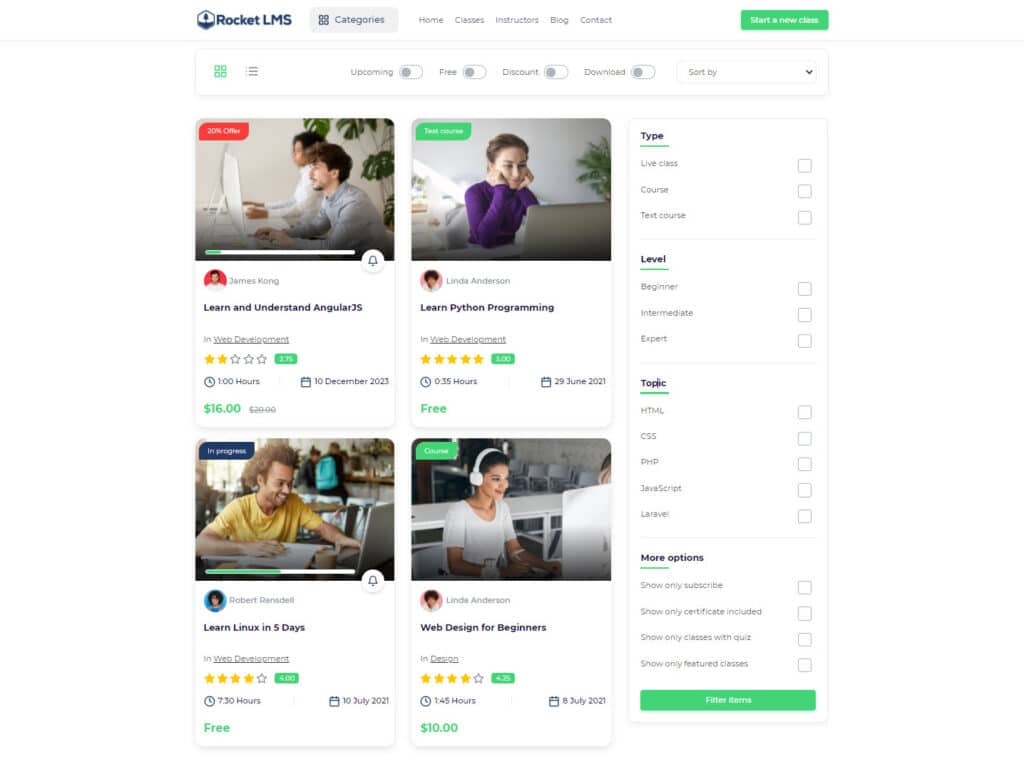
Content Management and Delivery with Rocket LMS
When you’re setting up an online course, how you manage and send out your materials really matters. Rocket LMS gives you a lot of ways to handle this. You can upload pretty much anything you can think of.
Supporting Multiple Content Formats
Rocket LMS is pretty flexible with what you can put on it. You’re not stuck with just one type of file. This means you can mix and match to make your courses more interesting.
- Video Courses: Upload your pre-recorded video lessons.
- Live Webinars: Schedule and host live sessions directly through the platform.
- Text-Based Courses: Use a plugin to create traditional text and image-based lessons.
- SCORM Courses: If you have existing SCORM-compliant content, you can upload that too, usually with a plugin.
- Article-Based Content: Simple articles can be posted directly.
Delivering Video, Live, and Text-Based Courses
So, you can have a course that’s mostly videos, but then maybe a live Q&A session each week. Or perhaps a text-heavy course with some embedded videos. It’s all about making the learning experience fit the subject matter.
The ability to combine different media types helps keep students engaged. It breaks up the monotony and caters to different learning styles, which is a big plus for any online academy.
SCORM Course Compatibility
If your organization already uses SCORM packages, Rocket LMS can often handle them. This is great because you don’t have to recreate all your existing training materials. You can just upload them and manage them within the Rocket LMS system.
Article-Based Content Delivery
For simpler topics or supplementary reading, you can just write articles directly in the platform. It’s a straightforward way to share information without needing to create a full video or presentation.
Managing Single and Multi-Instructor Platforms
Whether you’re a solo teacher or running a big academy with many instructors, Rocket LMS can work. For a single instructor, it’s simple to manage everything. If you have multiple instructors, it can handle the setup for a marketplace style, where different teachers can have their own profiles and courses. This is a key feature for scaling up your online education business.
Organizational Education Features
Institutions can really benefit here. You can group students and instructors into specific organizations. This is useful for companies or schools that want to manage their own training programs within the larger platform. They can even set their own prices for their learners.
Custom Pricing for Learners
This ties into the organizational features. If a company buys a bulk package of courses for its employees, they can often arrange custom pricing. It’s not just a one-size-fits-all approach.
Seamless Content Distribution
Once your content is uploaded and organized, getting it to your students is pretty easy. You can send out links, notifications, or have students access it directly through their dashboard. It makes sure everyone gets the materials they need without much fuss.
Payment Processing and Monetization Strategies
Rocket LMS really gives you a lot of options when it comes to getting paid and making money from your courses. It’s not just about selling a course once; they’ve built in ways to keep the revenue coming in.
Included Payment Gateways
Rocket LMS comes with three payment gateways right out of the box: PayPal, Razorpay, and PayU. This covers a good chunk of the world, which is pretty handy. But if you need more, and let’s be honest, most businesses do, there’s a whole pack of additional gateways available as a paid plugin. This means you can connect with customers pretty much anywhere, accepting payments in various currencies too.
Extensive List of Supported Gateways
Seriously, the list is long. Beyond the included ones, you can integrate with Stripe, Paytm, Paystack, and a bunch more. It’s almost like they’ve tried to think of every possible payment provider out there. This flexibility is key because different regions have preferred payment methods, and you don’t want to lose a sale just because you don’t accept a certain card or service.
Offline Payment Options
For those situations where online processing isn’t ideal, or for specific local transactions, Rocket LMS also supports offline payments. This is usually handled through a separate plugin, but it’s good to know the option exists. Think bank transfers or even cash payments if you’re running a local workshop.
Subscription System for Recurring Revenue
This is a big one for steady income. With the subscription plugin, you can set up monthly or yearly plans. Students pay a recurring fee for access to your content. It’s a great way to build a loyal student base and predict your income more reliably. You can set different tiers, too, giving access to more or less content depending on the subscription level.
Monetizing Courses Effectively
Beyond simple course sales and subscriptions, Rocket LMS lets you get creative. You can offer bundles of courses, set up payment plans for more expensive programs, or even use the meeting booking system to charge for one-on-one consultations. The affiliate and referral system is another smart move, letting others promote your courses for a commission, which can really expand your reach.
Supporting Various Payment Methods
It’s not just about the gateway; it’s about how people pay. Rocket LMS supports installment payments, meaning students can pay for a course over time instead of all at once. This makes higher-priced courses much more accessible. Cashback options are also available, which can encourage repeat business and customer loyalty.
Revenue Splitting for Marketplaces
If you’re running a multi-instructor platform, this is a lifesaver. Rocket LMS has features for revenue splitting, automatically dividing the earnings between you and your instructors based on pre-set commission rates. This simplifies the financial side of running a marketplace considerably.
Choosing the Right Payment Options
With so many choices, it’s important to pick what works best for your audience and your business model. Consider where your students are located, what payment methods they prefer, and how you want to structure your pricing. The platform’s flexibility means you can adapt as your business grows and your needs change.
User Experience and Accessibility in Rocket LMS
When you’re picking out a system for online learning, how easy it is to use and how accessible it is for everyone really matters. Rocket LMS seems to have put some thought into this, which is good to see. They’ve tried to make things straightforward for both the people running the courses and the students taking them.
Responsive Design for All Devices
It’s pretty important that your learning platform works well no matter what device someone is using. Whether it’s a big desktop monitor, a laptop, a tablet, or just a regular smartphone, the site should adjust itself so everything looks right and is easy to click on. Rocket LMS is built with this in mind, meaning your students can learn from anywhere, on any gadget they prefer. This flexibility is a big plus for keeping people engaged.
Mobile Learning Capabilities
Speaking of gadgets, the ability to learn on the go is a huge deal these days. People are busy, and being able to squeeze in a lesson during a commute or a lunch break is super convenient. Rocket LMS supports this by making sure its interface is friendly for mobile use. You can access course materials, watch videos, and even participate in discussions right from your phone. It’s like having a classroom in your pocket.
Simplified User Access
Getting into the system shouldn’t be a hassle. Rocket LMS offers a few ways to make logging in easier. You can use your existing social media accounts like Google or Facebook, which saves you from having to remember yet another password. They also have an option for SMS-based login, which is another quick way to get verified and into your courses.
Social Media Login Options
Using social logins is a common feature now, and for good reason. It cuts down on the steps needed to create an account or log in. If you’re already logged into Facebook or Google on your device, you can often just click a button in Rocket LMS and be in. This makes the initial sign-up process much smoother.
SMS-Based Login Convenience
For those who might not want to link their social media accounts or prefer a different method, the SMS login is a neat alternative. You typically enter your phone number, and then you get a code via text message that you use to log in. It’s a secure and fast way to access the platform, especially if you’re always on your phone.
Optimized for Smartphone and Tablet Use
It’s not just about the site fitting on the screen; it’s about how well it works there. Rocket LMS aims to make sure that buttons are easy to tap, text is readable without constant zooming, and videos play smoothly. This attention to detail on smaller screens makes a big difference in the overall learning experience.
Ensuring Smooth On-the-Go Learning
When you’re learning on a mobile device, you want things to just work. You don’t want to be fighting with the interface or waiting for pages to load slowly. Rocket LMS tries to provide a consistent and reliable experience, so you can focus on the learning material rather than the technology.
Enhancing User Accessibility
Accessibility is about making sure that people with different abilities can use the platform. This can include things like making sure there’s good contrast between text and background colors, that the site can be navigated using a keyboard, and that any video content has captions. While the specifics of Rocket LMS’s accessibility features would need a closer look, the inclusion of user-friendly design elements is a good start.
Security and Data Protection in Rocket LMS
When you’re running an online learning platform, keeping your data and your users’ information safe is a big deal. Rocket LMS really seems to get this. They’ve put a lot of thought into making sure the system is secure, which is good to hear because nobody wants their student records or payment details floating around where they shouldn’t be.
Top Priority on Security
Rocket LMS states that security is their main focus. This isn’t just a throwaway line; it means they’re actively working to build and maintain a system that protects against common online threats. It’s like having a good lock on your front door – it’s a basic but important step.
Advanced Encryption Protocols
They use advanced encryption methods to scramble your data. Think of it like sending a secret message that only the intended recipient can read. This applies to everything from user login details to any financial transactions that happen on the platform. It’s a pretty standard practice for secure online systems, but it’s good that they’re doing it right.
Protecting User Data and Transactions
This covers all the personal information your students give you – names, emails, maybe even addresses. It also includes payment information if they’re buying courses. Rocket LMS aims to keep this information private and secure, so you don’t have to worry about data breaches or unauthorized access. They want to make sure that when someone pays for a course, that transaction is protected from start to finish.
Regular Security Updates and Patches
Technology changes fast, and so do the ways bad actors try to get into systems. Rocket LMS commits to regular updates and patches. This is like getting regular check-ups for your system to fix any new weaknesses that might pop up. It’s an ongoing process, not a one-time fix, which is how it should be.
Safeguarding Against Vulnerabilities
They actively work to find and fix potential weak spots in the system before anyone else can exploit them. This proactive approach means they’re not just reacting to problems, but trying to prevent them from happening in the first place. It’s a smart way to manage risk.
Ensuring Platform Safety
This is about the overall health and security of the Rocket LMS platform itself. It means making sure the software is stable, reliable, and free from malware or other harmful code. A safe platform means a better experience for you and your students.
Maintaining Secure Transactions
When students make purchases, the process needs to be secure. Rocket LMS focuses on making sure that payment gateways and the data flow between them are protected. This builds trust with your customers, as they know their financial information is handled with care.
Proactive Security Measures
This ties into safeguarding against vulnerabilities. It means they’re constantly looking for ways to improve security, perhaps by adding new protective features or refining existing ones. It’s about staying ahead of the curve in the world of online security.
Customization and Branding with Rocket LMS
Extensive Customization Options
Rocket LMS really lets you make the platform your own. You can tweak a lot of things to fit your specific needs, which is pretty great. It’s not just about slapping your logo on it; you can really change how it looks and feels.
Modifying Design and Layout
Want your learning site to look totally different from the next guy’s? Rocket LMS gives you the tools. You can adjust colors, fonts, and the overall layout. This means your platform can have a unique vibe that matches your brand perfectly. It’s about creating a consistent experience for your students, from the first click to the last lesson.
Tailoring Functionality to Needs
Beyond just looks, you can also adjust how the platform works. Need to change how courses are displayed or how users interact with content? Rocket LMS allows for these kinds of functional tweaks. It’s designed to be flexible, so you’re not stuck with a one-size-fits-all setup.
Customizing User Interface Elements
Think about the little things – buttons, menus, even the dashboard. Rocket LMS lets you customize these user interface elements. This attention to detail helps make the platform feel more intuitive and branded. It’s all about making it easy for your users to find what they need and stay engaged.
Adapting Course Structure
How you present your courses is a big part of the learning experience. Rocket LMS allows you to adapt the structure of your courses. Whether you prefer a linear progression or a more modular approach, you can set it up in a way that makes sense for your content and your students.
Matching Platform to Your Brand
Making your learning platform instantly recognizable as yours is a big deal. Rocket LMS understands this. You can align the platform’s appearance with your existing brand guidelines. This includes everything from color schemes and logos to the overall tone and style. It helps build trust and professionalism.
Ensuring Specific Needs are Met
Every business is different, and your LMS should be too. Rocket LMS aims to meet those specific needs. If you have a particular way you want to manage enrollments, track progress, or interact with students, the customization options help you get there. It’s about making the software work for you, not the other way around.
Personalizing the Learning Environment
Ultimately, customization is about personalizing the learning environment. When students log in, they should feel like they’re in a space that’s been thoughtfully designed for them and their learning journey. Rocket LMS provides the building blocks to create that personalized experience, making learning more enjoyable and effective.
Tracking Student Performance and Analytics
Keeping tabs on how your students are doing is pretty important, right? Rocket LMS gives you tools to see what’s happening with your learners. You can check out their progress, see if they’re finishing courses, and how they’re doing on quizzes. It’s all about getting a clear picture so you know where to help out.
Robust Tracking Tools
This system is built to keep a close eye on everything. You get a good look at how far along each student is in their learning journey. It’s not just about starting a course; it’s about seeing it through.
Monitoring Student Progress
Rocket LMS lets you see exactly where each student stands. Are they moving through the lessons? Are they stuck on a particular topic? The platform tracks their activity, giving you insights into their engagement levels. This helps you identify students who might need a little extra attention or encouragement.
Analyzing Course Completion Rates
Completion rates are a big deal. They tell you if your courses are engaging enough and if students are finding them manageable. Rocket LMS provides clear data on who finishes and who doesn’t, allowing you to pinpoint potential issues with course design or delivery. You can see trends over time, which is great for making improvements.
Reviewing Quiz Scores
Quizzes are a good way to check understanding. Rocket LMS keeps track of quiz scores for each student. This means you can see how well they’re grasping the material. It’s easy to spot common mistakes or areas where many students might be struggling, which can inform your teaching approach. You can even see individual quiz attempts.
Generating Detailed Reports
All this data can be pulled into reports. These reports give you a summary of student performance, course completion, and quiz results. You can use these to see how your courses are performing overall and how individual students are stacking up. It’s a good way to get a quick overview of your e-learning business’s health. You can find out more about Rocket LMS features.
Measuring Success Metrics
Beyond just completion, you can look at other metrics. Things like how long students spend on lessons, their participation in discussions, or how often they revisit materials. These details paint a fuller picture of learning. It helps you understand what makes a course successful from the student’s perspective.
Identifying Areas for Support
When you see that a student is consistently scoring low on quizzes or not progressing through lessons, it’s a signal. Rocket LMS helps you flag these students. This way, you can reach out proactively, offer extra resources, or provide one-on-one help. It makes your support efforts more targeted and effective.
Understanding Student Interaction
How students interact with the platform and content is also tracked. Are they watching videos all the way through? Are they engaging with interactive elements? This data helps you understand what parts of your courses are most engaging and which might need a refresh. It’s all about making the learning experience better.
Customer Support and Resources for Rocket LMS
When you’re running an online academy, having good support is pretty important. It’s like having a reliable mechanic for your car; you don’t want to be stuck if something goes wrong. Rocket LMS gets this, and they’ve put together a decent support system to help you out.
Extensive Customer Support
Rocket LMS is an actively supported product. They help customers according to Codecanyon’s official support policy. This means when you buy Rocket LMS, you get:
- Lifetime product updates
- Regular fixes for bugs and performance tweaks
- Help with the features that are already built-in
- A one-time free installation if your hosting plan has a control panel like cPanel or Plesk.
It’s good to know they’re keeping the platform updated. They also mention that free installation is only for those who buy the Rocket LMS, the Plugin Bundle, and the Theme & Landing Page Builder. All support requests go through their CRM system, which sounds like a good way to keep things organized and get help quickly.
Availability of Tutorials
While they don’t explicitly list a huge library of video tutorials, the mention of
Updates, Maintenance, and Scalability of Rocket LMS
Keeping your online learning platform running smoothly and ready for future growth is a big deal, and that’s where Rocket LMS really shines. They’re pretty good about putting out new features and fixing things up.
Regular Feature Updates
Rocket LMS gets updated pretty regularly. You’ll see new tools and improvements added, which means the platform doesn’t get stale. It’s designed to evolve with the online education landscape. This keeps your courses and student experience feeling current. You can usually find out about these updates on their site or through email notifications. It’s like getting a tune-up for your business.
Performance Improvements
Beyond just new bells and whistles, they also focus on making the system run faster and more efficiently. This means less waiting for pages to load and a smoother experience for both you and your students. Think of it as optimizing the engine so everything runs just right.
Seamless Security Patching
Security is a big one, and Rocket LMS handles it by pushing out security patches. These are like quick fixes to close any potential security holes. They aim to do this without causing much disruption to your site. Keeping your data and your users’ information safe is a top priority, and these patches help with that.
Minimizing Downtime
When updates or maintenance happen, the goal is to keep your site available as much as possible. They work to make these processes quick and efficient, so your students can keep learning without major interruptions. It’s about keeping the lights on, so to speak.
Ease of Maintenance
Even if you’re not super tech-savvy, Rocket LMS tries to make maintenance straightforward. The system is built to be manageable, so you don’t necessarily need a dedicated IT person to keep things running. This is a big plus for smaller operations or individual instructors who wear many hats. You can find detailed server requirements in their knowledge base, which is helpful if you’re setting up your own hosting, similar to how you might look for accounting software with inventory management.
Platform Scalability
This is where Rocket LMS really shows its strength for growth. The system is built to handle more users, more courses, and more traffic as your online academy expands. You don’t have to worry about outgrowing your platform too quickly. Whether you’re starting small or planning a large-scale operation, it’s designed to grow with you.
Growing Without Outgrowing the System
This means you can add more courses, enroll more students, and even expand into new types of content or features without hitting a wall. The architecture is set up to support this expansion, which is pretty important for a long-term e-learning business. It’s about building something that can last and adapt.
Keeping Your Platform Up-to-Date
Ultimately, the combination of regular updates, maintenance, and a scalable design means your Rocket LMS platform stays current and capable. This allows you to focus more on creating great courses and engaging with your students, rather than worrying about the technical side of your platform.
Exploring Rocket LMS: Free Trials and Getting Started

Thinking about giving Rocket LMS a whirl? That’s a smart move. Most platforms like this offer a free trial, and Rocket LMS is no different. It’s a great way to poke around and see if it actually fits what you’re trying to do with your online courses before you spend any money. You get to test out all the bells and whistles without any commitment, which is pretty much the best way to figure things out.
Availability of Free Trials
Rocket LMS typically provides a free trial period. This allows potential users to explore the platform’s features and functionality firsthand. It’s a no-strings-attached opportunity to see if the system aligns with your specific educational or business needs. You can usually sign up directly on their website to get started with your trial.
Exploring Platform Features
During the trial, you can really get a feel for what Rocket LMS can do. Try creating a sample course, uploading different types of content like videos or text modules, and see how the student enrollment process works. You can also check out the reporting tools to understand how student progress is tracked. It’s all about getting hands-on experience.
Testing Functionality Before Commitment
This is where you really put Rocket LMS through its paces. Does it handle the types of courses you plan to offer? How easy is it to set up payment options or integrate with other tools you use? The trial period is your chance to confirm that the platform can genuinely support your e-learning vision.
No Upfront Cost Trials
One of the best parts is that these trials usually don’t require any payment information upfront. This means you can explore the system without worrying about being charged if you decide it’s not the right fit. It’s a risk-free way to evaluate your options.
Ensuring Needs are Met
Before your trial ends, make sure you’ve covered all your bases. Have you tested the features most important to your operation? For instance, if you plan to run a marketplace with multiple instructors, test that setup. If you need specific payment gateway integrations, verify they work as expected. This due diligence is key to making an informed decision.
Getting Your E-Learning Business Running
Once you’ve decided Rocket LMS is the way to go, getting started is straightforward. You can purchase the software and follow the included installation guide. For those who opt for hosting plans that include control panels, Rocket LMS offers a free one-time installation. This makes the transition to your new platform much smoother, especially if you’re not particularly tech-savvy. You can also find comprehensive documentation to help you along the way.
Purchasing Rocket LMS
After the trial, if you’re happy with the platform, the next step is to purchase a plan. They offer different options, so you can choose one that best suits your current needs and budget. The process is usually quite simple, leading you directly to the setup phase.
Utilizing Installation Guides
Rocket LMS comes with guides to help you get set up. Whether you’re installing it yourself or taking advantage of the free installation service, these guides are there to assist. They cover everything from initial setup to configuring your courses and user settings, making the whole process less daunting.
Rocket LMS Integration Capabilities
When you’re setting up your online academy with Rocket LMS, you’re not just getting a standalone system. It’s built to play nice with other tools you might already be using or might want to add down the line. This makes your whole operation run smoother, honestly.
Seamless Integration with Platforms
Rocket LMS is designed to connect with a bunch of other services, making your life easier. Think about linking your course schedules with your personal calendar or embedding videos from popular sites. It’s all about making the platform work within your existing digital life.
Google Calendar Integration
This is a pretty neat feature. If you’re using Google Calendar to manage your time, Rocket LMS can sync up with it. This means when you book a live session or a consultation through the platform, it can automatically show up in your Google Calendar. It helps avoid double-booking and keeps your schedule organized. It’s a simple thing, but it really helps keep things straight when you’re juggling a lot. You can check out how it works on the Rocket LMS website.
YouTube and Vimeo Integration
Video is a big part of online learning, right? Rocket LMS lets you easily embed videos from YouTube and Vimeo directly into your courses. This means you don’t have to worry about hosting large video files yourself, which can get expensive. Plus, these platforms handle the streaming and playback, so your students get a good viewing experience without you having to do much.
AWS Cloud Storage Integration
For those with a lot of video content or other large files, Rocket LMS supports integration with Amazon S3 (Simple Storage Service) and Wasabi. Using cloud storage like this can really cut down on your hosting costs and also makes your content more reliable. It’s a smart move for scaling up your course library without breaking the bank.
Connecting with Existing Websites
If you already have a website, maybe built on WordPress or Joomla, you can often embed Rocket LMS features directly into it. This means your students can sign up for courses or access content without leaving your main site. It keeps everything looking consistent and professional. It’s a good way to make your online academy feel like a natural extension of your existing brand.
Embedding Rocket LMS Features
Beyond just linking your site to Rocket LMS, you can actually embed specific parts of the platform. For example, you could put a course catalog or a sign-up form right onto a page of your existing website. This gives you a lot of flexibility in how you present your courses to potential students.
Enhancing User Experience Through Integrations
All these connections basically boil down to making things better for your students and for you. When everything works together smoothly, from scheduling to content delivery, it just makes the whole learning process feel more professional and less of a hassle. It’s about creating a good experience so people want to keep coming back.
The Rocket LMS Ecosystem and Workflow
Think of Rocket LMS as a whole system, not just a place to put courses. It’s designed to make everything run smoothly, from when you first think about a course to when a student finishes it and maybe even buys another one. It’s all connected.
Seamless Workflow for All Users
Rocket LMS tries to make things easy for everyone involved. Whether you’re the boss, a teacher, or a student, the platform is set up to guide you through what you need to do. It’s about making the whole process less of a headache.
Admin Control Panel Functionality
The admin panel is where the magic happens for the people running the show. You get to see everything, control who can do what, and manage all the courses and users. It’s like the central command center for your entire online school. You can adjust settings, view reports, and generally keep things in order. It’s pretty straightforward, too, which is a big plus.
Course Creation and Management
Creating and managing courses is a big part of the workflow. You can upload different types of content – videos, text, maybe even live sessions. Once a course is ready, you can organize it, set prices, and decide who can access it. It’s all about getting your educational material out there in a structured way.
Student Enrollment Processes
Getting students signed up should be simple. Rocket LMS allows for different ways students can join your courses. They can buy a course directly, or maybe sign up for a subscription if you offer that. The system handles these enrollments without much fuss, keeping track of who is in which course.
Direct Purchase Options
For many courses, a simple one-time purchase is the way to go. Rocket LMS supports this directly. Students can find a course they like, click to buy, and get access right away. This is a common way to monetize individual courses and is pretty easy for students to understand.
Subscription-Based Access
If you want to offer ongoing access to a library of content or a series of courses, subscriptions are a great option. Rocket LMS has a system for this, letting you set up different subscription tiers. Students pay regularly to keep their access, which can create a steady income stream for your business. This is a popular model for growing e-learning academies.
Live Meeting Booking
Beyond pre-recorded content, Rocket LMS also lets instructors or organizations offer live sessions or consultations. Students can book these directly through the platform, often for an additional fee. This adds another layer of interaction and monetization, allowing for more personal engagement.
Automated Revenue Splitting
If you’re running a marketplace with multiple instructors, splitting the money earned can be complicated. Rocket LMS automates this. When a course is sold, the revenue can be automatically divided between the platform owner and the instructor who created the content. This makes managing a multi-instructor setup much simpler and fairer.
The Rocket LMS Ecosystem and Workflow is designed to make learning easy and efficient. It helps you manage courses, track student progress, and create engaging lessons. Want to see how it works? Visit our website to learn more about how Rocket LMS can help you build a better learning experience.
So, What’s the Verdict on Rocket LMS?
Alright, so we’ve looked at what Rocket LMS can do. It seems like a pretty solid system for getting your online courses out there, whether you’re a solo teacher or part of a bigger group. It’s got a lot of ways to add your content, handle payments, and even get people to sign up using their social media. Setting it up might take a bit of time if you’re not super tech-savvy, and sometimes you might need extra bits for things like offline access. But overall, if you’re serious about building an online learning space, Rocket LMS looks like it could be a good fit. It’s got the features to grow with you.
Frequently Asked Questions
What exactly is Rocket LMS?
Rocket LMS is like a special online school building kit. It helps you create and run your own website where people can learn things. You can put videos, live talks, and written lessons on it, and manage all your students easily.
Can I use Rocket LMS if I’m just one teacher?
Totally! Whether you’re a single teacher sharing your knowledge or a big school with many teachers, Rocket LMS can work for you. It’s flexible and can be set up just the way you need it.
How do students pay for my courses?
Rocket LMS makes it simple for students to pay. You can connect it to different online payment services, like credit cards or PayPal, so people from all over can buy your courses without any hassle.
Can students learn on their phones with Rocket LMS?
Yes, they can! Rocket LMS is designed to look good and work well on phones and tablets. This means students can learn anytime, anywhere, even when they’re on the go.
Is it hard to make my website look like my own brand?
Not at all! You can change how your Rocket LMS site looks to match your colors, logo, and style. It helps your online school feel unique and professional.
Can I give students certificates when they finish?
Definitely! Rocket LMS lets you create and give out certificates when students finish courses or do well on tests. It’s a great way to show they’ve learned something.
Does Rocket LMS help me make money from my courses?
Yes, it has lots of ways to help you earn money. You can sell courses one time, offer monthly subscriptions, or even set up a system where other teachers can sell their courses too, and you get a cut.
How does Rocket LMS keep my information and my students’ information safe?
Rocket LMS takes safety very seriously. It uses strong coding to protect all your data and payments. They also update the system often to block any potential problems.
Can I see how well my students are doing?
Yes, Rocket LMS has tools to help you track your students. You can see if they’re finishing lessons, how they do on quizzes, and how much they’re learning. It’s like having a report card for your whole class.
What if I need help using Rocket LMS?
Don’t worry! Rocket LMS offers lots of help, like guides, videos, and a support team you can ask questions. They want to make sure you can use the system easily.
Can I try Rocket LMS before I buy it?
Usually, yes! Rocket LMS often lets you try it out for free for a little while. This way, you can explore all its features and make sure it’s the right fit for your online school before you pay.
Does Rocket LMS work with other tools I might already use?
Yes, it can connect with other helpful tools. For example, it can link with Google Calendar to keep track of class times, and you can also use it with video sites like YouTube or Vimeo.