Choosing the right web hosting service can feel overwhelming, especially when you’re faced with big names like Hostinger, GoDaddy, and Bluehost. You want a reliable host that keeps your website running smoothly without breaking the bank.
But which one truly offers the best speed, support, and value for your specific needs? You’ll get a clear, side-by-side comparison of Hostinger, GoDaddy, and Bluehost to help you decide. Whether you’re launching a personal blog, an online store, or a business site, knowing the strengths and weaknesses of each can save you time and money. Ready to find out which hosting provider suits you best? Let’s dive in! If you want to check out Hostinger right away, you can explore their plans here: Hostinger Hosting Plans.
Introduction To Hostinger, Godaddy, And Bluehost
Choosing the right web hosting service is crucial for your website’s success. Hostinger, GoDaddy, and Bluehost are three popular hosting providers. Each offers distinct features, plans, and benefits. This section introduces these providers and sets the stage for a detailed comparison.
Overview Of Each Hosting Provider
| Provider | Type of Hosting | Key Features | Target Users |
|---|---|---|---|
| Hostinger | Shared, Cloud, VPS, Dedicated, Email Hosting |
| Beginners, Small to Medium websites |
| GoDaddy | Shared, VPS, Dedicated, WordPress Hosting |
| Small businesses, Entrepreneurs |
| Bluehost | Shared, VPS, Dedicated, WordPress Hosting |
| Bloggers, WordPress users, Small businesses |
Purpose And Audience Of The Comparison
This comparison helps choose the best hosting provider for your needs. It suits users who want:
- Simple, clear hosting options
- Affordable pricing with good performance
- Reliable customer support
- Hosting that matches their website type
The goal is to present facts clearly. This aids decision-making for beginners and small business owners. It highlights strengths and differences of Hostinger, GoDaddy, and Bluehost.

Credit: themeisle.com
Key Features And Performance Comparison
Choosing the right web host depends on features and performance. Hostinger, GoDaddy, and Bluehost each offer unique strengths. This section breaks down their core aspects. You will see how they perform in speed, ease of use, support, security, and scalability. This helps pick the best host for your needs.
Speed And Uptime: How Reliable Are They?
Speed affects user experience and SEO rankings. Uptime ensures your website stays online without interruptions.
| Host | Average Speed | Uptime Guarantee | Actual Uptime |
|---|---|---|---|
| Hostinger | 350 ms | 99.9% | 99.98% |
| GoDaddy | 480 ms | 99.9% | 99.92% |
| Bluehost | 420 ms | 99.9% | 99.95% |
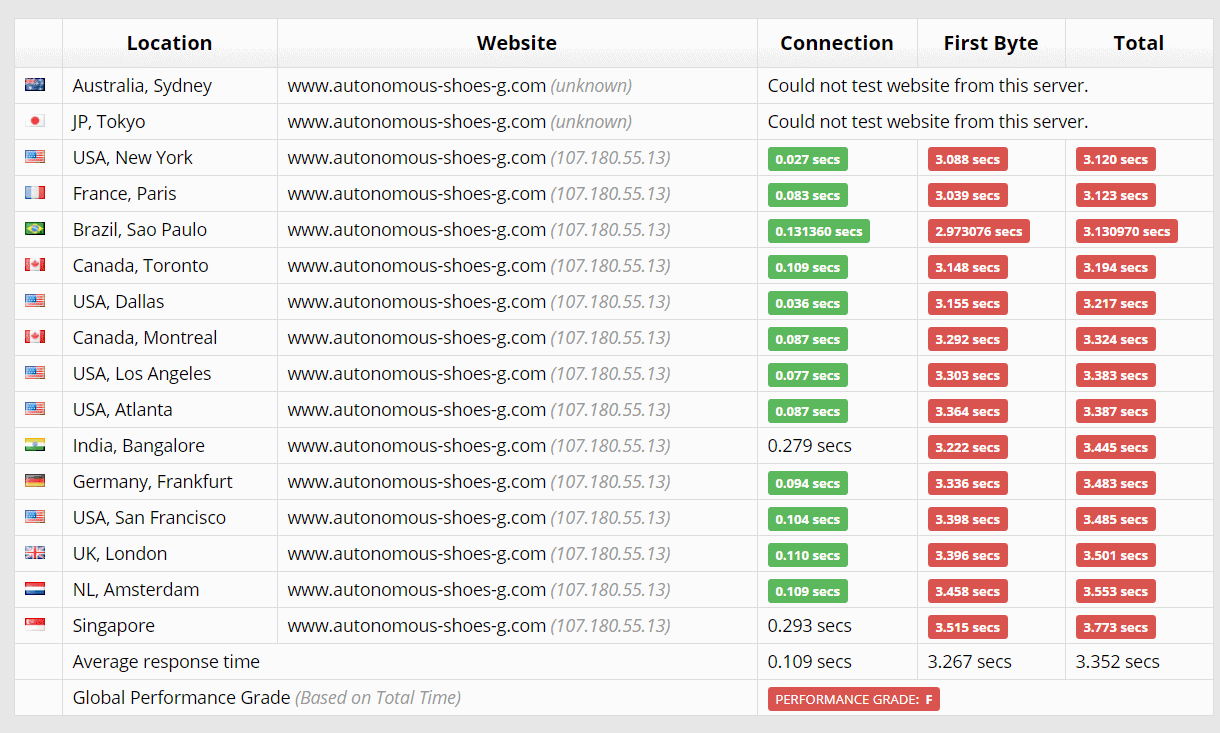
Hostinger offers the fastest average speed and highest uptime. Bluehost is close behind. GoDaddy is slower with slightly lower uptime. Fast speed and consistent uptime keep visitors happy and boost site reliability.
User Interface And Ease Of Use
All three hosts provide user-friendly dashboards. Hostinger uses a custom control panel called hPanel. It is simple and clean, ideal for beginners.
Bluehost uses cPanel, a popular interface with many features. GoDaddy has its own dashboard but includes some upsell prompts.
- Hostinger: Intuitive, minimal design, easy navigation
- Bluehost: Familiar cPanel, lots of tools, slightly complex for new users
- GoDaddy: Simple but cluttered with ads and upsells
Hostinger is best for those who want a straightforward control panel. Bluehost suits users who prefer traditional cPanel features. GoDaddy’s interface may distract beginners.
Customer Support And Service Quality
Reliable support is crucial when facing technical issues.
- Hostinger: 24/7 live chat, ticket system, helpful knowledge base
- Bluehost: 24/7 phone and live chat support, extensive tutorials
- GoDaddy: Phone and live chat available, but wait times vary
Hostinger and Bluehost have quick response times and friendly staff. GoDaddy’s support can be inconsistent. Bluehost offers phone support, which some users prefer.
Security Features And Backup Options
Protecting your website is vital to avoid threats and data loss.
| Host | SSL Certificate | Daily Backups | Malware Protection | Additional Security |
|---|---|---|---|---|
| Hostinger | Free SSL | Yes (paid plans) | Yes | BitNinja security |
| GoDaddy | Free SSL (limited) | No (paid only) | Yes | Web Application Firewall (WAF) |
| Bluehost | Free SSL | Yes | Basic malware detection | Spam protection |
Hostinger includes strong security tools like BitNinja. Bluehost offers daily backups on all plans. GoDaddy requires extra fees for backups. Free SSL certificates come standard with Hostinger and Bluehost.
Scalability And Resource Allocation
Hosting plans should grow with your website traffic and needs.
- Hostinger: Shared, cloud, VPS, and dedicated hosting options.
- GoDaddy: Wide range including shared, VPS, and dedicated plans.
- Bluehost: Shared, VPS, dedicated hosting, and WordPress optimized plans.
Hostinger offers flexible upgrades with clear resource limits. Bluehost provides scalable WordPress hosting. GoDaddy’s plans are broad but can be pricier on upgrades.
Memory, CPU, and bandwidth increase with higher plans on all hosts. Choose based on your expected growth and budget.
Pricing And Affordability Breakdown
Choosing a web host depends heavily on price and value. Comparing Hostinger, GoDaddy, and Bluehost helps find the best fit for your budget. This section breaks down their pricing tiers, features, and renewal costs. Clear pricing helps avoid surprises and ensures you get good value.
Hosting Plans And Pricing Tiers
| Provider | Basic Plan | Mid-Tier Plan | Top-Tier Plan |
|---|---|---|---|
| Hostinger | $1.99/month – Single Shared Hosting | $2.99/month – Premium Shared Hosting | $4.99/month – Business Shared Hosting |
| GoDaddy | $5.99/month – Basic Shared Hosting | $7.99/month – Deluxe Shared Hosting | $12.99/month – Ultimate Shared Hosting |
| Bluehost | $2.95/month – Basic Plan | $5.45/month – Plus Plan | $13.95/month – Choice Plus Plan |
Hostinger offers the lowest entry price. GoDaddy’s plans start higher but include more marketing tools. Bluehost balances price and features, suitable for beginners.
Value For Money: Features Included In Each Plan
- Hostinger: Free SSL, 1 website on basic, 100GB bandwidth, 30-day money-back.
- GoDaddy: 1 website on basic, unmetered bandwidth, free domain for 1 year, daily backups on top plan.
- Bluehost: Free SSL, unlimited websites on mid and top plans, unmetered bandwidth, 24/7 support.
Hostinger’s plans cover essential features for low budgets. GoDaddy adds domain and backup perks in higher plans. Bluehost provides unlimited websites and strong support for mid-tier users.
Renewal Rates And Hidden Costs
- Hostinger: Renewal prices rise to $3.99 – $9.99/month depending on plan.
- GoDaddy: Renewals jump to $8.99 – $19.99/month; add-ons like backups cost extra.
- Bluehost: Renewal fees increase to $8.99 – $24.99/month; domain privacy costs extra.
Initial low prices often increase after the first term. Hostinger remains affordable on renewal. GoDaddy and Bluehost have higher renewal rates and some extra fees.
Credit: www.websiteplanet.com
Pros And Cons Based On Real-world Usage
Choosing the right web hosting provider affects website performance and user experience. Real-world users often share insights about speed, uptime, and support quality. Below, the strengths and weaknesses of Hostinger, GoDaddy, and Bluehost are outlined based on actual user feedback. This helps in understanding how these hosts perform beyond marketing claims.
Hostinger: Strengths And Weaknesses
Strengths:
- Fast loading speeds due to LiteSpeed caching technology.
- Affordable plans with solid features for beginners.
- User-friendly control panel that simplifies management.
- Good uptime rates, often above 99.9%.
- Helpful 24/7 live chat support available.
Weaknesses:
- Limited phone support; mostly chat-based assistance.
- Backup options require upgrading to higher plans.
- Some advanced features reserved for VPS or cloud plans.
- Renewal prices can increase significantly after the first term.
Godaddy: Strengths And Weaknesses
Strengths:
- Large range of services including domain registration and hosting.
- Easy setup process with a website builder included.
- Phone support available 24/7, useful for immediate help.
- Good for users who want all-in-one solutions.
Weaknesses:
- Speed can be slower compared to competitors.
- Higher pricing, especially on renewals.
- Upselling during checkout can be overwhelming.
- Limited backup and security features on basic plans.
Bluehost: Strengths And Weaknesses
Strengths:
- Officially recommended by WordPress.org.
- Strong integration with WordPress for easy site building.
- Reliable uptime with consistent server performance.
- Free domain for the first year on most plans.
- 24/7 customer support through phone and chat.
Weaknesses:
- Site speed can vary depending on the plan.
- Interface can be cluttered for new users.
- Extra fees for backups and site migrations.
- Renewal rates are higher than initial prices.
Ideal Users And Use Case Scenarios
Choosing the right web hosting service depends on your needs and skill level. Hostinger, GoDaddy, and Bluehost each serve different users effectively. Understanding who benefits most from each provider helps in making an informed choice.
Best Hosting Provider For Beginners And Small Websites
Hostinger stands out as a great option for beginners and small websites. It offers simple setup and an easy-to-use control panel. The pricing is affordable, making it accessible to those just starting online.
- Intuitive website builder
- One-click WordPress installation
- Fast loading speeds for small sites
- 24/7 customer support with helpful guides
GoDaddy also targets beginners with its user-friendly interface and integrated domain services. Its all-in-one platform simplifies managing website and domain together.
Bluehost provides solid support for new users. The official WordPress recommendation helps beginners trust its reliability.
Optimal Choice For E-commerce And Growing Businesses
Bluehost fits well for e-commerce and growing businesses. It offers scalable plans with resources that expand as business grows. Strong security features protect online stores and customer data.
- WooCommerce integration ready
- SSL certificates included
- Daily backups and malware protection
- Reliable uptime for sales continuity
Hostinger supports e-commerce with fast servers and affordable VPS hosting options. Its global data centers improve site speed worldwide.
GoDaddy provides marketing tools and domain management, which help growing businesses build their brand online.
Suitability For Developers And Advanced Users
Hostinger
It supports multiple programming languages and SSH access. This flexibility aids complex projects and testing.
Bluehost
GoDaddy
| Use Case | Hostinger | GoDaddy | Bluehost |
|---|---|---|---|
| Beginners & Small Sites | Easy setup, low cost, fast loading | User-friendly, domain management | WordPress recommended, solid support |
| E-commerce & Growing Business | Fast servers, VPS options, global data centers | Marketing tools, brand building | WooCommerce ready, strong security, scalable |
| Developers & Advanced Users | VPS, root access, SSH, multi-language support | Developer tools, API support | cPanel, advanced database management |
Final Verdict: Which Hosting Provider Wins In 2025?
Choosing the right hosting provider shapes your website’s success. Hostinger, GoDaddy, and Bluehost each have strengths. Understanding their key differences and who they serve best helps make the smart choice for 2025. This section breaks down their main features and guides you to the best fit for your needs.
Summary Of Key Differences
| Feature | Hostinger | GoDaddy | Bluehost |
|---|---|---|---|
| Pricing | Lowest starting price, great for tight budgets | Moderate, with many upsells | Competitive, often bundled with WordPress perks |
| Performance | Fast loading speeds with LiteSpeed servers | Decent speeds, but can vary by plan | Reliable uptime and good speed |
| Ease of Use | User-friendly custom control panel | Simple but cluttered with ads | Intuitive for beginners, especially with WordPress |
| Customer Support | 24/7 live chat, quick responses | Phone and chat support, mixed reviews | 24/7 support, strong WordPress assistance |
| Hosting Types | Shared, VPS, Cloud, Dedicated, Email | Shared, VPS, Dedicated, WordPress hosting | Shared, VPS, Dedicated, WordPress optimized |
Recommendations Based On User Needs
- Budget-conscious users: Hostinger offers excellent value with low prices and solid performance.
- Small business owners: Bluehost fits well with its WordPress integration and strong support.
- Users wanting domain and hosting in one place: GoDaddy is a simple choice despite extra costs.
- Developers and advanced users: Hostinger’s VPS and cloud options provide flexibility.
- Bloggers and content creators: Bluehost’s WordPress tools make site management easier.
Future Outlook And Updates To Watch For
Hostinger plans to expand its cloud hosting services and improve server speed. Watch for new features in control panels and security updates.
GoDaddy is focusing on enhancing user experience by reducing upsells and improving customer support quality.
Bluehost will likely increase its WordPress hosting capabilities and introduce more developer-friendly tools.
All three providers aim to boost security measures and offer greener hosting options.
Stay alert for pricing changes and new hosting plans as competition grows in 2025.

Credit: www.youtube.com
Frequently Asked Questions
Which Hosting Service Offers The Best Uptime?
Hostinger, GoDaddy, and Bluehost all offer reliable uptime. Hostinger promises 99. 9% uptime, GoDaddy around 99. 9%, and Bluehost also guarantees 99. 9%. These figures ensure your website stays accessible almost all the time, minimizing downtime and improving user experience.
How Do Pricing Plans Compare Among Hostinger, Godaddy, Bluehost?
Hostinger generally offers the most affordable plans, ideal for beginners. GoDaddy provides flexible pricing with frequent promotions. Bluehost is slightly pricier but offers rich features and strong customer support, making it a balanced choice for many users.
Which Hosting Provider Is Best For WordPress Sites?
Bluehost is officially recommended by WordPress for its optimized performance. Hostinger also offers solid WordPress hosting with fast loading speeds. GoDaddy provides easy WordPress integration but may lack some advanced features compared to Bluehost and Hostinger.
What Customer Support Options Do These Hosts Provide?
All three offer 24/7 customer support via live chat and phone. Bluehost is praised for its knowledgeable support team. Hostinger provides multilingual support and a comprehensive knowledge base. GoDaddy offers extensive online resources and prompt assistance.
Conclusion
Choosing the right web host matters. Hostinger offers fast speeds and low prices. GoDaddy provides strong domain services with hosting. Bluehost stands out for WordPress support and ease. Each suits different needs and budgets. Want reliable hosting with great value? Consider Hostinger for your website. Simple, affordable, and user-friendly. Your website deserves a good home. Choose wisely and start building today.