Are you torn between choosing Hostinger or Cloudways for your website hosting? You’re not alone.
Picking the right host can make or break your site’s speed, security, and overall performance. In this review, we’ll break down exactly how Hostinger and Cloudways compare, so you can make an informed choice that fits your needs and budget. Whether you’re launching a blog, an online store, or a business site, understanding the strengths and weaknesses of each platform will save you time and frustration. Ready to find out which hosting service gives you the best value and performance? Let’s dive in and explore everything you need to know about Hostinger and Cloudways. If you want to get started with Hostinger right away, check out their latest deals here: Hostinger Hosting Plans.
Credit: www.websiteplanet.com
Introduction To Hostinger And Cloudways
Choosing the right web hosting service is vital for online success. Hostinger and Cloudways are popular options with distinct features. This section introduces both platforms and outlines the scope of their comparison.
Overview Of Hostinger And Its Hosting Solutions
Hostinger offers a variety of hosting plans suitable for beginners and small businesses. It provides shared hosting, cloud hosting, VPS, and WordPress hosting. Hostinger focuses on speed and affordability.
- Uses LiteSpeed servers for fast performance
- Includes NVMe SSD storage for quick data access
- Built-in caching and free CDN improve load times
- Managed cloud hosting plans require no extra setup
- Automated backups available on all plans
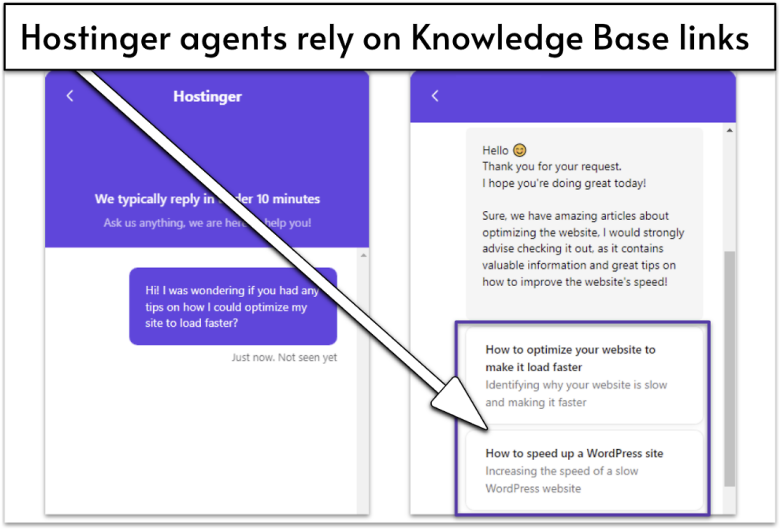
Hostinger’s control panel is user-friendly, ideal for beginners. Support mainly relies on AI chatbots, which can delay human assistance.
Introduction To Cloudways And Its Managed Cloud Platform
Cloudways is a managed cloud hosting platform focused on flexibility and scalability. It connects users to cloud providers like DigitalOcean, AWS, and Google Cloud.
- Offers managed hosting with server management handled by Cloudways
- Supports multiple cloud infrastructure providers
- Includes features like automated backups, staging environments, and advanced security
- Designed for developers and businesses needing custom cloud solutions
Cloudways provides excellent performance potential with more control, but requires some technical knowledge.
Purpose And Scope Of The Hosting Comparison
This comparison aims to help users choose between Hostinger and Cloudways based on their needs. Key areas covered include:
- Performance and speed
- Ease of use
- Customer support
- Pricing and value
- Features and scalability
Both services offer unique benefits. This review highlights their strengths and weaknesses clearly.
Key Features And Performance Comparison
The performance and features of hosting services shape your website’s success. Hostinger and Cloudways offer strong cloud hosting options, but their strengths differ. Examining their core features and speed helps choose the right host.
Hostinger’s Optimized Cloud Hosting And Speed Enhancements
Hostinger focuses on fast, reliable cloud hosting with minimal setup. All plans include:
- NVMe SSD storage for quick data access
- LiteSpeed servers that boost website loading speed
- Built-in caching to reduce server load and speed up delivery
- Free CDN integration to serve content faster worldwide
This setup delivers excellent speed without extra configuration. Hostinger’s platform ensures consistent performance for small to medium websites.
Cloudways’ Flexible Cloud Infrastructure And Scalability
Cloudways provides flexible cloud hosting with multiple cloud providers like DigitalOcean and AWS. Key benefits include:
- Easy scaling of resources based on traffic needs
- Choice of different cloud infrastructure for tailored performance
- Pay-as-you-go pricing for better cost control
Cloudways suits growing sites needing adaptable infrastructure and advanced customization options.
Built-in Caching, Cdn, And Storage Technologies
| Feature | Hostinger | Cloudways |
|---|---|---|
| Caching | Integrated LiteSpeed cache on all plans | Multiple caching options including Varnish, Memcached, Redis |
| CDN | Free CDN included | Optional CDN setup through third-party services |
| Storage | NVMe SSD by default | Depends on cloud provider (SSD-based) |
Both hosts use strong caching and storage tech. Hostinger offers built-in CDN and caching ready to use. Cloudways provides more caching choices but requires manual CDN setup.
User Interface And Ease Of Use For Beginners And Experts
Hostinger delivers a simple, clean control panel. Its user-friendly design helps beginners start websites quickly. The dashboard integrates website and server management in one place.
Cloudways uses a custom platform focused on advanced users. It offers deep server control and cloud provider options. The learning curve is steeper but offers more power for experts.
- Hostinger: Ideal for beginners and users wanting fast setup.
- Cloudways: Best for developers needing flexibility and control.
Pricing And Affordability Breakdown
Understanding pricing helps choose the right hosting provider. Both Hostinger and Cloudways offer unique pricing models. This section breaks down their costs and value clearly.
Hostinger’s Pricing Tiers And Value For Money
Hostinger offers straightforward, budget-friendly plans. Prices start low and scale with added features.
| Plan | Monthly Cost (USD) | Main Features |
|---|---|---|
| Single Shared Hosting | $1.99 | 1 Website, 30 GB SSD, 100 GB Bandwidth |
| Premium Shared Hosting | $2.99 | Unlimited Websites, 100 GB SSD, Free Domain |
| Business Shared Hosting | $4.99 | Unlimited Websites, 200 GB SSD, Daily Backups |
Hostinger delivers excellent value for small to medium websites. It bundles speed enhancements like LiteSpeed servers and free CDN without extra cost.
Prices may vary with promotions and billing cycles.
Cloudways’ Pay-as-you-go Model And Cost Considerations
Cloudways uses a flexible pay-as-you-go pricing model. Users pay for resources used per hour or month.
- Starting price: Around $10/month for basic cloud hosting
- Costs increase with RAM, CPU, and storage upgrades
- No fixed plans; choose cloud provider: DigitalOcean, Vultr, AWS, etc.
This model suits businesses needing scalable resources. It avoids paying for unused capacity.
Cloudways includes managed features such as automatic backups and security patches within pricing.
Comparing Feature Sets Across Pricing Plans
| Feature | Hostinger | Cloudways |
|---|---|---|
| Storage Type | NVMe SSD | SSD (varies by cloud provider) |
| Free CDN | Included on all plans | Available but may cost extra |
| Backups | Daily backups on business plans | Automated backups included |
| Server Setup | Pre-configured for speed | User selects server and configs |
| Support | Chat support; limited human access | 24/7 expert support included |
Hidden Costs And Renewal Fees To Watch For
Hostinger’s initial prices are low but renewals cost more. Renewal fees can be 2-3 times the starting rate.
Be aware of add-ons like domain privacy, SSL certificates on some plans.
Cloudways has no long-term contracts but costs rise with resource usage.
Extra charges may apply for additional IP addresses or premium support.
Both providers require careful review of terms to avoid surprises.

Credit: www.reddit.com
Pros And Cons Based On Real-world Usage
Understanding the strengths and weaknesses of Hostinger and Cloudways helps make smarter hosting choices. Real-world usage reveals how these platforms perform in speed, security, support, and flexibility. This section breaks down the advantages and challenges of each, based on actual user experience.
Advantages Of Hostinger: Speed, Security, And Support
- Speed: Hostinger uses NVMe SSD storage and LiteSpeed servers for fast loading times.
- Built-in Caching and Free CDN: These features improve website performance without extra setup.
- Security: Hostinger includes solid security measures to protect sites from common threats.
- Support: Helpful AI chatbot offers quick answers for common issues.
- User-Friendly Management: Intuitive control panel makes website and server management easy for beginners.
Disadvantages Of Hostinger: Support Accessibility And Entry-level Limitations
- Support Accessibility: Users often struggle to reach human support beyond the AI chatbot.
- Entry-Level Plan Limits: Basic plans lack CDN, ecommerce features, and use older-generation SSDs.
- Advanced Features Missing: No advanced AI tools or enhanced ecommerce support in low-tier packages.
Strengths Of Cloudways: Customizability And Cloud Provider Options
- Customizability: Offers flexible server configurations and control to match specific needs.
- Cloud Provider Choices: Supports multiple cloud providers like DigitalOcean, AWS, Google Cloud, and more.
- Performance Potential: Users can optimize servers for high traffic and complex websites.
- Managed Hosting: Handles server maintenance and security, easing technical burdens.
Challenges With Cloudways: Pricing Complexity And Setup
- Pricing Complexity: Pay-as-you-go model can be confusing and may lead to unexpected costs.
- Setup Difficulty: Initial configuration is more complex compared to Hostinger’s ready-to-use plans.
- Learning Curve: Requires more technical knowledge to manage and optimize hosting effectively.
Ideal Users And Use Case Recommendations
Choosing the right hosting depends on your project needs and skill level. Hostinger and Cloudways serve different user groups and use cases. Understanding their strengths helps pick the best fit for your website or business.
Why Hostinger Is Best For Beginners And WordPress Users
Hostinger offers a simple and user-friendly interface, perfect for beginners. Its setup process is quick, requiring no technical skills. The platform includes one-click WordPress installation and built-in caching for faster load times.
Hostinger also provides:
- Free SSL certificate to secure your site
- NVMe SSD storage for improved speed
- LiteSpeed servers and a free CDN to optimize performance
These features help WordPress users launch and manage websites easily without extra setup or cost.
When To Choose Cloudways For Advanced And Scalable Projects
Cloudways suits projects that demand high scalability and control. It offers managed cloud hosting with multiple cloud providers like AWS, Google Cloud, and DigitalOcean. Users can scale resources instantly based on traffic needs.
Cloudways is ideal for:
- Developers needing SSH and Git integration
- Websites requiring advanced performance optimization
- Projects with fluctuating traffic and resource demands
The platform provides team collaboration tools and automated backups, making it a strong choice for complex and growing sites.
Suitability For Woocommerce And Ecommerce Websites
| Feature | Hostinger | Cloudways |
|---|---|---|
| WooCommerce Optimization | Basic WooCommerce support with easy setup | Advanced WooCommerce hosting with scalability |
| SSL & Security | Free SSL, basic security features | Dedicated firewalls, regular security patches |
| Performance | Good for small to medium shops | High performance for large or growing stores |
| Support for eCommerce Features | Limited eCommerce tools | Supports custom integrations and advanced caching |
Hostinger works well for small WooCommerce stores. Cloudways fits larger eCommerce sites needing more power and flexibility.
Recommendations For Agencies, Developers, And Enterprises
Agencies and developers benefit from Cloudways’ flexibility. It supports multiple cloud providers and developer tools like SSH, WP-CLI, and staging environments.
Enterprises requiring robust infrastructure and scalability also favor Cloudways. Its ability to handle heavy traffic and complex applications is a key advantage.
Hostinger suits small agencies or freelancers managing simple sites. It offers affordable plans and ease of use without complex configurations.

Credit: cybernews.com
Final Verdict: Hostinger Vs Cloudways For 2026
Choosing between Hostinger and Cloudways depends on your hosting needs and priorities. Both providers excel in different areas. Hostinger offers a straightforward, fast setup with solid performance for small to medium sites. Cloudways provides flexible cloud hosting with scalability and customization for advanced users.
Summary Of Key Differences And Strengths
| Feature | Hostinger | Cloudways |
|---|---|---|
| Performance | Guaranteed speed with NVMe SSD and LiteSpeed servers | Potential for higher performance via cloud providers like AWS and Google Cloud |
| Setup | Optimized with built-in caching and free CDN without extra configuration | Requires manual setup but offers flexible cloud environment control |
| Support | Limited human support; mainly AI chatbot-based | 24/7 expert support with live chat and ticket system |
| Ease of Use | User-friendly for beginners with intuitive control panel | Designed for developers and advanced users |
| Storage | NVMe SSD on all plans | Depends on chosen cloud provider; generally high-performance SSD |
Which Hosting Provider Offers Better Value And Performance
Hostinger delivers consistent speed and value for small to medium websites. Its all-in-one packages include caching and CDN without extra fees.
Cloudways excels in performance potential by letting users choose top cloud infrastructures. This suits growing sites needing scalable power.
- Hostinger is cost-effective with easy setup.
- Cloudways provides more control and advanced features.
- Hostinger may lack some advanced tools on entry plans.
- Cloudways’ pay-as-you-go pricing fits variable workloads.
Future Outlook And Innovations To Expect
Hostinger is expected to improve AI-driven support and integrate newer storage technology soon. They focus on enhancing beginner-friendly tools.
Cloudways plans to expand cloud provider options and add more automation for server management. Their aim is to simplify cloud hosting complexity.
- Hostinger may add ecommerce and AI features on lower plans.
- Cloudways will likely boost performance tuning and security layers.
- Both will advance CDN and caching technologies for faster delivery.
Making The Right Choice Based On Your Hosting Needs
Choose Hostinger if you want affordable, fast hosting with minimal setup. It suits beginners and small businesses.
Choose Cloudways if you need flexible cloud hosting, scalability, and expert support. Ideal for developers and growing websites.
- Consider your technical skills and control needs.
- Evaluate your budget and required features.
- Think about future growth and scalability plans.
Both providers offer strong options for 2026 but target different user groups.
Frequently Asked Questions
Which Is Better, Cloudways Or Hostinger?
Cloudways excels in performance and flexibility for experienced users. Hostinger offers affordable, user-friendly hosting with fast speeds and built-in features. Choose based on your budget and technical needs.
What Is The Disadvantage Of Hostinger?
Hostinger’s disadvantage includes limited customer support access and entry-level plans missing advanced features like CDN and ecommerce tools.
Which One Is Better, Hostinger Or Hostgator?
Hostinger outshines HostGator with better beginner-friendly tools, stronger security, automated backups, and more intuitive management. It offers greater value for money.
Is Cloudways A Pakistani Company?
Yes, Cloudways has Pakistani origins, founded by Aaqib Gadit and part of the Gaditek group. Its headquarters is in Malta.
Conclusion
Choosing between Hostinger and Cloudways depends on your hosting needs. Hostinger offers easy setup and fast loading with built-in features. Cloudways provides more control and flexibility for advanced users. Both have strong performance but different support options. Consider your technical skills and website goals before deciding. For a simple, reliable start, Hostinger is a solid choice. Explore Hostinger’s plans here: Hostinger Hosting Plans. Make a choice that fits your website’s future.