Are you ready to unlock the full potential of your Hostinger website? Connecting Google Analytics to your Hostinger site is the key to understanding your visitors, tracking your traffic, and making smarter decisions to grow your online presence.
But if you’re wondering how to set it up quickly and correctly, you’re in the right place. This Hostinger Google Analytics Integration Guide breaks down every step in simple, clear language so you can start seeing valuable insights without any hassle. Plus, if you haven’t secured your hosting yet, Hostinger offers powerful features at an affordable price that make launching and managing your site a breeze. Get started with Hostinger today and connect Google Analytics seamlessly by clicking here: Hostinger Basic Plan. Let’s dive in and turn your website data into your biggest asset!
Credit: www.hostinger.com
Introduction To Hostinger Google Analytics Integration
Integrating Google Analytics with Hostinger allows website owners to track visitor behavior. This integration helps understand user interactions and improve website performance. The process connects Hostinger’s hosting services with Google’s powerful analytics tools.
This section explains the basics of Hostinger and Google Analytics, the benefits of combining them, and who should follow this guide.
Overview Of Hostinger And Google Analytics
Hostinger is a popular web hosting provider known for affordable plans and easy setup. It supports website building and management through its control panel, hPanel. Many users rely on Hostinger for its speed and uptime.
Google Analytics is a free tool from Google that tracks website traffic. It collects data on visitors, their behavior, and conversions. This helps businesses make data-driven decisions to grow online.
| Feature | Hostinger | Google Analytics |
|---|---|---|
| Primary Function | Website hosting and management | Website traffic tracking and analysis |
| User Interface | hPanel (custom control panel) | Google Analytics Dashboard |
| Cost | Affordable hosting plans | Free |
| Purpose | Host websites online | Track and report website activity |
Purpose And Benefits Of Integrating Google Analytics With Hostinger
Connecting Google Analytics to Hostinger websites brings many benefits. It gives clear insights into visitor numbers, behavior, and popular content. Users can see which pages perform best and which need improvement.
- Track visitor sources: Know where visitors come from (search engines, social media, etc.).
- Monitor user behavior: Understand how visitors navigate your site.
- Measure conversions: See how many users complete goals like purchases or sign-ups.
- Improve marketing: Adjust strategies based on real data.
- Enhance user experience: Identify and fix website issues.
This integration helps turn raw data into actionable insights. It supports website growth and better decision-making.
Who Should Use This Guide
This guide is ideal for Hostinger users wanting to track their website traffic. It suits beginners with little technical knowledge. Also, small business owners, bloggers, and marketers benefit from understanding visitor data.
Anyone managing a website on Hostinger who wants to improve their online presence will find this guide useful. The steps are clear and simple to follow, even for non-experts.
Key Features Of Hostinger Google Analytics Integration
Hostinger’s integration with Google Analytics offers essential tools for website owners. It allows easy tracking of visitor activity and helps improve website performance. The integration combines powerful analytics with Hostinger’s user-friendly platform.
This section highlights the main features that make this integration valuable for monitoring and growing your website.
Seamless Setup Through Hostinger Hpanel: Simplifying Analytics Connection
Hostinger provides a smooth setup process via its hPanel. Users can connect Google Analytics to their website without technical hassle.
- Login to Hostinger hPanel.
- Navigate to the Analytics or Integrations section.
- Enter your Google Analytics tracking ID.
- Save changes and start tracking immediately.
This setup reduces waiting time and avoids complex coding. It suits beginners and experts alike.
Real-time Traffic Monitoring: Understanding Your Audience Instantly
Google Analytics integration enables real-time visitor tracking. Website owners see live data on user actions.
- Number of active visitors on your site.
- Pages currently viewed.
- Geographic location of visitors.
- Traffic sources like search engines or social media.
Real-time insights help adjust content and marketing strategies quickly.
Detailed Visitor Insights: Tailoring Content To User Behavior
The integration delivers in-depth data about visitor behavior. This includes:
- Page views and session duration.
- Bounce rates and exit pages.
- New vs returning visitors.
- Device types and screen sizes.
These insights guide content creation and website design to better meet audience needs.
Compatibility With Hostinger Website Builder And WordPress
Hostinger supports Google Analytics integration on both its Website Builder and WordPress hosting.
| Platform | Integration Method | Benefits |
|---|---|---|
| Hostinger Website Builder | Direct input of Google Analytics ID in settings | Easy for beginners, no coding required |
| WordPress on Hostinger | Use plugins or manual code insertion | Flexible and customizable tracking options |
This compatibility ensures users can track visitors regardless of their website platform.
Built-in Analytics Vs. Google Analytics: Why Use Both?
Hostinger offers built-in analytics for basic website stats. Google Analytics provides advanced tracking and detailed reports.
- Built-in Analytics: Easy access, shows visits and bandwidth.
- Google Analytics: Deep insights into user behavior, conversions, and marketing.
Using both gives a complete picture: quick overview plus detailed analysis.
Step-by-step Guide To Setting Up Google Analytics On Hostinger
Integrating Google Analytics with your Hostinger website helps track visitor behavior. This guide walks through each step clearly. You will learn how to create an account, connect with Hostinger tools, and verify the setup.
Creating A Google Analytics Account And Property
Start by making a Google Analytics account. Follow these steps:
- Go to Google Analytics.
- Sign in with your Google account.
- Click Admin at the bottom left.
- Under Account, select Create Account.
- Enter an account name and click Next.
- Fill in your website’s property name, time zone, and currency.
- Complete the business info and click Create.
This process creates a tracking ID you will use to connect with your Hostinger site.
Connecting Google Analytics Via Hostinger Website Builder
Use Hostinger’s Website Builder to add Google Analytics easily:
- Log into your Hostinger hPanel.
- Open the Website Builder for your domain.
- Navigate to Settings > Integrations.
- Find Google Analytics and paste your tracking ID.
- Save changes and publish your website.
This method directly inserts tracking code without manual edits.
Integrating Google Analytics With WordPress On Hostinger
For WordPress sites hosted on Hostinger, integration differs slightly:
- Log into your WordPress admin panel.
- Go to Appearance > Theme Editor.
- Open the
header.phpfile. - Paste the Google Analytics tracking code before the closing
tag. - Save the file and clear any caching plugins.
This adds Google Analytics tracking site-wide.
Using Plugins Like Site Kit For Easier Integration
Google’s Site Kit plugin simplifies Analytics setup on WordPress:
- From WordPress dashboard, go to Plugins > Add New.
- Search for Site Kit by Google.
- Install and activate the plugin.
- Follow the setup wizard to connect your Google Analytics account.
- Site Kit handles all code insertion automatically.
This method suits beginners and avoids manual code changes.
Verifying The Integration And Tracking Status
Confirm Google Analytics works correctly by:
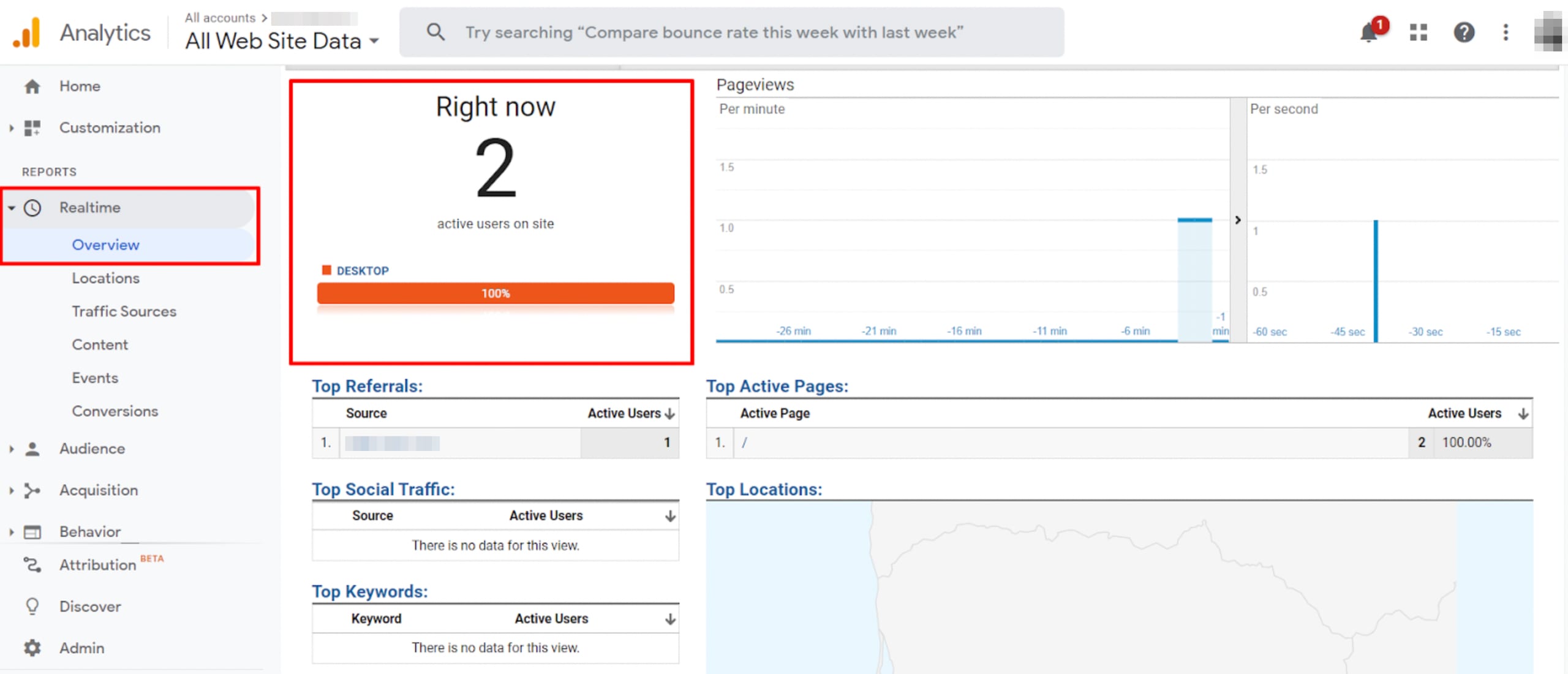
- Opening Google Analytics dashboard.
- Going to Realtime reports.
- Visiting your website in a new browser tab.
- Checking if your visit appears in the Realtime user list.
- Using browser extensions like Google Tag Assistant for extra verification.
Proper verification ensures accurate data collection for your website.
Pricing And Affordability Breakdown
Understanding the costs involved in integrating Google Analytics with Hostinger helps you plan your budget wisely. This section breaks down pricing details for Hostinger plans that support Google Analytics, the cost differences between free and premium Google Analytics features, and evaluates the overall value of this integration.
Cost Of Hostinger Plans With Google Analytics Compatibility
Hostinger offers several hosting plans that support Google Analytics integration. Here is a summary of the main plans and their costs:
| Plan | Monthly Price (Billed Annually) | Google Analytics Support |
|---|---|---|
| Single Shared Hosting | $1.99 | Yes |
| Premium Shared Hosting | $2.99 | Yes |
| Business Shared Hosting | $3.99 | Yes |
| Cloud Hosting | $9.99 | Yes |
All plans allow easy integration with Google Analytics through Hostinger’s control panel. Prices depend on the features and resources you need.
Google Analytics Pricing: Free Vs. Premium Features
Google Analytics offers two main versions:
- Free Version: Includes essential tracking and reporting tools for most websites.
- Google Analytics 360 (Premium): Designed for large businesses, it provides advanced analytics, higher data limits, and dedicated support.
The free version suits small to medium websites hosted on Hostinger. Premium pricing starts at around $150,000 per year, which is usually unnecessary for most users.
Value Assessment: Roi Of Integrating Google Analytics With Hostinger
Integrating Google Analytics with Hostinger delivers strong value for website owners:
- Cost-effective tracking: Use the free Google Analytics without extra charges from Hostinger.
- Improved insights: Understand visitor behavior to optimize your site and marketing.
- Better decisions: Data-driven choices boost conversions and traffic.
The affordable Hostinger plans combined with free Google Analytics create a high return on investment. This integration helps you grow your website with minimal upfront cost.
Pros And Cons Of Hostinger Google Analytics Integration
Integrating Google Analytics with Hostinger gives website owners powerful tools to understand visitor behavior. It helps track traffic, user actions, and site performance. This integration has clear benefits but also some challenges. Knowing these pros and cons helps users make smart choices.
Advantages: Enhanced Data Insights And User-friendly Setup
Hostinger’s integration with Google Analytics offers valuable insights that improve website strategy.
- Detailed visitor data: See where visitors come from, which pages they like, and how long they stay.
- Easy setup: Hostinger’s control panel guides you step-by-step to link your site with Google Analytics.
- Real-time tracking: Monitor live user activity to respond quickly to trends.
- Custom reports: Build reports that fit your business goals.
- Free tool: Google Analytics is free, adding value without extra cost.
This combination helps users make data-driven decisions to grow their websites effectively.
Potential Challenges: Technical Setup And Data Privacy Considerations
Some users face issues during integration or ongoing use.
- Technical setup: Connecting Google Analytics with Hostinger may require basic knowledge of website code or DNS settings.
- Tracking delays: Data may not appear instantly, needing patience to see full reports.
- Privacy concerns: Collecting visitor data demands compliance with privacy laws like GDPR.
- Data accuracy: Incorrect setup can lead to incomplete or skewed analytics data.
Users should follow clear instructions and understand privacy rules to avoid problems.
Comparison With Other Hosting Providers’ Analytics Integration
| Feature | Hostinger | Other Hosting Providers |
|---|---|---|
| Ease of Setup | Step-by-step guides, simple control panel | Varies; some require manual code insertion |
| Built-in Support | Good support via tutorials and help center | Mixed; some offer less detailed help |
| Integration Type | Direct integration with Hostinger Website Builder | Often requires plugins or manual setup |
| Pricing | Free with Google Analytics | Free or paid depending on provider |
| Privacy Features | Basic compliance tools, user responsibility | Some offer advanced privacy integrations |
Hostinger provides a balanced mix of ease and features. Other hosts may need extra steps or cost more for similar functions.

Credit: www.hostinger.com
Recommendations For Ideal Users And Scenarios
Hostinger’s Google Analytics integration suits various users aiming to understand their website traffic. The setup offers valuable insights that help improve performance. Choosing the right users and scenarios ensures you get the most benefits from this tool.
Small To Medium Businesses Seeking Growth Through Data
Small and medium businesses benefit greatly from Hostinger Google Analytics integration. It helps track visitor behavior and website performance. Business owners can:
- Identify popular pages and user paths
- Monitor traffic sources to focus marketing efforts
- Measure campaign effectiveness in real time
Using these insights, businesses can improve customer experience and increase sales. The integration is simple and does not require technical skills. It fits well for those who want data-driven growth without complexity.
E-commerce Websites Using Hostinger And Woocommerce
Online stores hosted on Hostinger with WooCommerce gain crucial analytics support. Google Analytics tracks product views, cart actions, and sales conversions. Key benefits include:
| Feature | Benefit |
|---|---|
| Enhanced E-commerce Tracking | Measures product performance and shopping behavior |
| Sales Funnel Analysis | Identifies where customers drop off |
| Audience Segmentation | Targets marketing to specific customer groups |
Data from Google Analytics helps optimize product listings and promotions. This leads to better conversion rates and higher revenue.
Content Creators And Bloggers Looking To Optimize Engagement
Content creators and bloggers can track visitor engagement easily. Hostinger’s integration with Google Analytics provides insights on:
- Most read articles and pages
- Average time spent on content
- Visitor demographics and interests
These details help refine content strategy to attract and retain readers. Bloggers can improve SEO and social sharing by understanding visitor behavior. The setup is user-friendly and supports content growth goals.
When To Consider Advanced Google Analytics Features
Advanced features suit users with complex tracking needs or larger websites. Consider them when:
- You require custom event tracking beyond basic page views
- Detailed user journey analysis is needed
- Integration with other marketing tools is planned
- Multi-channel attribution and conversion modeling are critical
Advanced Google Analytics helps businesses with deeper insights and tailored reports. However, it needs more setup time and technical knowledge. It is ideal for users ready to invest in detailed data analysis.
Advanced Tips And Best Practices For Optimization
Optimizing Google Analytics integration on Hostinger boosts your website’s success. Advanced tips help you track key actions, manage tags efficiently, and analyze data for growth. Follow best practices to keep your data accurate and compliant.
Setting Up Goals And Conversion Tracking
Goals and conversion tracking identify important user actions on your website. These actions can be purchases, sign-ups, or contact form submissions. Setting goals helps measure how well your site meets business objectives.
Steps to set up goals:
- Log in to your Google Analytics account.
- Go to the Admin panel and select Goals.
- Click New Goal and choose a template or custom goal.
- Define goal details like destination URL or event action.
- Save and test the goal to ensure it tracks properly.
Track conversions to improve marketing efforts and user experience.
Using Google Tag Manager With Hostinger
Google Tag Manager (GTM) simplifies managing tracking codes on your Hostinger site. GTM lets you add and update analytics tags without changing site code.
- Create a GTM account and container.
- Copy the GTM container code.
- Paste the code into your Hostinger website header or use the Website Builder’s custom code feature.
- Set up tags for Google Analytics and other tools inside GTM.
This method reduces errors and speeds up tag deployment.
Analyzing Reports To Drive Website Improvements
Google Analytics offers valuable reports that reveal how visitors interact with your site. Use these reports to find strengths and weaknesses.
| Report Type | Purpose | Action |
|---|---|---|
| Audience Overview | Understand visitor demographics and behavior | Adjust content to match user interests |
| Acquisition | See where visitors come from (search, ads, social) | Focus marketing on best channels |
| Behavior | Track popular pages and site navigation | Optimize site layout and content flow |
| Conversions | Measure goal completions and sales | Improve calls to action and checkout process |
Regularly review reports to make informed website decisions.
Maintaining Data Accuracy And Compliance
Accurate data ensures reliable insights. Compliance respects user privacy and legal rules.
- Check tracking code installation on all pages.
- Filter out internal traffic from your IP addresses.
- Enable data retention and anonymize IP to protect privacy.
- Inform visitors about cookies and data use via a privacy policy.
- Use Google Analytics settings to comply with GDPR and other laws.
Consistent monitoring helps keep data clean and lawful.
Conclusion And Next Steps
Integrating Google Analytics with your Hostinger website is a smart move. It gives clear data about your visitors and their behavior. Use this information to make smart choices for your site. The process is straightforward and worth the effort.
Recap Of Integration Benefits And Setup Process
Google Analytics helps you track visitor numbers, page views, and user actions.
- Understand who visits your website and what they like.
- Measure which pages perform best.
- Identify sources bringing traffic to your site.
Setup steps include:
- Create a Google Analytics property in your account.
- Copy the tracking ID or code snippet.
- Paste it into your Hostinger website builder or hPanel.
- Verify the connection to start collecting data.
Encouragement To Utilize Analytics For Website Growth
Use the data from Google Analytics to improve your site. Check visitor trends and popular pages often.
Adjust your content and marketing based on real insights. This helps you reach more people and keep them engaged.
Set goals in Analytics to measure success. Small steps lead to better website growth.
Additional Resources And Support From Hostinger
Hostinger provides helpful guides and tutorials on Google Analytics integration.
| Resource | Description |
|---|---|
| Hostinger Tutorials | Step-by-step videos and articles on setup and use. |
| Hostinger Support | 24/7 customer service for technical help. |
| Google Analytics Help Center | Official Google documentation for deeper learning. |
Reach out to Hostinger support anytime for assistance. Use all available tools to maximize your site’s potential.

Credit: www.youtube.com
Frequently Asked Questions
How Do I Connect Google Analytics To Hostinger?
Log into Google Analytics and create a property for your website. Copy the tracking ID. In Hostinger’s hPanel, go to Website Builder settings, paste the tracking ID in the Google Analytics field, and save changes to connect your site.
How To Connect Hostinger To Google?
Log into Hostinger hPanel and locate your Google Workspace order. Click “Setup” next to it and complete the process. Create a primary admin account to connect Hostinger to Google services.
How To Integrate With Google Analytics?
Create a Google Analytics property and get your tracking ID. Add this ID to your website’s header or use a plugin. Verify integration by checking real-time reports in Google Analytics.
Does Hostinger Provide Analytics?
Hostinger offers built-in analytics in its Website Builder to track visitor data. You can also integrate Google Analytics for detailed insights.
Conclusion
Connecting Google Analytics to Hostinger helps track your website visitors easily. It shows who visits and what they do on your site. Use these insights to improve your content and grow your audience. The setup process is simple and fast, even for beginners. Start analyzing your traffic today and make smarter decisions. Choose Hostinger for reliable hosting and easy integration. Get started now with Hostinger by visiting this link. Your website’s success depends on understanding your visitors well.