Are you ready to take full control of your website by connecting your domain to Hostinger? Whether you just purchased a domain or already own one elsewhere, linking it properly to your Hostinger account is crucial for making your site live and accessible to visitors.
But don’t worry—this Hostinger Connect Domain Guide will walk you through every step with clear, simple instructions that anyone can follow. By the end, you’ll know exactly how to point your domain to Hostinger quickly and confidently, avoiding common pitfalls that can slow you down. Ready to get started? Click here to explore Hostinger’s affordable hosting plans and connect your domain today: Hostinger Basic Hosting.
Introduction To Hostinger Connect Domain
Hostinger Connect Domain is a simple way to link your domain to your Hostinger hosting account. This connection allows your website to appear online using your chosen domain name. Without connecting your domain, visitors cannot find your website easily.
Connecting a domain involves changing some settings so Hostinger can manage your website address. This step is crucial for building a professional online presence. Many users find the process straightforward with Hostinger’s tools.
What Is Hostinger Connect Domain And Its Purpose
Hostinger Connect Domain is a service to link your domain name with Hostinger’s hosting platform. It allows your website files to be displayed under your own custom domain.
- Enables your website to be accessible via your domain
- Manages DNS settings from Hostinger control panel
- Supports both new and existing domains
- Simplifies website management and hosting
The main purpose is to make your website reachable by typing your domain in a browser. Hostinger helps automate this with easy setup steps.
Why Linking Your Domain To Hostinger Matters For Your Website
Linking your domain to Hostinger is key for your website’s online identity. It ensures your visitors see your website using your own domain name, not a generic Hostinger URL.
Benefits include:
| Reason | Importance |
|---|---|
| Professional Appearance | A custom domain builds trust and brand recognition. |
| SEO Advantage | Search engines rank websites with custom domains higher. |
| Easy Access | Visitors remember and return to your domain easily. |
| Email Setup | Use your domain for professional email addresses. |
Without linking your domain, your website may remain invisible or hard to find. Hostinger’s connection process makes this step clear and fast.

Credit: www.youtube.com
Key Features Of Hostinger Connect Domain
Hostinger Connect Domain offers essential features that simplify managing and linking domains. It supports easy domain connection, flexible domain use, and smart DNS management. These features make domain setup fast and reliable for website owners.
User-friendly Interface: Simplifying The Domain Connection Process
The interface of Hostinger Connect Domain is designed for ease of use. It guides users step-by-step to connect their domains without confusion. Even beginners can complete the domain setup quickly.
Key points include:
- Clear navigation menus
- Visual prompts for each step
- Minimal technical jargon
Support For External Domains: Flexibility To Use Any Domain You Own
Hostinger Connect Domain allows you to link domains registered outside Hostinger. This flexibility ensures users keep their existing domain names while hosting websites on Hostinger.
Benefits include:
- Use domains from any registrar
- No need to transfer domain ownership
- Manage all domains in one place
Automatic Dns Configuration: Saving Time And Reducing Errors
The platform automatically sets DNS records when you connect your domain. This feature saves time and prevents common mistakes during manual DNS setup.
Advantages of automatic DNS setup:
- Instant configuration of A, CNAME, and MX records
- Eliminates incorrect entries
- Faster domain propagation
Multiple Connection Methods: Nameservers Vs Dns Record Pointing
Hostinger offers two main ways to connect domains:
| Connection Method | Description | When to Use |
|---|---|---|
| Nameservers | Change your domain’s nameservers to Hostinger’s servers. | Ideal for full domain management by Hostinger. |
| DNS Record Pointing | Keep your current nameservers and update DNS records to Hostinger IP. | Best when you want to keep domain control with your registrar. |
Choosing the right method depends on your control preferences and setup needs.
Step-by-step Guide To Connect Your Domain On Hostinger
Connecting your domain to Hostinger is a simple process. This guide walks you through each step clearly. Follow the instructions carefully to link your domain with your website. This ensures your visitors reach your site without issues.
Accessing The Websites Tab And Starting The Connection
First, log in to your Hostinger account. Then, find the Websites tab on the dashboard. Click it to see your current websites and domain options.
Next, click the button to connect a domain. This action begins the setup process. You will be redirected to the website creation area.
Choosing Between Ai Template Generator And Pre-made Templates
Hostinger offers two ways to build your website:
- AI Template Generator: Creates a custom design based on your answers.
- Pre-Made Templates: Select from ready-made designs to start quickly.
Pick the option that fits your needs best. Both work well with your connected domain.
Configuring Dns Records Manually: A Detailed Walkthrough
Manual DNS setup gives you full control over domain pointing. Follow these steps:
- Go to the DNS Zone Editor in your Hostinger control panel.
- Locate existing records for your domain.
- Add or edit the following records:
Record Type Name Value TTL A @ Hostinger server IP address 14400 CNAME www yourdomain.com 14400 - Save the changes and wait up to 24 hours for DNS propagation.
Using Hostinger Nameservers For Seamless Domain Pointing
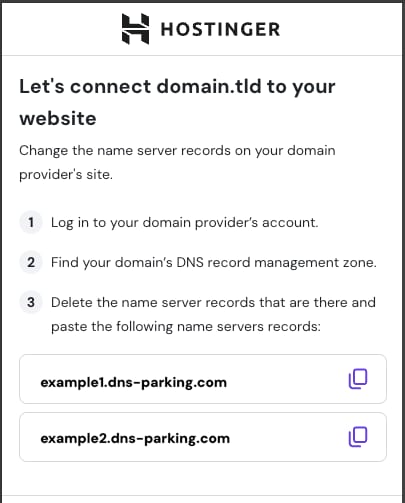
Using Hostinger nameservers simplifies connection. To do this:
- Log in to your domain registrar’s control panel.
- Find the nameserver settings.
- Replace existing nameservers with Hostinger’s:
| Nameserver |
|---|
| ns1.dns-parking.com |
| ns2.dns-parking.com |
Save changes. Nameserver update may take a few hours to complete.
Verifying Domain Connection And Troubleshooting Common Issues
Check your domain status in the Hostinger control panel after setup. The domain should show as connected.
If your site does not load:
- Clear your browser cache.
- Confirm DNS records or nameservers are correct.
- Allow up to 24 hours for DNS changes to take effect.
- Check for typos in your domain name or records.
- Contact Hostinger support if the problem continues.
Following these steps ensures your domain links properly to Hostinger.
Pricing And Affordability Breakdown
Understanding the costs and value of connecting a domain with Hostinger helps you make smart choices. This section covers pricing for domain registration, compatible hosting plans, and what you get for your money. Clear insight into these points aids in budget planning and getting the best service.
Cost Of Domain Registration Via Hostinger Vs External Providers
Hostinger offers competitive pricing for domain registration, often bundled with hosting plans. Domain costs vary by extension (.com, .net, .org, etc.), but Hostinger keeps prices affordable.
| Domain Extension | Hostinger Price (1st Year) | External Provider Price (Average) |
|---|---|---|
| .com | $8.99 | $10 – $15 |
| .net | $11.99 | $12 – $18 |
| .org | $9.99 | $10 – $17 |
Hostinger often includes free domain registration with certain hosting plans. This reduces initial costs and simplifies setup.
Hostinger Hosting Plans Compatible With Domain Connection
Hostinger’s hosting plans support easy domain connection. Plans vary by features and price, fitting different needs.
- Single Shared Hosting: Best for beginners, includes free domain for first year on premium plans.
- Premium Shared Hosting: Offers free domain registration, more resources, and better speed.
- Business Shared Hosting: Includes free domain, daily backups, and advanced performance features.
- Cloud Hosting: Supports multiple domains, high speed, and strong uptime guarantees.
Each plan allows domain connection via DNS or direct linking in the dashboard.
Evaluating Value: What You Get For Your Investment
Hostinger provides more than just domain registration and hosting. The value lies in combined services and support.
- Free Domain: Included with premium plans, saving initial setup costs.
- User-Friendly Control Panel: Simplifies domain connection and management.
- Reliable Performance: Fast servers and good uptime for websites.
- Customer Support: 24/7 assistance, mainly via chat and tickets.
- Additional Features: SSL certificates, email accounts, and website builders often included.
These features make Hostinger a cost-effective choice for individuals and small businesses.
Pros And Cons Of Using Hostinger Connect Domain
Hostinger Connect Domain offers a simple way to link your domain to hosting services. It suits beginners and small businesses. Understanding its pros and cons helps decide if it fits your needs.
Advantages: Ease Of Use, Automation, And Flexibility
Ease of Use: The interface is clean and straightforward. Connecting a domain takes only a few clicks. Users access the Websites tab and follow clear prompts. No deep technical skills are needed.
Automation: Hostinger automates DNS setup for your domain. This reduces errors and saves time. The system handles domain pointing automatically after initial input.
Flexibility: Users can connect custom domains easily. Hostinger supports both new and existing domains. You can switch templates or website builders without disconnecting your domain.
Limitations: Support Challenges And Feature Restrictions On Entry Plans
| Limitation | Details |
|---|---|
| Support Challenges | Getting human support is difficult. AI chatbots handle most queries, slowing complex issue resolution. |
| Feature Restrictions | Entry-level plans lack essential features like CDN and ecommerce support. They also use older SSD storage, affecting speed and performance. |
Real-world Usage Insights From Hostinger Users
- Many users praise the fast and easy domain connection process.
- Some report delays in receiving live support when facing technical issues.
- Users with basic plans notice limitations when scaling their websites.
- Flexibility in switching website templates without losing domain setup is appreciated.
Credit: www.hostinger.com
Ideal Users And Scenarios For Hostinger Connect Domain
Hostinger Connect Domain suits various users who want a simple way to link domains to their websites. It fits those needing fast setup, easy domain management, or handling multiple sites.
Small Business Owners Looking For Quick Website Setup
Small business owners benefit from Hostinger Connect Domain due to its straightforward process. The setup requires minimal technical skills and completes fast.
- Easy domain linking with Hostinger’s intuitive interface
- Quick launch of websites to start business online
- AI Template Generator helps create professional sites without delay
This tool is ideal for owners who want to focus on business, not on complex domain settings.
Bloggers And Content Creators Wanting Hassle-free Domain Linking
Bloggers and content creators often need a smooth way to connect domains. Hostinger Connect Domain offers a hassle-free solution.
- Simple DNS setup for custom domain use
- Works well with Hostinger Website Builder for easy site creation
- Allows quick domain activation to start publishing content
No deep technical knowledge is required, making it perfect for those focused on content, not tech.
Web Developers Managing Multiple Client Domains
Web developers find Hostinger Connect Domain useful for managing many client sites. It provides centralized control and quick connection.
- Organizes multiple domains under one Hostinger account
- Speeds up client website deployment with easy domain pointing
- Supports bulk domain management to save time
This tool helps developers maintain smooth workflows and meet client deadlines efficiently.
When To Consider Alternative Solutions
Hostinger Connect Domain may not fit all cases. Alternatives might suit users with specific needs.
- Users requiring advanced CDN or ecommerce features absent in entry-level plans
- Those needing faster or more personalized customer support beyond AI chatbots
- Businesses wanting more control over DNS or custom server setups
In such cases, other hosting or domain services may provide better options.
Conclusion And Final Recommendations
Connecting a domain to Hostinger is a simple and effective way to get your website online. This process ensures your site is accessible with a custom domain name, improving your brand identity and online presence. Following the right steps helps avoid common issues and saves time.
Summary Of Benefits And Key Takeaways
- Easy Setup: Hostinger offers a user-friendly interface for connecting domains quickly.
- Compatibility: You can use any domain registrar with Hostinger hosting services.
- Speed: Domain connection usually completes within a few hours, sometimes up to 24 hours.
- Flexibility: Hostinger supports both new domains and existing ones for connection.
- Support: Access to tutorials and guides helps with the connection process.
Remember that proper DNS setup is key to ensuring your domain points correctly to Hostinger servers.
Tips For A Smooth Domain Connection Experience On Hostinger
- Double-check DNS Records: Ensure you update A records or nameservers accurately.
- Wait for Propagation: Allow up to 24 hours for domain changes to take full effect.
- Use Hostinger’s Website Builder: It simplifies linking your domain to your site.
- Keep Login Details Ready: Have your domain registrar and Hostinger credentials handy.
- Clear Browser Cache: Refresh your browser to see the updated website after connection.
Resources For Further Help And Learning
| Resource | Description | Link |
|---|---|---|
| Hostinger Tutorials | Step-by-step guides for domain connection and hosting setup. | hostinger.com/tutorials |
| Hostinger YouTube Channel | Video walkthroughs covering domain pointing and website building. | youtube.com/HostingerOfficial |
| Hostinger Support | Live chat and help center for personalized assistance. | hostinger.com/contact |
Use these resources to solve issues quickly and learn more about domain management.

Credit: help.shopify.com
Frequently Asked Questions
How To Connect A Domain In Hostinger?
Access the Hostinger control panel and go to the Websites tab. Click “Add Domain,” enter your domain name, and update DNS settings. Point your domain’s nameservers to Hostinger’s servers. Wait for DNS propagation, then your domain connects to your Hostinger website.
What Is The Disadvantage Of Hostinger?
Hostinger’s main disadvantage is limited customer support, making it hard to reach a human agent quickly. Entry-level plans lack features like CDN and advanced AI.
How Long Does It Take To Connect A Domain To Hostinger?
Connecting a domain to Hostinger typically takes a few minutes to a few hours. DNS propagation may require up to 24-48 hours for full activation. You can start using your domain immediately after setup, but global access depends on DNS update speed.
Can I Use My Own Domain In Hostinger?
Yes, you can use your own domain with Hostinger, even if it’s registered elsewhere. Simply connect your domain via DNS settings.
Conclusion
Connecting your domain to Hostinger is simple and fast. Follow the steps carefully to avoid errors. You can use any domain, even if not registered with Hostinger. This guide helps you set up your website without confusion. Start building your online presence confidently today. For easy hosting and domain connection, check out Hostinger.