Looking to get your website online without the hassle? You’re in the right place.
This Hostinger Buy Hosting Guide will walk you through every step to secure reliable, fast, and affordable hosting tailored just for your needs. Whether you’re starting a blog, launching an online store, or building a portfolio, choosing the right hosting plan can feel overwhelming. But don’t worry — by the end of this guide, you’ll know exactly how to pick the perfect Hostinger plan and get your site up and running smoothly. Ready to make the smart choice for your website? Let’s dive in and get you started with Hostinger today! Start your hosting journey here: Hostinger Hosting Plans

Credit: www.youtube.com
Introduction To Hostinger And Its Hosting Services
Hostinger stands as a popular web hosting provider known for its affordability and reliable service. It offers a variety of hosting solutions to fit different needs, from personal blogs to business websites. Understanding what Hostinger provides helps in making a clear decision for your website hosting.
Overview Of Hostinger As A Web Hosting Provider
Hostinger started in 2004 and quickly grew to serve millions worldwide. It focuses on fast loading speeds and user-friendly tools.
- Global data centers for better speed
- Simple control panel (hPanel) for easy management
- 24/7 customer support to assist users
- Strong uptime record to keep websites online
Hostinger combines performance with low prices, making it a trusted choice for many website owners.
Purpose And Benefits Of Choosing Hostinger For Hosting
Hostinger aims to offer hosting that is both affordable and powerful. It suits beginners and experienced users alike.
- Cost-effective plans that fit small budgets
- Fast website loading with optimized servers
- Easy setup with one-click installers
- Security features like SSL certificates and backups
- Scalability to grow with your website needs
Choosing Hostinger reduces technical hassle and cuts hosting costs.
Types Of Hosting Plans Offered By Hostinger
Hostinger offers several hosting types, each designed for different website needs.
| Hosting Type | Description | Ideal For |
|---|---|---|
| Shared Hosting | Multiple websites share one server. Low cost and easy to use. | Personal blogs, small business sites |
| Cloud Hosting | Uses multiple servers for better speed and uptime. | Growing websites needing more resources |
| VPS Hosting | Virtual private servers give more control and power. | Advanced users, medium to large websites |
| WordPress Hosting | Optimized for WordPress sites with special tools. | WordPress users wanting easy management |
Each plan includes essential features like free SSL, SSD storage, and 24/7 support.
Key Features That Make Hostinger Unique
Hostinger stands out with a set of features designed for easy, fast, and secure web hosting. These features help users manage their websites efficiently, even with little technical knowledge. Each element is crafted to improve performance and user experience.
User-friendly Hpanel: Simplifying Hosting Management
Hostinger offers a custom control panel called hPanel. It is intuitive and easy to navigate. Users can manage domains, emails, files, and databases all in one place. The clean design reduces confusion and saves time.
- Easy domain and website management
- One-click installations for popular apps like WordPress
- Clear layout for beginners and experts
Speed And Performance Optimizations
Fast loading websites improve user experience and SEO. Hostinger uses LiteSpeed caching and SSD storage. These technologies boost website speed and reliability.
| Feature | Benefit |
|---|---|
| LiteSpeed Cache | Reduces server load and speeds up page delivery |
| SSD Storage | Faster data access than traditional hard drives |
| Global CDN | Delivers content quickly to visitors worldwide |
Robust Security Measures Included
Hostinger includes strong security tools to protect websites. Daily backups keep data safe. SSL certificates encrypt data for secure browsing. Security patches and monitoring guard against attacks.
- Free SSL certificates with most plans
- Automatic backups to avoid data loss
- DDoS protection to prevent attacks
Free Domain And Ssl Certificates With Select Plans
Some Hostinger plans include a free domain name for one year. This saves money and keeps hosting and domain in one place. Free SSL certificates come standard with these plans, securing sites from the start.
- Choose a qualifying hosting plan
- Register your free domain during signup
- Activate SSL certificate easily via hPanel
24/7 Customer Support And Knowledge Base
Hostinger provides round-the-clock support through live chat. Experts respond quickly to technical questions. The extensive knowledge base offers tutorials and guides for self-help.
- Live chat support available any time
- Step-by-step tutorials for beginners
- Helpful articles covering common hosting topics
Step-by-step Guide To Buying Hosting From Hostinger
Buying hosting from Hostinger is simple and straightforward. This guide walks you through each step to ensure a smooth purchase experience. Follow these steps to select the best plan, navigate the website, apply discounts, and complete your order.
Choosing The Right Hosting Plan Based On Your Needs
Hostinger offers several hosting plans designed for different needs. Focus on what suits your website type and expected traffic. Here are common options:
| Hosting Type | Best For | Key Features |
|---|---|---|
| Shared Hosting | Beginners, small websites | Affordable, easy to use, basic resources |
| Cloud Hosting | Growing websites, better speed | Scalable, improved performance, dedicated resources |
| VPS Hosting | Advanced users, high traffic | Full control, root access, powerful servers |
| WordPress Hosting | WordPress sites | Optimized for WordPress, automatic updates |
Tip: Start with a smaller plan if unsure. You can upgrade later.
How To Navigate Hostinger’s Website And Hpanel
Visit Hostinger.com. The homepage shows hosting categories at the top menu.
- Hover over “Hosting” to see all options.
- Click the plan type you want to explore.
- Use filters to compare features and prices.
After purchase, access your hosting dashboard through hPanel. It is user-friendly and lets you manage all settings:
- Create websites
- Manage domains and emails
- Access file manager and databases
- View billing and support
Applying Discounts And Promo Codes Effectively
Hostinger often offers discounts and promo codes. Use these tips to save money:
- Check the homepage for current deals.
- Look for promo codes on trusted coupon websites.
- Enter the promo code in the checkout page’s discount box.
- Verify the discount before finalizing the purchase.
Note: Some discounts apply only to new customers or specific plans.
Completing The Purchase And Setting Up Your Account
Follow these steps to finish your order:
- Select the hosting plan and billing period (monthly or yearly).
- Add a domain name or choose to register later.
- Enter your personal and payment details.
- Apply any promo codes you have.
- Review your order summary.
- Click “Complete Order” to finalize.
Once done, create your Hostinger account or log in. Access your hPanel dashboard and start building your website immediately.
Pricing And Affordability Breakdown
Hostinger offers a range of hosting plans designed to fit different budgets and needs. Understanding pricing details helps you pick the right plan without overspending. This section breaks down costs, renewal rates, and the value each plan delivers.
Comparing Hostinger’s Plans: Shared, Vps, And Cloud Hosting
Hostinger provides three main hosting types: Shared, VPS, and Cloud Hosting. Each plan varies by price, features, and performance.
| Plan Type | Starting Price (Monthly) | Key Features |
|---|---|---|
| Shared Hosting | $1.99 | Good for beginners, includes 1 website, free SSL, and 100 GB bandwidth |
| VPS Hosting | $3.95 | Dedicated resources, full root access, scalable for growing sites |
| Cloud Hosting | $9.99 | High speed, managed service, automatic backups, multiple server locations |
Shared hosting suits small blogs or sites. VPS fits medium to large businesses. Cloud hosting is for high traffic and performance needs.
Understanding Renewal Rates And Hidden Fees
Initial prices are attractive but renewals cost more. Renewal rates rise by about 50% to 100% depending on the plan.
- Shared plans renew around $3.49–$4.99 per month.
- VPS renewals start near $8.95 per month.
- Cloud hosting renews close to $15.99 monthly.
Watch for fees on domain registration and SSL certificates if not included. Some add-ons like daily backups or advanced security may increase costs.
Value For Money: What You Get At Each Price Point
Every Hostinger plan includes essentials like a free SSL certificate and easy website builder tools. More expensive plans add resources and extras.
- Entry-level (Shared): Best for simple sites, includes email accounts and 24/7 support.
- Mid-level (VPS): Offers control with root access and improved speed.
- Premium (Cloud): Focuses on uptime, speed, and automatic backups.
Hostinger’s low starting prices deliver solid value, especially for beginners and small businesses.
Payment Methods And Money-back Guarantee Policy
Hostinger accepts various payment options:
- Credit and debit cards (Visa, MasterCard, American Express)
- PayPal
- Cryptocurrencies
There is a 30-day money-back guarantee. You can request a full refund within this period if unhappy. This policy reduces risk and builds trust.
Pros And Cons Of Hostinger Based On Real-world Usage
Hostinger offers a popular web hosting service known for its affordability and user-friendly features. Real users report a mix of strong performance and some limitations. This section explores the key advantages and drawbacks experienced by actual customers.
Advantages: Performance, Support, And Ease Of Use
Performance: Hostinger delivers fast loading speeds and reliable uptime. Its servers use LiteSpeed technology, which enhances website speed and handles traffic well. Many users note quick response times and smooth site operation.
Support: Customer support is available 24/7 via live chat. The support team is helpful and responds quickly. Users appreciate the clear guidance and problem-solving assistance they receive.
Ease of Use: The hPanel dashboard is intuitive and simple to navigate. Beginners find it easy to manage domains, emails, and websites. The setup process is straightforward, making it accessible for non-technical users.
Limitations: Storage, Backup Frequency, And Server Locations
| Limitation | Description |
|---|---|
| Storage | Some plans offer limited SSD storage, which may restrict larger websites. |
| Backup Frequency | Backups occur weekly, not daily, which can be risky if data loss happens between backups. |
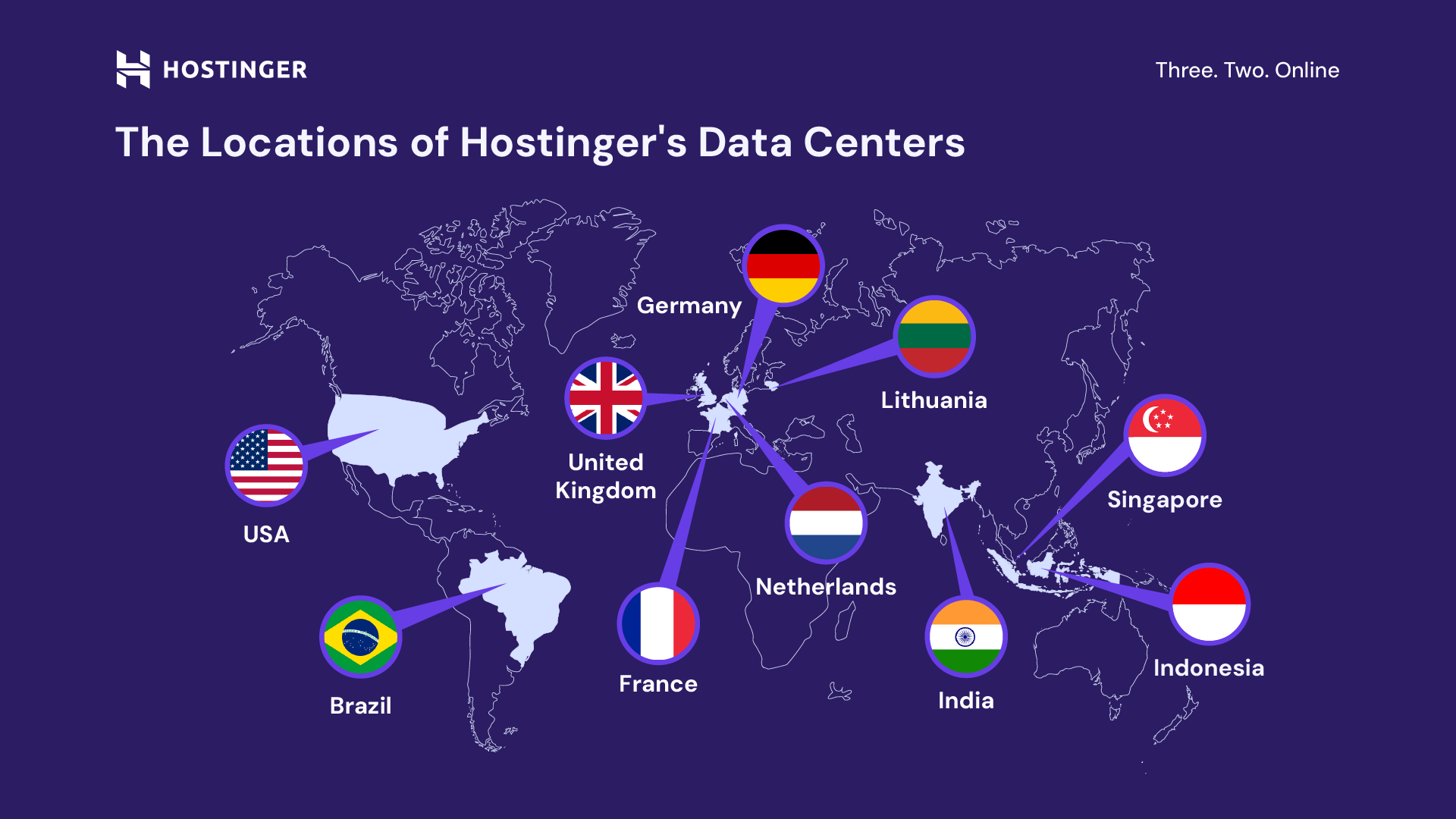
| Server Locations | Hostinger has fewer data centers compared to competitors, which might affect site speed in certain regions. |
User Feedback And Common Complaints
- Some users find the renewal prices higher than initial rates.
- Backup restore options are limited on lower-tier plans.
- Occasional downtime reported, though rare.
- Customer support is good but can be slow during peak times.
How Hostinger Addresses Its Weaknesses
Hostinger works on improving backup options by offering daily backups on premium plans. It expands server locations gradually to reduce latency worldwide.
To ease renewal concerns, Hostinger provides clear pricing details upfront. Support teams receive continuous training to speed up response times. These efforts aim to enhance user experience and reliability.
Credit: www.hostinger.com
Ideal Users And Scenarios For Hostinger Hosting
Hostinger hosting offers a variety of plans tailored to different users and needs. Its services fit many website types, from small personal blogs to growing businesses. Understanding who benefits most helps select the right plan and avoid paying for unused features.
Best For Beginners And Small Businesses
Hostinger is a top choice for beginners and small businesses. Its user-friendly control panel makes managing websites simple. Affordable pricing suits tight budgets.
- Easy setup with clear instructions
- Good performance for small to medium traffic
- 24/7 customer support to help new users
- Includes free SSL and daily backups
Small companies benefit from scalable plans that grow with their needs. Hostinger’s shared hosting offers enough resources for small business websites without complex management.
Suitable For Bloggers And Personal Websites
Bloggers and personal website owners find Hostinger practical. It provides enough storage and bandwidth for typical personal sites. The one-click WordPress installer simplifies launching blogs.
- Optimized for WordPress and other CMS
- Affordable starter plans with free domain options
- Good uptime ensures your site stays live
Hostinger supports multiple website types, making it easy to start and maintain personal projects.
When To Consider Vps Or Cloud Hosting With Hostinger
Choose VPS or cloud hosting if your site needs more power and control. These plans suit growing businesses or websites with high traffic.
| Scenario | Recommended Hosting Type | Benefits |
|---|---|---|
| High traffic websites | VPS Hosting | Dedicated resources, faster loading |
| Custom server configurations | VPS Hosting | Full root access, control |
| Scalable resource needs | Cloud Hosting | Automatic scaling, reliability |
| Running multiple applications | Cloud or VPS Hosting | Isolated environments, stable |
These options offer better performance but require more technical skills. Ideal for users ready to manage advanced hosting features.
Who Should Look For Alternative Hosting Providers
Hostinger may not fit everyone. Some users need different services or features.
- Large enterprises needing extensive custom solutions
- Websites with very high traffic requiring specialized infrastructure
- Users wanting full managed hosting with hands-off support
- Those needing advanced security compliance like HIPAA or PCI DSS
Consider other hosts if your needs exceed Hostinger’s scope or require industry-specific certifications.
Tips And Tricks For Smart Hosting Purchases With Hostinger
Buying hosting with Hostinger requires some knowledge to get the best value. Simple strategies help you save money and improve website performance. Smart purchases mean you get more features without overspending. This section shares useful tips for making the most of Hostinger’s services.
Maximizing Discounts And Promotions
Hostinger offers frequent discounts that reduce hosting costs significantly. Here are ways to maximize savings:
- Use promo codes found on the Hostinger website or trusted coupon sites.
- Buy hosting plans for longer terms to get lower monthly rates.
- Watch for seasonal sales like Black Friday or Cyber Monday.
- Combine hosting with domain registration for bundle discounts.
Plan ahead and check the Hostinger promotions page before purchase.
Upgrading And Scaling Your Hosting Plan Efficiently
Start with a hosting plan that fits your current needs. Hostinger makes upgrading easy when your website grows. Follow these tips:
- Monitor your website traffic regularly.
- Choose a plan with scalable resources like bandwidth and storage.
- Upgrade through the hPanel dashboard with a few clicks.
- Upgrade early to avoid slowdowns during high traffic periods.
Efficient upgrades prevent downtime and keep your site fast.
Leveraging Hostinger’s Tools For Website Optimization
Hostinger provides built-in tools to improve website speed and security:
- Cache Manager: Speeds up loading times by storing site data.
- Auto Installer: Easily install WordPress and other CMS.
- SSL Certificates: Protect your site and improve SEO rankings.
- Website Builder: Create pages quickly without coding.
Use these tools to keep your website optimized and secure.
Ensuring Smooth Domain And Hosting Integration
Integrate your domain and hosting smoothly to avoid technical issues. Follow these steps:
- Register your domain directly through Hostinger to simplify setup.
- Use Hostinger’s DNS management for easy domain pointing.
- Enable automatic SSL for secure connections.
- Check domain and hosting status in the hPanel dashboard regularly.
Smooth integration ensures your website goes live without delays.

Credit: www.youtube.com
Conclusion: Making The Most Of Your Hostinger Hosting Experience
Hostinger provides a solid hosting platform designed for ease and efficiency. Maximizing your experience requires understanding its key features and purchasing steps. This section breaks down Hostinger’s strengths, offers clear buying advice, and points to helpful resources.
Summary Of Hostinger’s Strengths And Purchase Guide
Hostinger stands out for its fast performance and user-friendly interface. It offers a variety of plans suitable for beginners and professionals alike.
- Speed: Optimized servers ensure quick loading times.
- Affordability: Competitive pricing with frequent discounts.
- Ease of Use: hPanel simplifies management tasks.
- Support: 24/7 live chat and knowledge base.
To buy hosting from Hostinger:
- Visit hostinger.com.
- Choose a hosting plan that fits your website needs.
- Create an account or log in if you already have one.
- Complete the payment process using secure options.
- Access hPanel to start setting up your website.
Final Recommendations For New And Existing Users
New users should start with shared hosting plans. They are budget-friendly and easy to manage.
Existing users can upgrade or add plans via the Marketplace section in hPanel. This keeps all services centralized and easy to control.
- Review your website requirements before choosing a plan.
- Use the 30-day money-back guarantee to test services risk-free.
- Keep your login details secure to manage your hosting smoothly.
- Regularly update your website and backups for safety.
Resources For Continued Learning And Support
Hostinger offers many tools to help users grow their websites. These include tutorials, guides, and a knowledge base.
- Hostinger Tutorials: Step-by-step instructions on hosting and website management.
- Help Center: Answers to common questions and troubleshooting tips.
- Live Chat Support: Expert assistance available 24/7.
- Community Forums: Share ideas and solutions with other users.
Use these resources to improve your skills and solve issues quickly.
Frequently Asked Questions
What Is The First Step To Buy Hosting On Hostinger?
The first step is to visit Hostinger’s website and explore hosting plans. Choose a plan that fits your website needs and budget before proceeding.
How Do I Choose The Right Hostinger Hosting Plan?
Consider your website type, traffic, and technical needs. Hostinger offers shared, VPS, and cloud hosting to match different requirements.
Can I Buy Domain And Hosting Together On Hostinger?
Yes, Hostinger allows you to purchase a domain and hosting package together. This simplifies setup and often includes discounts.
How Secure Is Hosting With Hostinger?
Hostinger provides secure hosting with SSL certificates, daily backups, and protection against cyber threats to keep your site safe.
Conclusion
Choosing Hostinger for your hosting needs is simple and efficient. Their plans fit different website types and budgets. You get fast, secure hosting with easy setup steps. Visit this link to start your journey: Hostinger Buy Hosting Guide. Make your website reliable and ready for visitors today.