

Are you struggling to choose the best tool to build your WordPress site quickly and beautifully? If you want a website that stands out without spending hours on design, you’re probably looking at Nexter and Elementor.
Both promise powerful features, but which one truly fits your needs? Whether you’re a beginner or a seasoned creator, understanding their differences can save you time and frustration. Ready to discover which builder will make your website shine? Let’s dive into the Nexter Vs Elementor showdown and find the perfect match for your next project. Check out Nexter here for a fast, all-in-one WordPress toolkit packed with 90+ blocks, templates, and extensions: Nexter.
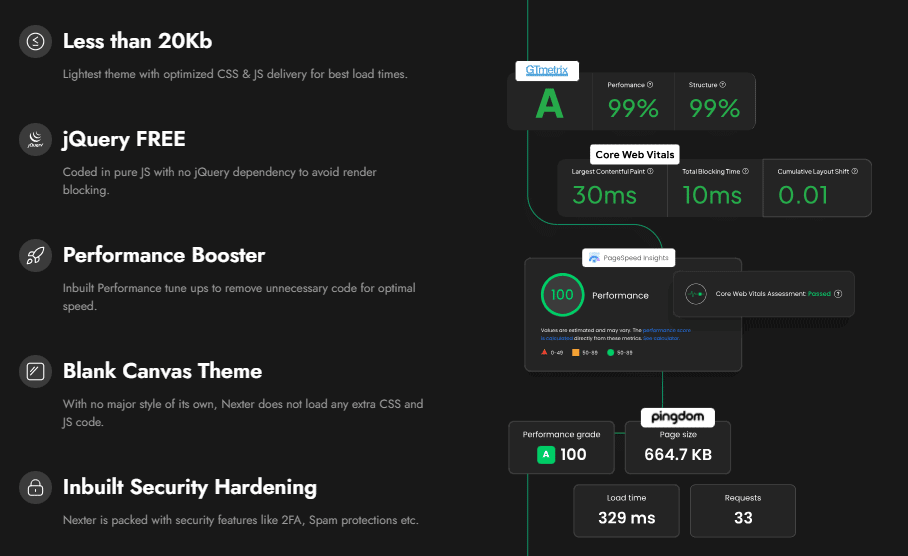
Credit: nexterwp.com
Introduction To Nexter And Elementor
Choosing the right website builder is key to creating a strong online presence. Nexter and Elementor stand out as popular tools for building WordPress websites. Both offer unique features to help users design and launch sites quickly and efficiently. Understanding their strengths and differences helps users pick the best fit for their needs.
Overview Of Nexter As A Website Builder
Nexter is an all-in-one WordPress toolkit designed to help users build stunning websites fast. It includes over 90 blocks, templates, and extensions that simplify the website creation process. Nexter focuses on speed and ease, making it ideal for users who want to launch sites quickly without coding skills.
- Offers a wide range of pre-built blocks and templates
- Includes powerful extensions to enhance site functionality
- Designed for fast website launches
- Focuses on simplicity and user-friendly tools
Overview Of Elementor As A Website Builder
Elementor is one of the most popular WordPress page builders. It provides a drag-and-drop interface for designing custom layouts without coding. Elementor comes with many widgets, templates, and design options to create professional websites.
- Drag-and-drop visual editor
- Large library of widgets and templates
- Advanced design controls and integrations
- Supports responsive design and custom CSS
Purpose And Importance Of Comparing These Tools
Comparing Nexter and Elementor helps users find the right tool for their website goals. Each builder suits different needs and skill levels. Nexter is great for quick launches with ready-made blocks. Elementor offers more design freedom and advanced customization.
Understanding their differences helps users:
- Choose a builder that matches their skill set
- Save time and effort in website creation
- Ensure the website meets design and functionality needs
- Make an informed investment in website tools
Key Features Of Nexter And Their Benefits
Nexter offers a powerful set of tools designed to build stunning WordPress websites quickly. It combines ease of use with rich functionality, helping users create professional sites without coding. The toolkit includes over 90 blocks, templates, and extensions to enhance your design workflow.
User-friendly Drag-and-drop Interface For Effortless Design
Nexter’s drag-and-drop editor lets you design pages visually. No coding skills are needed. Simply pick elements and place them where you want.
- Intuitive controls speed up site creation
- Instantly see changes in real-time
- Customize layouts easily with simple clicks
This interface reduces design frustration and saves time, making website creation accessible to all.
Pre-built Templates And Customization Options To Speed Up Development
Nexter includes 90+ ready-made templates covering various styles and industries. These templates act as starting points for your site.
- Wide selection fits different business needs
- Templates are fully editable to match your brand
- Customize fonts, colors, and layouts easily
Templates help launch websites faster by reducing design from scratch. They ensure a professional look from the beginning.
Integrated Seo Tools To Boost Website Visibility
Nexter incorporates SEO features directly into the builder. This helps improve your site’s ranking on search engines.
- Optimize titles and meta descriptions easily
- Control URL structure and image alt tags
- Built-in tools guide SEO best practices
These tools increase your site’s chances of being found by users, driving more traffic without extra plugins.
Responsive Design Capabilities For Mobile Optimization
Nexter ensures websites look great on all devices. It automatically adjusts layouts for mobile, tablet, and desktop screens.
- Mobile-friendly design improves user experience
- Customize breakpoints to fit your needs
- Preview responsiveness directly in the editor
Responsive design helps retain visitors and supports SEO rankings by providing a seamless experience on any device.
Key Features Of Elementor And Their Benefits
Elementor stands out as a powerful WordPress page builder. It offers tools that simplify website design and enhance user experience. Its features empower users to create professional sites without coding. Each feature adds value, saving time and boosting creativity.
Advanced Visual Editor With Real-time Editing
Elementor’s editor shows changes instantly on the page. This real-time editing helps users see their work as it happens. Drag-and-drop functionality allows easy placement of elements.
- Instant feedback: See updates live, no refreshing needed.
- User-friendly: Simple to use, even for beginners.
- Precise design: Adjust spacing, colors, and fonts visually.
Extensive Widget Library For Diverse Functionalities
Elementor offers over 90 widgets to add different functions to any page. These widgets cover forms, buttons, sliders, icons, and more.
- Variety: Widgets for images, videos, social media, and navigation.
- Customization: Each widget can be styled to fit the site’s look.
- Functionality: Add interactive elements without extra plugins.
Theme Builder For Complete Design Control
The Theme Builder allows editing all parts of a WordPress site. Users can design headers, footers, archive pages, and single posts with ease.
| Feature | Benefit |
|---|---|
| Global Design | Apply consistent styles site-wide |
| Custom Templates | Create unique layouts for different pages |
| Dynamic Content | Show content that changes based on user or page |
Third-party Plugin Compatibility To Extend Features
Elementor works well with many WordPress plugins. This compatibility adds extra tools and functions to sites.
- Flexibility: Enhance sites with SEO, e-commerce, and marketing plugins.
- Integration: Connect with popular plugins like WooCommerce and Yoast SEO.
- Expandability: Add new features without changing the core design.
Pricing And Affordability Comparison
Choosing the right website builder depends a lot on price and value. Both Nexter and Elementor offer plans aimed at different users and budgets. Understanding their pricing structures helps find the best fit for your needs. This section breaks down their costs and what you get for your money.
Nexter’s Pricing Plans And Value For Money
Nexter offers a straightforward pricing model with a focus on speed and ease. It provides an all-in-one WordPress toolkit with over 90 blocks, templates, and extensions included.
| Plan | Price | Key Features |
|---|---|---|
| Single License | One-time fee (varies on platform) | Access to all blocks, templates, extensions; use on one site |
| Multi-Site License | Higher one-time fee | Use on multiple websites; full toolkit access |
Nexter focuses on value with a one-time payment option. This suits users wanting no recurring fees. Its extensive design elements reduce need for extra plugins or add-ons.
Elementor’s Pricing Tiers And What They Include
Elementor uses a subscription model with multiple tiers. Each tier unlocks more advanced features and support for more sites.
| Plan | Annual Cost | Site Usage | Main Features |
|---|---|---|---|
| Essential | $59 | 1 site | Basic widgets, templates, support |
| Expert | $99 | 25 sites | Advanced widgets, theme builder, WooCommerce tools |
| Studio | $199 | 100 sites | Team features, live chat support, full kit |
| Agency | $399 | 1000 sites | Full enterprise features, VIP support |
Cost Efficiency Based On User Needs And Business Size
- Small users and hobbyists: Nexter’s one-time payment is cheaper long-term.
- Freelancers and agencies: Elementor’s multi-site plans offer flexibility and ongoing support.
- Businesses needing advanced design: Elementor’s higher tiers provide powerful tools and integrations.
- Users wanting simple, fast site building: Nexter’s toolkit covers most needs without extra costs.
Choosing depends on project scale, budget, and preference for payment style. Nexter suits those wanting a simple, cost-effective package. Elementor fits those needing ongoing updates, support, and more advanced features.
Pros And Cons Based On Real-world Usage
Choosing the right WordPress builder impacts your website’s design and speed. Nexter and Elementor both offer powerful tools, but their strengths and weaknesses differ in practical use. Below is a clear look at what users experience daily with each platform.
Strengths Of Nexter In Practical Scenarios
- Fast Website Building: Nexter lets users create sites quickly using over 90 blocks, templates, and extensions.
- All-in-One Toolkit: It combines multiple features in one place, reducing the need for extra plugins.
- User-Friendly Interface: Beginners find it easy to navigate and design without coding skills.
- Pre-Designed Templates: Ready-made designs speed up the launch process.
- Lightweight and Efficient: Nexter’s blocks are optimized to keep websites fast and responsive.
Limitations Of Nexter Users Should Consider
- Smaller Community: Fewer users mean less third-party support and tutorials.
- Limited Advanced Customization: Power users may find fewer options for deep design tweaks.
- Newer Product: Updates and new features are still rolling out, so some tools may lack polish.
- Compatibility Issues: Certain themes or plugins might not integrate smoothly yet.
Strengths Of Elementor In Real-world Applications
- Extensive Plugin Ecosystem: Many add-ons expand Elementor’s core features.
- Highly Customizable: Advanced users can create unique designs with detailed control.
- Strong Community Support: Large user base provides plenty of tutorials and help.
- Drag-and-Drop Editor: Simple editing with instant visual feedback.
- Wide Theme Compatibility: Works well with most WordPress themes and plugins.
Challenges Users Might Face With Elementor
- Slower Load Times: Heavy use of widgets can slow down website speed.
- Steeper Learning Curve: Beginners may struggle with the many customization options.
- Higher Cost for Pro Features: Some advanced tools require paid plans.
- Potential Plugin Conflicts: Integrations sometimes cause errors or crashes.
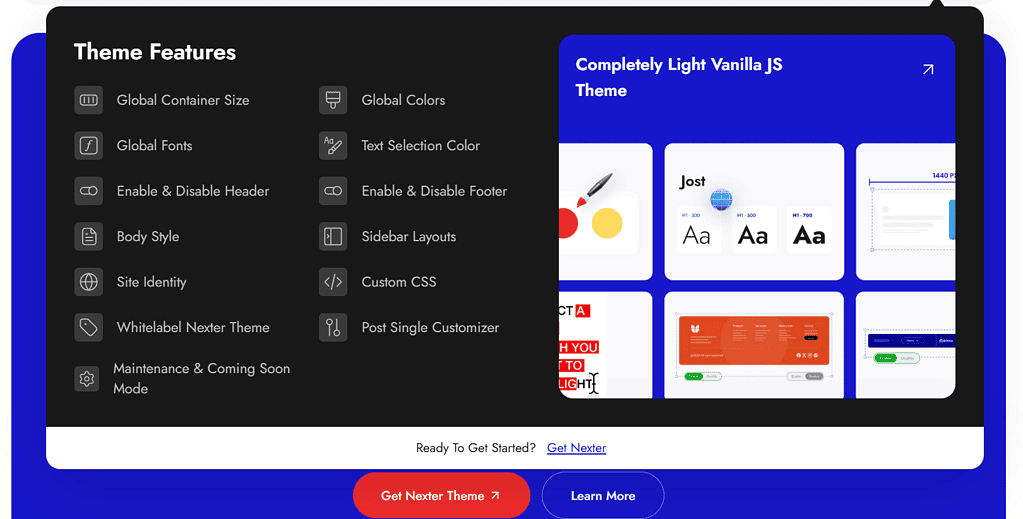
Credit: nexterwp.com
Ideal Users And Use Cases For Nexter
Nexter is designed for users who want to build WordPress websites quickly and easily. It suits people with limited time or coding skills. The toolkit offers over 90 blocks, templates, and extensions that speed up the website creation process.
The platform fits various needs, from small business owners to freelancers and creatives. Its features also help users who want built-in SEO and mobile-friendly designs without extra plugins.
Small Business Owners Seeking Quick Website Setup
Small business owners benefit from Nexter’s fast setup and ready-made templates. It lets them launch professional websites without hiring developers.
- Pre-built templates save design time
- Drag-and-drop blocks simplify page creation
- All-in-one toolkit reduces the need for multiple plugins
- Fast site launch helps start online presence quickly
Freelancers And Creatives Needing Simple Customization
Freelancers and creatives enjoy Nexter’s flexible design blocks and easy customization. It allows crafting unique websites with minimal effort.
- 90+ customizable blocks to match different styles
- Extensions add extra features without coding
- User-friendly interface saves time on edits
- Supports portfolio, blog, and service pages
Users Prioritizing Built-in Seo And Mobile Responsiveness
Nexter includes built-in SEO tools and mobile-friendly design. This helps users improve site visibility and user experience on all devices.
| Feature | Benefit |
|---|---|
| SEO-optimized templates | Boost search engine rankings easily |
| Responsive blocks | Ensure websites look good on phones and tablets |
| Fast loading times | Improve user engagement and reduce bounce rates |
Ideal Users And Use Cases For Elementor
Elementor suits a wide range of users who need powerful tools for website building. Its flexibility supports both simple and complex projects. The platform stands out for its advanced design options and plugin support. This makes it a top choice for various professionals and businesses.
Designers And Developers Requiring Advanced Customization
Elementor offers deep customization features. Designers can craft unique layouts with drag-and-drop ease. Developers benefit from access to custom code and APIs. This allows tailored solutions beyond basic templates.
- Custom CSS and JavaScript integration
- Widget creation and third-party add-ons
- Theme builder for full site design control
The platform supports detailed design tweaks. It fits users who want total control over site appearance and functionality.
Businesses Needing Complex Layouts And Integrations
Businesses with complex needs find Elementor valuable. It supports multi-page layouts and dynamic content. Integration with popular marketing and e-commerce tools simplifies workflows.
| Feature | Benefit |
|---|---|
| WooCommerce support | Build online stores with custom product pages |
| Marketing integrations | Connect forms, email services, and CRM tools |
| Responsive design controls | Ensure layouts work on all devices |
These features help businesses create professional sites that match their brand and goals.
Users Who Benefit From Extensive Plugin Ecosystem
Elementor has a large plugin ecosystem. Users can expand site functionality through numerous add-ons. This ecosystem covers:
- Advanced form builders
- SEO and performance tools
- Custom widgets and templates
Many plugins enhance design and speed up development. This flexibility suits users wanting to extend their site’s features easily.
Conclusion: Choosing Between Nexter And Elementor
Deciding between Nexter and Elementor depends on what you need for your WordPress site. Both tools help build websites fast but have different strengths. Understanding these differences helps pick the right one for your project.
Summary Of Key Differences And Strengths
| Feature | Nexter | Elementor |
|---|---|---|
| Ease of Use | Simple, drag-and-drop with 90+ blocks and templates | User-friendly with visual editor and live preview |
| Design Options | Includes many ready-made templates and extensions | Highly customizable with many widgets and themes |
| Speed | Optimized for fast site launches | Can be slower with many plugins or complex designs |
| Pricing | One-time purchase via AppSumo | Subscription-based pricing model |
| Target User | Beginners and small businesses wanting quick setups | Designers and developers needing advanced control |
Recommendations Based On Specific User Needs
- For beginners: Nexter offers an easy start with ready blocks and templates.
- For quick launches: Nexter’s toolkit speeds up site building.
- For advanced design: Elementor gives more customization options.
- For developers: Elementor supports custom code and advanced features.
- For budget-conscious users: Nexter’s one-time fee may be more affordable.
- For frequent updates: Elementor’s subscription ensures regular new features.
Final Thoughts On Making The Best Choice
Choose Nexter if you want a straightforward tool to build sites fast. Its many blocks and templates make design simple and quick.
Choose Elementor if you need more design freedom and advanced features. Its visual editor suits creative users and professionals.
Both tools work well with WordPress. Your choice depends on your skill level, budget, and design needs.
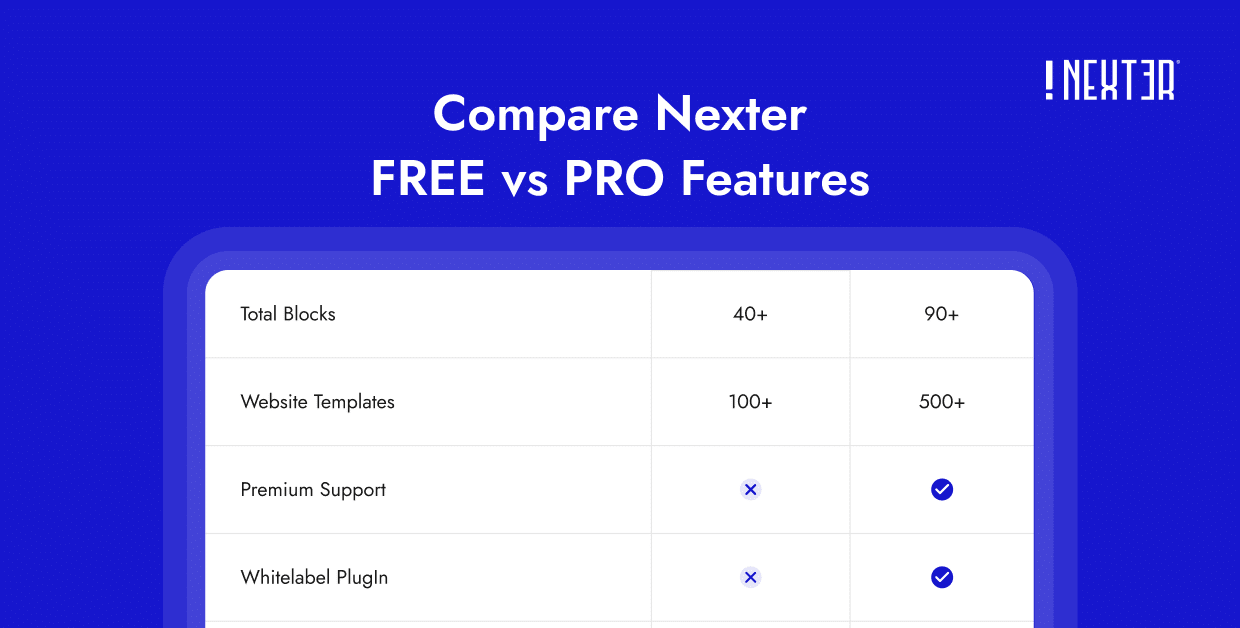
Credit: nexterwp.com
Frequently Asked Questions
What Are The Main Differences Between Nexter And Elementor?
Nexter is a lightweight page builder focused on speed. Elementor offers extensive design features and templates. Nexter suits simple projects, while Elementor fits complex, customizable websites.
Is Nexter Better Than Elementor For Beginners?
Nexter has a simpler interface ideal for beginners. Elementor provides more tools but may require a learning curve. Beginners benefit from Nexter’s ease and Elementor’s flexibility.
Can Nexter And Elementor Be Used Together?
Generally, using both together is not recommended. They may cause conflicts or slow website speed. Choose one builder based on your project needs for optimal performance.
Which Builder Offers More Design Customization Options?
Elementor offers a wider range of design elements and templates. Nexter focuses on essential features with fewer customization options. Elementor is best for advanced design control.
Conclusion
Choosing between Nexter and Elementor depends on your site needs. Nexter offers 90+ blocks, templates, and extensions to build fast. Elementor is popular but can feel complex for beginners. Nexter’s all-in-one toolkit simplifies website creation for WordPress users. Want to try Nexter? Explore its features here: Nexter. Both tools help create good websites, but Nexter stands out for ease and speed. Pick the one that suits your skill and project best.






