Choosing the right hosting plan can feel overwhelming, especially with so many options out there. But what if you could find a plan that fits your needs perfectly without breaking the bank?
That’s exactly what you’ll discover when comparing Hostinger plans. Whether you’re starting a personal blog, launching an online store, or growing your business website, knowing the differences between Hostinger’s Basic, Premium, Business, and Cloud plans will help you make the smartest choice. Ready to find the plan that gives you the best speed, features, and value? Dive into this detailed Hostinger Plans Comparison and see which option is tailored just for you. Start exploring Hostinger’s plans now and grab the best deal here: Hostinger Plans.
Credit: www.hostinger.com
Introduction To Hostinger And Its Hosting Plans
Hostinger is a well-known web hosting provider. It offers a variety of hosting plans designed for different website needs. This section introduces Hostinger and explains its hosting options.
Overview Of Hostinger As A Hosting Provider
Hostinger is popular for its affordable pricing and user-friendly interface. It uses a custom control panel called hPanel, which is easy to navigate. Hostinger supports fast loading speeds through modern SSD storage. It also includes free SSL certificates on many plans, adding security for websites.
Hostinger serves millions of users worldwide. It offers:
- Shared Hosting
- Cloud Hosting
- WordPress Hosting
- VPS Hosting
Each hosting type has multiple plans to fit different budgets and requirements.
Purpose And Scope Of Hostinger Plans Comparison
This guide compares Hostinger’s key plans to help choose the best one. It covers:
- Plan features
- Performance differences
- Pricing details
- Ideal use cases
Comparison focuses on plans such as Premium Shared, Business Shared, and Cloud Hosting. It highlights strengths and limitations of each plan.
Target Audience For This Guide
This guide helps beginners and small business owners. It suits people who want clear, simple information about hosting plans. Also useful for bloggers and developers seeking cost-effective options.
The content is written in easy English. It avoids technical jargon. Readers will find it simple to understand and act on.
Key Features Of Hostinger Plans And Their Benefits
Hostinger offers several plans designed to fit various website needs. Each plan comes with key features that improve website speed, security, and ease of use. These features help beginners and experts build and manage websites efficiently. Below is a detailed look at these features and how they benefit users.
Litespeed Servers: Enhancing Website Speed And Performance
Hostinger uses LiteSpeed servers to boost website speed. LiteSpeed technology handles more visitors with less delay. This means pages load faster, improving user experience and search engine rankings.
- Supports HTTP/3 for faster connections
- Reduces server load during high traffic
- Improves response time and page loading speed
Faster websites keep visitors engaged and lower bounce rates.
Hpanel Control Panel: User-friendly Interface For Beginners
Hostinger’s hPanel is simple and clean. It helps beginners manage their websites without confusion. Tasks like setting up email, installing WordPress, and managing domains are easy.
- Intuitive dashboard with clear navigation
- One-click WordPress installation
- Easy file and database management
Users save time and avoid technical hassles using hPanel.
Free Ssl And Domain Inclusions: Securing And Branding Your Site
All Hostinger plans include free SSL certificates. SSL encrypts data, protecting visitor information. Some plans also offer a free domain name for the first year, helping establish your brand online.
| Feature | Benefit |
|---|---|
| Free SSL Certificate | Secures site with HTTPS, builds trust |
| Free Domain (select plans) | Easy website branding and recognition |
Email Hosting Features: Managing Communication Efficiently
Hostinger plans include email hosting with professional features. Manage your business or personal emails from the control panel. Features include:
- Spam and virus protection
- Webmail access from any device
- Easy email setup with custom domains
Professional emails improve communication and business image.
Backup And Security Options: Protecting Your Data
Data safety is a priority with Hostinger. Plans come with automated backups and security tools to protect your site. This includes:
- Daily or weekly backups (depending on plan)
- Firewall and DDoS protection
- Malware scanning and removal
These features reduce risk of data loss or attacks.
WordPress Optimization: Tailored Solutions For WordPress Users
Hostinger offers WordPress-optimized plans for smoother site operation. These plans include:
- Pre-installed WordPress setup
- Enhanced caching for faster page loads
- Automatic updates for security and performance
WordPress users get a faster, safer, and easier website experience.
Detailed Breakdown Of Hostinger Plans
Hostinger offers a range of hosting plans designed to meet different website needs. Each plan varies in performance, features, and pricing. This section explains the key features of Hostinger’s main plans. Understanding these details helps choose the best plan for your website.
Premium Shared Hosting: Balance Of Performance And Affordability
The Premium Shared Hosting plan is ideal for small to medium websites. It delivers solid speed and uptime while keeping costs low.
- Suitable for: Personal blogs, portfolios, and small business sites
- Storage: Around 100 GB SSD storage
- Bandwidth: Unlimited bandwidth for smooth traffic handling
- Domains: Host up to 100 websites
- SSL: Free SSL certificate included
- Emails: 100 email accounts
- Performance: LiteSpeed caching for faster loading
This plan balances cost and performance well. It suits users who want growth potential without high expenses.
Business Shared Hosting: Advanced Features For Growing Websites
Business Shared Hosting targets websites that need more power and tools. It builds on Premium features with extras for business use.
- Storage: 200 GB SSD storage
- Bandwidth: Unlimited bandwidth
- Domains: Host unlimited websites
- Emails: Unlimited email accounts
- SSL: Free SSL and daily backups
- Performance: Enhanced CPU and RAM for faster processing
- Support: Priority support for quick help
This plan suits growing websites needing better speed, security, and support.
Cloud Hosting Plans: Scalability And Enhanced Resources
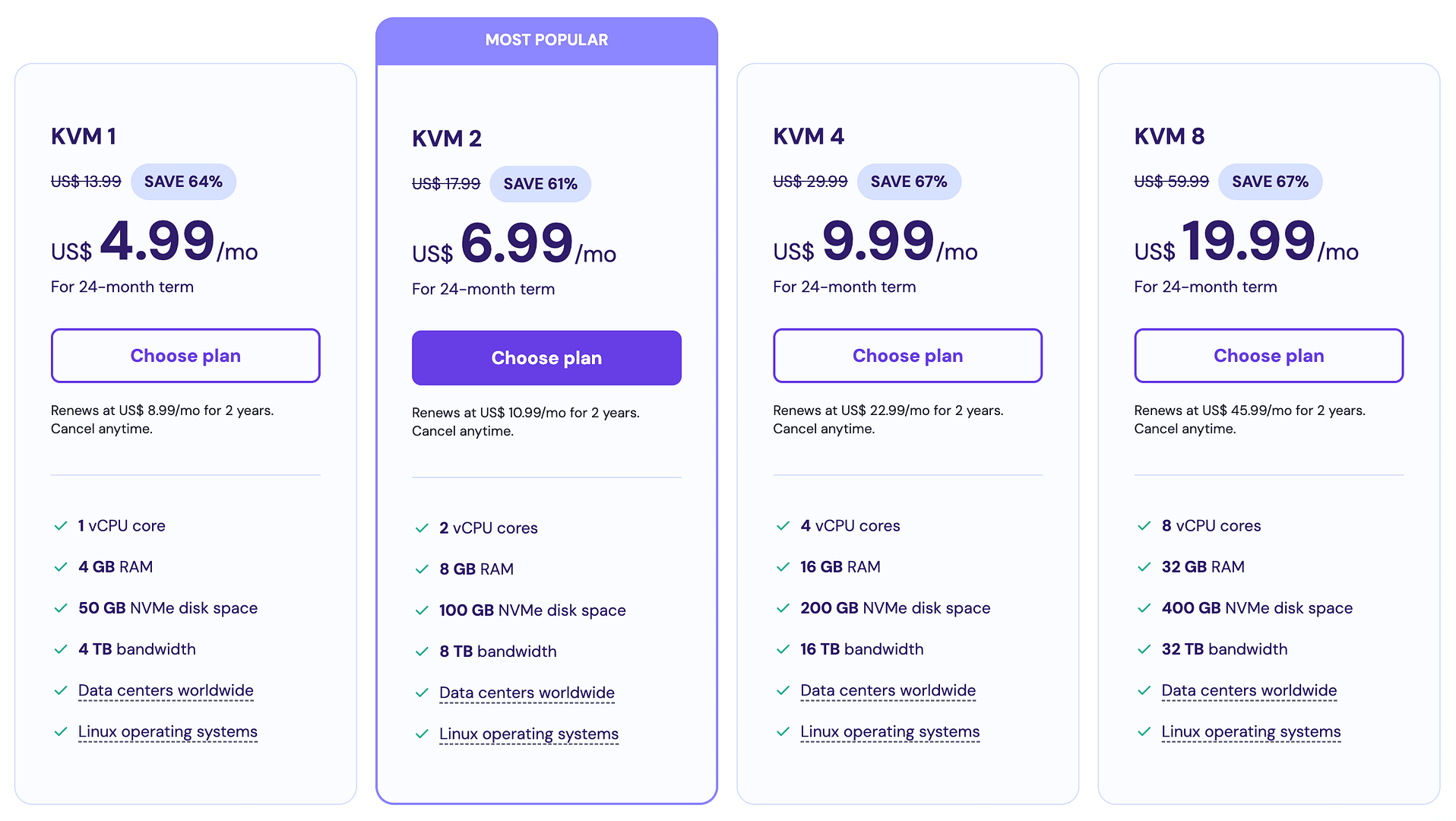
Cloud Hosting offers scalable resources and higher reliability. It uses cloud servers instead of shared servers.
- Storage: Starts at 200 GB SSD storage
- Bandwidth: 3 TB bandwidth
- Domains: Unlimited websites
- Emails: Unlimited email accounts
- SSL: Free SSL certificate
- Performance: Dedicated CPU cores and RAM
- Backup: Daily and weekly backups included
- Support: Priority support and advanced security
Cloud Hosting suits websites with high traffic or resource needs. It offers more control and power than shared plans.
Comparing Storage, Bandwidth, And Other Resources Across Plans
| Feature | Premium Shared Hosting | Business Shared Hosting | Cloud Hosting |
|---|---|---|---|
| Storage | 100 GB SSD | 200 GB SSD | 200 GB SSD (scalable) |
| Bandwidth | Unlimited | Unlimited | 3 TB |
| Number of Websites | Up to 100 | Unlimited | Unlimited |
| Email Accounts | 100 | Unlimited | Unlimited |
| SSL Certificate | Free | Free + Daily Backups | Free + Daily & Weekly Backups |
| CPU & RAM | Shared resources | Higher limits | Dedicated cores & RAM |
| Support | Standard | Priority | Priority + Advanced |
This comparison highlights how Hostinger plans scale in resources and features. Choose based on website size, traffic, and technical needs.
Pricing And Affordability Analysis
Hostinger offers a range of plans suited for different user needs. Understanding their pricing and value is key to choosing the right hosting option. This section breaks down the pricing structure, compares it with competitors, and highlights potential extra costs.
Introductory Pricing Vs Renewal Costs: What To Expect
Hostinger’s initial prices are very competitive, especially for new customers. The introductory rates are often significantly lower than renewal fees. For example, the Single Shared Hosting plan starts at a low monthly price but renews at a higher rate after the first term.
This pricing model encourages long-term commitments to lock in lower rates. Renewal costs can be up to two or three times the introductory price. Users should plan for these increases to avoid surprises.
| Plan | Introductory Price (Monthly) | Renewal Price (Monthly) |
|---|---|---|
| Single Shared Hosting | $1.99 | $3.99 |
| Premium Shared Hosting | $2.99 | $6.99 |
| Business Shared Hosting | $4.99 | $9.99 |
Value For Money: Features Included In Each Price Tier
Each Hostinger plan includes different features that add value beyond the price. The higher the tier, the more benefits you get. Here is a quick breakdown:
- Single Shared Hosting: 1 website, 30 GB SSD storage, free SSL, and 100 GB bandwidth.
- Premium Shared Hosting: Unlimited websites, 100 GB SSD storage, free SSL, free domain (1 year), and weekly backups.
- Business Shared Hosting: All Premium features plus daily backups, more processing power, and priority support.
The inclusion of a free SSL certificate and domain with Premium and Business plans adds significant value. The Business plan suits small businesses needing better performance and support.
Comparing Hostinger Pricing With Competitors Like Godaddy
Hostinger generally offers lower prices than GoDaddy, especially for first-time customers. GoDaddy’s plans often have higher renewal costs and fewer included features.
| Provider | Starting Price (Monthly) | Renewal Price (Monthly) | Free SSL Included | Free Domain |
|---|---|---|---|---|
| Hostinger | $1.99 | $3.99 – $9.99 | Yes | Yes (on Premium+) |
| GoDaddy | $5.99 | $8.99 – $14.99 | No (except some plans) | No |
Hostinger’s user-friendly interface and faster servers provide extra value. GoDaddy offers strong brand recognition and phone support but costs more overall.
Hidden Costs And Upselling: What Users Should Watch For
Hostinger keeps upselling to a minimum but users should watch for these potential extra costs:
- Domain renewals: Free for the first year only on certain plans.
- Backups: Daily backups come only with Business plans; others pay for backups.
- Premium support: Available with higher plans; basic support is standard.
- Extra services: Email accounts, SEO tools, and security add-ons can increase costs.
Overall, Hostinger’s pricing remains transparent, with fewer hidden fees than many competitors.
Pros And Cons Of Hostinger Based On Real-world Usage
Hostinger offers a variety of plans tailored for different hosting needs. Real users share mixed experiences, highlighting both strengths and weaknesses. Understanding these helps in choosing the right plan for your website.
Advantages: Speed, Cost-effectiveness, And User Experience
Speed is a key strength of Hostinger. Most plans use modern SSD storage, ensuring fast loading times. This benefits websites aiming for better performance and user retention.
Cost-effectiveness stands out. Hostinger provides competitive pricing, especially for beginners and budget-conscious users. Plans include free SSL certificates and a user-friendly control panel (hPanel), adding value without extra fees.
User experience is smooth with easy setup and intuitive interfaces. Beginners appreciate the simple website builder and one-click WordPress installation. This makes launching a site quick and hassle-free.
Disadvantages: Support Limitations And Feature Gaps
Hostinger’s support system relies heavily on AI chatbots. Users report difficulty reaching live human support quickly. This can frustrate users who need immediate help.
Some feature gaps appear in entry-level plans. These include the absence of a Content Delivery Network (CDN), ecommerce tools, and advanced AI features. Also, initial plans sometimes use older SSD generations, which may impact speed slightly.
Impact Of Plan Limitations On Different User Needs
| User Type | Plan Limitations Impact | Recommendation |
|---|---|---|
| Beginners | Entry plans offer basic tools; suitable for small sites or blogs. | Start with Premium plan for balanced features and cost. |
| Small Businesses | Lack of ecommerce support in low-tier plans may restrict growth. | Business or Cloud plans recommended for ecommerce and scalability. |
| Advanced Users | Missing advanced tools and CDN can limit site optimization. | Choose higher-tier plans with enhanced features and performance. |
User Feedback And Common Complaints
- Support delays and difficulty reaching live agents cause frustration.
- Entry plans lack some important features like CDN and ecommerce tools.
- Renewal prices can increase, catching some users by surprise.
- Some users report occasional downtime, though generally uptime is good.
- Positive feedback often highlights fast loading speeds and easy setup.
Who Should Choose Which Hostinger Plan?
Choosing the right Hostinger plan depends on your website needs, budget, and expected traffic. Hostinger offers different hosting options, each suited for specific users and goals. Understanding who benefits most from each plan helps make a smart choice.
Ideal Users For Premium Shared Hosting
Premium Shared Hosting fits users who want solid performance without high costs. It suits:
- Personal blogs and small portfolios
- New websites with moderate traffic
- Users needing multiple websites on one account
This plan offers faster speeds than basic shared hosting and includes free SSL. It is perfect for beginners and small projects.
Best Scenarios For Business Hosting Plans
Business Hosting targets users with growing websites needing more power and security. Choose this if you:
- Run small to medium online stores
- Need daily backups and higher uptime
- Require advanced caching for faster loading
- Expect medium to high traffic volumes
The Business plan supports ecommerce features and offers better CPU and RAM for stable performance.
When To Opt For Cloud Hosting Solutions
Cloud Hosting is ideal for websites with fluctuating or heavy traffic. Opt for this plan if your website:
- Needs dedicated resources for speed and reliability
- Hosts multiple high-traffic sites or apps
- Requires scalable resources during traffic spikes
- Demands advanced security and faster load times
Cloud Hosting delivers better uptime and flexibility, supporting business growth efficiently.
Recommendations Based On Website Type And Traffic
| Website Type | Traffic Level | Recommended Hostinger Plan |
|---|---|---|
| Personal Blog or Portfolio | Low to Moderate | Premium Shared Hosting |
| Small Business or Online Store | Moderate to High | Business Hosting |
| Large E-commerce or Enterprise Site | High to Very High | Cloud Hosting |
| Multiple Websites with Medium Traffic | Moderate | Business or Cloud Hosting |
Choosing the right plan depends on your site’s needs and expected visitors. Premium Shared suits small sites. Business Hosting works well for growing stores. Cloud Hosting fits sites needing more power and uptime.
Conclusion: Making The Best Choice With Hostinger Plans
Choosing the right Hostinger plan means balancing cost and features. Each plan targets different needs, from beginners to growing businesses. Understanding what each plan offers helps you pick the best fit. This section breaks down key points, compares affordability and features, and shares tips for your decision.
Summary Of Key Takeaways
- Single Shared Hosting suits beginners with basic websites and tight budgets.
- Premium Shared Hosting offers better speed and more resources for growing sites.
- Business Shared Hosting includes advanced features like daily backups and improved performance.
- Cloud Hosting is ideal for high-traffic sites needing scalability and reliability.
- All plans include free SSL, easy-to-use control panel, and 24/7 support.
- Entry-level plans lack some features like CDN and ecommerce tools.
Final Thoughts On Affordability Vs Features
Budget plans provide essential tools but limit performance and extras.
Higher-tier plans cost more but add speed, backups, and business features.
Decide if you need extra speed, security, or ecommerce support before upgrading.
Remember, paying slightly more can save time and prevent future issues.
Tips For Selecting The Right Hosting Plan For Your Needs
- Assess your website type: Simple blogs need basic plans; online stores need business or cloud plans.
- Estimate traffic volume: Higher traffic requires better resources and faster servers.
- Check feature requirements: Look for backups, SSL, email accounts, and ecommerce tools.
- Consider growth potential: Choose plans that allow easy upgrades as your site grows.
- Test customer support: Responsive support matters, especially if you are new to hosting.
Credit: themeisle.com

Credit: www.youtube.com
Frequently Asked Questions
What Is The Disadvantage Of Hostinger?
Hostinger’s disadvantages include limited phone support, entry-level plans lacking CDN and ecommerce features, and older-generation SSD storage. Reaching human support can be difficult due to AI chatbot barriers.
Is Godaddy Or Hostinger Better?
Hostinger offers better value, speed, and free SSL with lower prices and a user-friendly panel. GoDaddy provides strong brand trust, phone support, and PCI compliance but costs more with upsells. Choose Hostinger for affordability and performance; pick GoDaddy for support and established reputation.
Which Is Cheaper, Hostinger Or Bluehost?
Hostinger is generally cheaper than Bluehost, offering lower introductory prices and better long-term value. Hostinger includes free SSL and domain, enhancing affordability. Bluehost’s renewal rates tend to be higher, making Hostinger the budget-friendly choice for most users.
Is Hostinger’s Single Plan Worth It?
Hostinger’s Single plan offers excellent value with fast speed, free SSL, and beginner-friendly tools. It suits small websites but lacks advanced features. Ideal for budget-conscious users needing reliable basic hosting with good performance.
Conclusion
Choosing the right Hostinger plan depends on your website needs. Basic plans suit small sites and beginners well. Premium and Business plans offer more speed and features for growing sites. Cloud hosting fits those needing extra power and reliability. Each plan provides value with easy setup and strong performance. Explore options carefully to find your best fit. Start your hosting journey with Hostinger here: Hostinger Basic Plan.