Are you looking to boost your website’s performance or fix compatibility issues? Changing your PHP version on Hostinger might be the key.
But if you’re unsure how to do it without breaking your site, you’re in the right place. This Hostinger PHP Version Change Guide will walk you through each step clearly and quickly, so you can update your PHP version with confidence. Whether you want faster load times or need the latest features, this guide has got you covered. Ready to take control of your hosting environment? Let’s dive in and make your website run smoother today! If you haven’t chosen a reliable host yet, check out Hostinger — an affordable and user-friendly hosting service that makes managing PHP versions easy. You can get started here: Hostinger Hosting Plans.
Credit: www.hostinger.com
Introduction To Hostinger Php Version Change
Changing the PHP version in Hostinger is a key task for website owners. It helps keep your site fast, secure, and compatible with new features. Many users do not realize how important it is to update PHP regularly. This guide introduces you to the essentials of PHP and explains why updating it matters. It also describes Hostinger’s hosting setup and how it supports different PHP versions.
Understanding Php And Its Importance In Web Hosting
PHP is a programming language used to build dynamic websites. Most websites use PHP to run scripts, manage databases, and create interactive content.
Here is why PHP is important in web hosting:
- Server-side scripting: PHP executes code on the server, delivering content to users quickly.
- Compatibility: Many popular content management systems (CMS) like WordPress rely on PHP.
- Performance: Newer PHP versions run code more efficiently, improving site speed.
Without proper PHP support, your website may run slowly or break.
Why Updating Php Version Matters For Your Website
Using an updated PHP version has many benefits:
- Improved Security: Updates fix vulnerabilities to protect your site from attacks.
- Better Performance: New versions process code faster and use fewer resources.
- Access to New Features: Developers can use modern functions and tools.
- Compatibility: Keeps your website compatible with themes, plugins, and scripts.
Running an outdated PHP version risks slow loading times and security issues.
Overview Of Hostinger’s Hosting Environment And Php Support
Hostinger offers a flexible hosting platform that supports multiple PHP versions. Users can select the PHP version they need via the control panel.
| Feature | Details |
|---|---|
| PHP Versions Supported | Multiple versions including PHP 7.x and PHP 8.x |
| PHP Version Change | Easy switch via Hostinger’s PHP Configuration page |
| Effect on Websites | Applies to all sites under your hosting plan (except Hostinger Website Builder sites) |
| Update Time | Changes take effect within minutes |
Hostinger also supports required PHP extensions to enhance functionality for different applications.

Credit: www.youtube.com
Key Features Of Hostinger’s Php Version Management
Hostinger offers a robust system to manage PHP versions with ease and flexibility. Its features help users update PHP settings quickly without technical hassle. This ensures websites run smoothly and securely with the latest PHP improvements.
User-friendly Hpanel Interface For Easy Php Version Switching
The hPanel interface is designed for simplicity. Users can change PHP versions with just a few clicks. The clear layout shows all available PHP versions. No coding skills are needed to switch versions.
The interface guides users step-by-step:
- Navigate to the PHP Configuration page.
- Select the desired PHP version from a dropdown menu.
- Click Update to apply changes.
The update process is fast and straightforward, making it ideal for beginners.
Support For Multiple Php Versions And Extensions
Hostinger supports many PHP versions, including older and latest releases. This helps run different applications requiring specific PHP versions.
| Feature | Description |
|---|---|
| PHP Versions | Supports multiple versions from PHP 5.6 to PHP 8.x |
| PHP Extensions | Includes popular extensions like cURL, GD, mbstring, and more |
Users can enable or disable extensions easily via hPanel. This flexibility ensures applications get all needed PHP features.
Ability To Change Php Version For Specific Websites Or Subfolders
Hostinger allows setting different PHP versions per website or even subfolder. This is helpful for managing multiple projects under one hosting account.
Key points:
- Default PHP version applies to all sites by default.
- Custom PHP versions can be set for individual domains.
- Subfolder-specific PHP settings are possible by editing
.htaccessfiles.
This feature prevents conflicts between sites needing different PHP environments.
Fast Update Process Ensuring Minimal Downtime
Changes to the PHP version take effect within minutes. Hostinger’s system applies updates swiftly to reduce downtime.
- Clicking Update triggers the PHP switch immediately.
- Websites remain accessible during the update.
- Minimal wait time ensures quick testing and deployment.
This speed is vital for maintaining website performance and security.
Step-by-step Guide To Changing Php Version On Hostinger
Changing the PHP version on Hostinger is simple and quick. It helps improve website speed, security, and compatibility with new features. This guide shows each step clearly, helping you update your PHP version without hassle.
Accessing The Hosting Dashboard In Hostinger Hpanel
First, log in to your Hostinger hPanel. This is the control center for your hosting settings.
- Go to hostinger.com and click Log In.
- Enter your email and password to access the dashboard.
- From the dashboard, select your hosting plan by clicking on it.
- Find and click the Advanced section to open more options.
- Click on PHP Configuration to start changing PHP settings.
Selecting And Updating The Desired Php Version
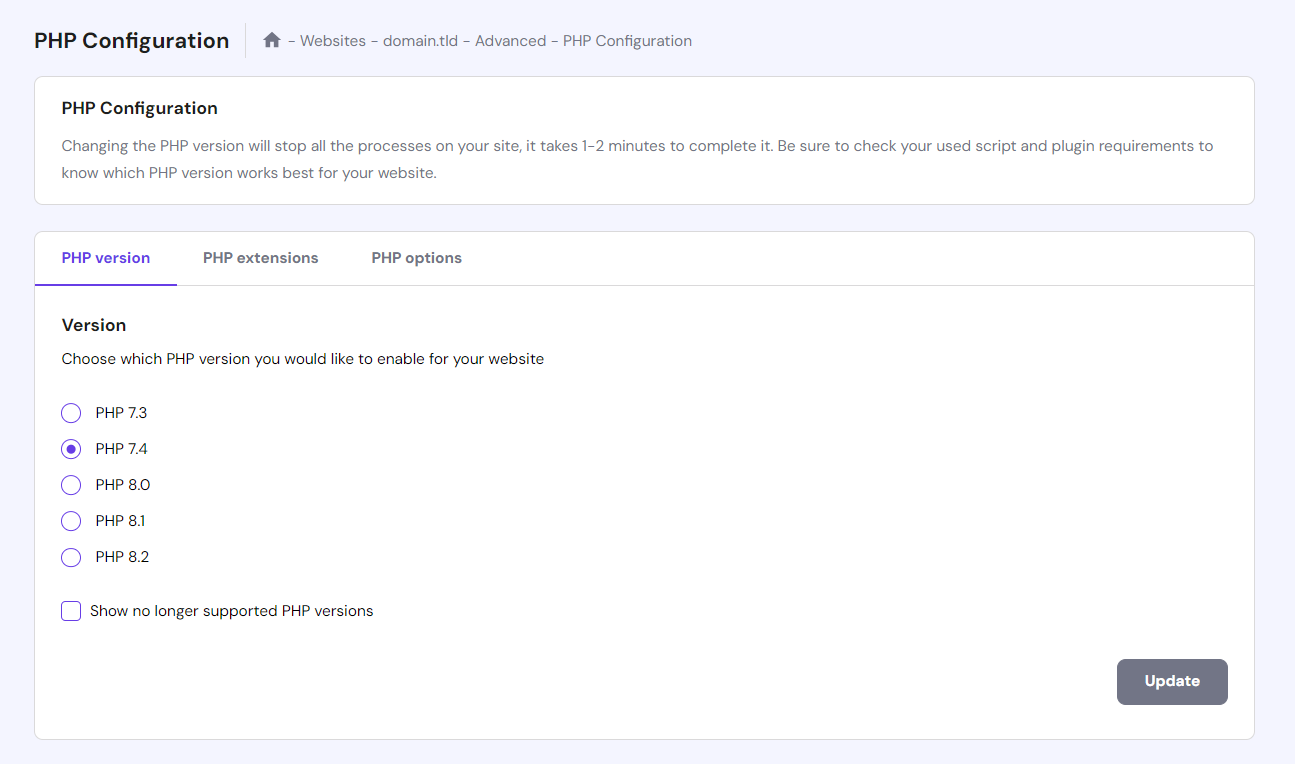
On the PHP Configuration page, you can choose the PHP version for your website.
- Locate the PHP Version dropdown menu.
- Select the preferred PHP version from the list (for example, PHP 7.4, PHP 8.0, or PHP 8.1).
- Click the Update button to save changes.
The update usually takes a few minutes. The chosen PHP version will apply to all websites under your hosting plan, except those built with Hostinger Website Builder.
Changing Php Version For Subdomains And Subfolders
You can set different PHP versions for subdomains or subfolders using the .htaccess file.
Follow these steps:
- Access your hosting files via File Manager or FTP.
- Navigate to the subdomain or subfolder directory.
- Edit or create a
.htaccessfile in that directory. - Add the following code to set the PHP version (replace
XXwith the desired version number):
AddHandler application/x-httpd-phpXX .phpThis method lets you run different PHP versions on separate parts of your website.
Verifying The Php Version Change And Troubleshooting Common Issues
Check if the PHP version updated correctly:
- Create a new file named
phpinfo.phpin your website root folder. - Add this code inside the file:
php phpinfo(); ?- Open your browser and visit
yourdomain.com/phpinfo.php. - Look for the PHP version displayed on the page.
If the version did not update, try these fixes:
- Clear your browser cache and refresh the page.
- Ensure you clicked the Update button after selecting the PHP version.
- Check
.htaccessfiles for conflicting PHP handlers. - Contact Hostinger support if issues persist.
Pricing And Affordability Of Hostinger Hosting Plans
Hostinger offers hosting plans that are both affordable and flexible. The pricing suits beginners and small businesses. Most plans support easy PHP version changes, giving users control over their website environment. This feature helps keep websites updated and secure without extra cost.
Overview Of Hostinger Plans Supporting Php Version Changes
Hostinger provides several plans that allow PHP version customization. These include:
- Single Shared Hosting: Ideal for basic websites. Supports PHP updates.
- Premium Shared Hosting: Good for growing sites. Allows multiple PHP versions.
- Business Shared Hosting: Best for small businesses. Offers advanced PHP flexibility.
- Cloud Hosting: For higher performance needs, with full PHP control.
All plans offer access to the PHP Configuration page in the control panel. Users can select their preferred PHP version and apply it quickly.
Comparing Cost-effectiveness With Other Hosting Providers
| Hosting Provider | Starting Price (Monthly) | PHP Version Change | Plan Features |
|---|---|---|---|
| Hostinger | $1.99 | Easy, via control panel | Free SSL, 24/7 support, PHP flexibility |
| Provider A | $3.50 | Limited or manual | Basic support, limited PHP options |
| Provider B | $4.00 | Possible, but complex | Advanced features, higher price |
Hostinger offers one of the lowest prices with full PHP version control. Other providers may charge more for similar features or restrict PHP changes.
Value Added Through Php Version Flexibility In Hosting Packages
Changing PHP versions adds value to your hosting plan in several ways:
- Security: Use newer PHP versions with latest fixes.
- Performance: Upgrade to faster PHP releases.
- Compatibility: Run older or newer scripts as needed.
- Ease of Use: Change PHP versions without technical help.
This flexibility helps keep websites running smoothly. It also saves money by avoiding the need to switch hosts or pay for expensive upgrades.
Pros And Cons Of Using Hostinger For Php Version Management
Managing PHP versions on Hostinger offers several benefits and some limitations. This section explains the main advantages and drawbacks of Hostinger’s PHP version management. It also includes user feedback on PHP updates and hosting performance.
Advantages: Ease Of Use, Speed, And Flexibility
Hostinger simplifies changing PHP versions through its user-friendly control panel. Users can select their preferred PHP version quickly without technical skills. The update usually completes within minutes.
- Easy interface: PHP version selection is straightforward and clear.
- Fast updates: Changes apply quickly, reducing downtime.
- Flexible options: Multiple PHP versions are available to suit different needs.
This flexibility supports various applications and scripts, helping developers maintain compatibility and optimize performance.
Limitations: Restrictions With Hostinger Website Builder And Ssh Customization
Hostinger imposes some limits on PHP version management. Websites built with the Hostinger Website Builder cannot change their PHP version. This restriction affects users relying on the builder for their site.
SSH users face limited customization options for PHP settings. Advanced developers may find the lack of full SSH control a drawback for fine-tuning their environments.
| Limitation | Impact |
|---|---|
| Hostinger Website Builder | PHP version cannot be changed for builder sites |
| SSH Customization | Limited control over PHP settings via SSH |
Real-world User Feedback On Php Updates And Hosting Performance
Users report smooth PHP updates on Hostinger with minimal issues. Many appreciate how fast version changes happen and the ease of use.
Some users mention occasional compatibility problems after updates, especially with older plugins or themes. Testing sites before switching PHP versions is recommended.
Hosting speed remains stable across PHP versions. Users note consistent uptime and good server response times.
- Fast PHP version changes save time.
- Minor compatibility checks needed after updates.
- Hosting performance stays reliable and steady.
Credit: www.hostinger.com
Ideal Users And Scenarios For Hostinger Php Version Updates
Hostinger PHP version updates suit various users who want better speed, security, and compatibility. Changing PHP versions can improve website performance and fix bugs.
Different users need to update PHP for specific reasons. Below are key groups who benefit the most from these updates.
Web Developers And Agencies Managing Multiple Websites
Developers and agencies handle many websites with different needs. They must keep all sites updated to run smoothly.
- Update PHP to support new features and frameworks.
- Ensure compatibility across all client websites.
- Fix security holes by using the latest PHP versions.
Using Hostinger’s control panel, developers can quickly change PHP versions for all sites. This saves time and avoids manual work.
WordPress Users Optimizing Site Performance And Security
WordPress users benefit greatly from newer PHP versions. WordPress runs faster and safer on updated PHP.
- Speed up page loading and improve user experience.
- Use the latest WordPress plugins requiring modern PHP.
- Protect sites from vulnerabilities with enhanced security.
Hostinger allows easy PHP version switching without breaking WordPress themes or plugins.
Small To Medium Businesses Requiring Reliable And Fast Php Updates
Small and medium businesses need hosting that supports growth and stability.
| Business Needs | PHP Version Benefits |
|---|---|
| Faster website loading | Newer PHP versions use fewer resources and respond quickly. |
| Security assurance | Updated PHP fixes bugs and prevents hacking risks. |
| Easy maintenance | Hostinger’s update tools simplify PHP version changes. |
Businesses can trust Hostinger for fast updates that keep their sites reliable.
Additional Tips For A Smooth Php Version Upgrade On Hostinger
Upgrading the PHP version on Hostinger requires careful steps to avoid website issues. Following some key tips ensures a smooth transition. These tips help protect your site, maintain performance, and fix problems quickly.
Backing Up Your Website Before Changing Php Version
Backup your website completely before starting the PHP upgrade. This step protects your data and files in case something goes wrong. Hostinger offers easy backup tools in the control panel.
- Use Hostinger’s backup feature or a plugin for WordPress sites.
- Download a full copy of your website files via FTP.
- Export your database using phpMyAdmin or Hostinger’s database tools.
Having a reliable backup allows quick restoration to the previous state if needed.
Checking Compatibility Of Themes And Plugins With New Php Versions
Verify if your themes and plugins support the new PHP version before upgrading. Older or untested plugins can cause errors or crashes.
- Visit the official plugin and theme pages for compatibility notes.
- Test your website on a staging environment with the new PHP version.
- Update all plugins and themes to their latest versions first.
This process reduces the chance of incompatibility issues after the update.
Enabling Php Error Reporting To Identify Issues Post-update
Turn on PHP error reporting after upgrading to find problems early. It helps detect warnings, deprecated functions, or fatal errors.
ini_set('display_errors', 1); ini_set('display_startup_errors', 1); error_reporting(E_ALL);Add these lines to your php.ini or .htaccess file temporarily. Review errors, fix them, then disable error display for security.
Updating Php Extensions And Libraries As Needed
Ensure all necessary PHP extensions and libraries are installed and updated for your site’s functions.
| Extension | Purpose | Example |
|---|---|---|
| curl | Allows data transfer with URLs | API requests |
| mbstring | Supports multibyte string processing | Text encoding |
| mysqli | Interacts with MySQL databases | Database connections |
Check Hostinger’s control panel to enable or update these extensions. Missing extensions can break website features.
Conclusion: Simplifying Php Version Changes With Hostinger
Changing PHP versions on Hostinger is straightforward and user-friendly. The platform offers a quick way to update PHP without technical hassles. This ease helps maintain website security and performance.
Recap Of Benefits And Easy Steps
Hostinger allows users to select PHP versions from the control panel easily. Updates apply within minutes and affect all sites under the hosting plan, except those built with Hostinger Website Builder.
- Simple interface to choose PHP versions
- Fast update process without downtime
- Supports multiple PHP versions to match site needs
- Automatic application to all relevant websites
Steps to change PHP version:
- Log in to Hostinger control panel
- Go to the PHP Configuration page
- Select the desired PHP version
- Click “Update” to apply changes
Encouragement To Keep Php Versions Updated For Optimal Performance
Using the latest PHP version improves website speed and security. Updated PHP versions fix bugs and support modern features. Keeping PHP current protects your site from vulnerabilities.
Regular PHP updates ensure compatibility with new plugins and themes. This keeps your site running smoothly and reduces errors. Hostinger makes it easy to stay up to date.
Final Thoughts On Hostinger’s Role In Streamlining Php Management
Hostinger simplifies PHP management with a clear, fast process. The control panel’s design helps users avoid complex setups. This approach reduces errors and saves time.
By providing quick PHP version changes, Hostinger supports website owners in maintaining optimal site health. It is a reliable choice for hassle-free PHP updates.
Frequently Asked Questions
How Do I Change The Php Version In Hostinger?
Log in to Hostinger hPanel, go to Hosting, select your domain, then navigate to Advanced → PHP Configuration. Choose your desired PHP version and click Update. The change applies within minutes to all websites except those using Hostinger Website Builder.
How To Convert Php 5.6 To Php 7?
To convert PHP 5. 6 to PHP 7, update your hosting control panel’s PHP version. Test your website for compatibility. Fix deprecated code and install required PHP 7 extensions. Enable error reporting to identify issues. Backup your site before upgrading for safety.
Should I Use Php 7.4 Or 8 For WordPress?
Use PHP 8 for WordPress to benefit from improved speed, security, and latest features. PHP 7. 4 still works but lacks updates. Ensure your themes and plugins support PHP 8 before upgrading to avoid compatibility issues.
How To Convert Php 7 To Php 8?
To convert PHP 7 to PHP 8, update your server’s PHP version via hosting control panel. Check compatibility and fix code errors. Install required PHP 8 extensions and test your website thoroughly for smooth performance.
Conclusion
Changing your PHP version in Hostinger is quick and simple. This update helps improve your website’s speed and security. Always pick a PHP version that fits your site’s needs. Remember to back up your site before making changes. For easy hosting with great support, consider using Hostinger. Stay updated and keep your website running smoothly!