


Choosing the right email service for your business or personal use can feel overwhelming. You want something reliable, easy to use, and packed with features that fit your needs without breaking the bank.
That’s where the showdown between Hostinger Email and Google Workspace comes in. Which one gives you the best value? Which one simplifies your daily tasks and keeps your communication smooth? You’ll discover the key differences, benefits, and drawbacks of both options, helping you make a confident decision. Ready to find out which email hosting service suits you best? Let’s dive in! If you want to explore Hostinger’s email services right away, check them out here: Hostinger Email Hosting.
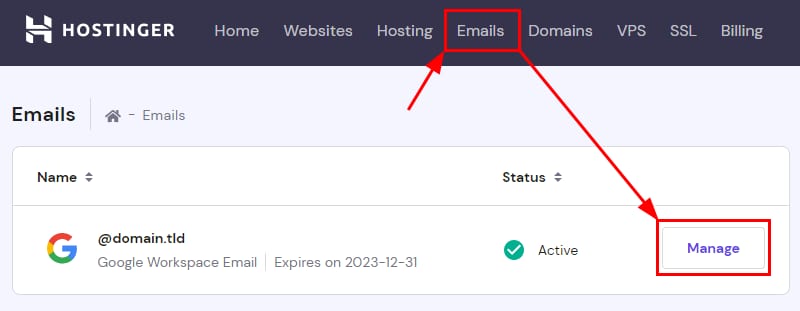
Credit: www.hostinger.com
Introduction To Hostinger Email And Google Workspace
Email services are essential for businesses and individuals today. Choosing the right provider affects communication, productivity, and security.
This section introduces Hostinger Email and Google Workspace, two popular email solutions. Understanding their features and uses helps pick the best fit for your needs.
Overview Of Hostinger Email And Its Intended Use
Hostinger Email is designed mainly for website owners and small to medium businesses. It offers reliable, affordable email hosting tied to your domain name.
Key features of Hostinger Email include:
- Custom domain email addresses
- Spam and virus protection
- IMAP/POP3 support for email clients
- Access via webmail or mobile apps
- Integration with Hostinger’s hosting services
This service suits users wanting professional email without complex tools. It focuses on simple, secure email communication linked to websites.
Overview Of Google Workspace And Its Intended Use
Google Workspace is a comprehensive cloud productivity suite. It includes Gmail, Docs, Drive, Calendar, Meet, and more.
Its email service, Gmail for business, offers:
- Custom domain email with advanced spam filters
- Large storage capacity per user
- Seamless collaboration tools
- Integration with Google apps and third-party tools
- Strong security and admin controls
Google Workspace targets businesses of all sizes needing integrated tools for communication and teamwork.
Why Comparing These Two Email Solutions Matters In 2025
Both Hostinger Email and Google Workspace provide email services but differ in scope and features.
Choosing between them impacts:
- Cost efficiency
- Ease of use
- Collaboration needs
- Storage and security
- Integration with other tools
In 2025, businesses seek flexible, secure, and scalable email solutions. Understanding these options helps make informed decisions aligned with future needs.
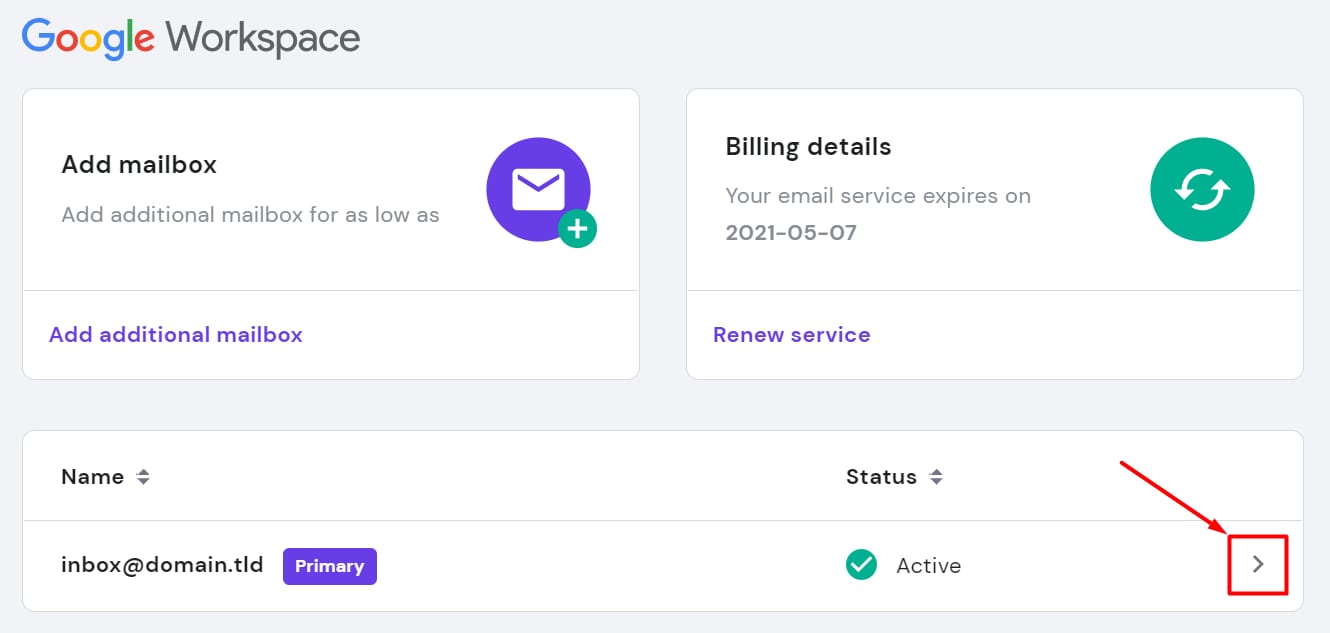
Credit: www.hostinger.com
Key Features Of Hostinger Email
Hostinger Email offers a solid set of features designed for easy use and strong performance. It suits small to medium businesses and individuals who want reliable email hosting without complexity. The service focuses on simplicity, security, and integration with Hostinger’s web hosting plans.
User-friendly Interface And Ease Of Setup
The interface is clean and intuitive. Users can manage emails with minimal effort. Setting up an email account takes only a few steps. A clear dashboard helps to organize inbox, folders, and contacts efficiently.
- Simple control panel for email creation
- Quick domain connection and verification
- Supports webmail access and mobile syncing
Security Measures And Spam Protection
Security is a priority for Hostinger Email. It includes multiple layers of protection to keep emails safe. Spam filters reduce unwanted messages automatically. SSL encryption secures data during transfer.
- Advanced spam and virus filtering
- SSL/TLS encryption for secure email sending
- Two-factor authentication (2FA) support
Storage Capacity And Email Management Tools
Hostinger provides ample storage for email accounts, supporting smooth communication. Users can organize messages using folders and labels. Search tools help find emails quickly. The service offers:
| Feature | Details |
|---|---|
| Email Storage | Up to 10 GB per mailbox (varies by plan) |
| Email Filtering | Custom filters to sort incoming mail |
| Auto-responders | Set automatic replies for busy periods |
Integration With Hostinger Web Hosting Services
Hostinger Email works smoothly with Hostinger’s hosting plans. Users benefit from easy domain management and unified billing. This tight integration means less hassle for website owners.
- One control panel for website and email
- Automatic DNS setup for email domains
- Access to support for both hosting and email
Key Features Of Google Workspace
Google Workspace offers a broad set of tools designed to boost team productivity and simplify communication. It is built to support seamless collaboration, strong security, and ease of use across devices.
The following sections highlight the core features that make Google Workspace a preferred choice for many businesses.
Comprehensive Collaboration Tools (gmail, Docs, Drive)
Google Workspace includes essential tools for team collaboration:
- Gmail: A reliable email service with smart inbox management and powerful search capabilities.
- Google Docs: Create, edit, and share documents in real time with team members.
- Google Drive: Secure cloud storage that allows easy file sharing and access from any device.
These tools integrate smoothly, enabling teams to work together without switching apps.
Advanced Security And Compliance Features
Google Workspace prioritizes data protection and regulatory compliance. Key security features include:
- Two-factor authentication to secure user accounts.
- Data loss prevention policies to protect sensitive information.
- Encryption of data in transit and at rest.
- Compliance with major standards like GDPR, HIPAA, and ISO/IEC 27001.
This ensures that business data stays safe and meets legal requirements.
Ai-powered Productivity Enhancements
Google Workspace uses artificial intelligence to improve work efficiency:
- Smart Compose and Smart Reply in Gmail speed up email writing.
- Automatic meeting scheduling in Google Calendar saves time.
- AI-driven suggestions in Docs help improve content quality.
- Google Meet uses AI for noise cancellation and video quality optimization.
These features reduce manual effort and help users focus on important tasks.
Cross-platform Accessibility And Syncing
Google Workspace works smoothly on various devices and platforms:
- Access your email, documents, and files from desktops, tablets, and smartphones.
- Real-time syncing keeps all files and calendars updated everywhere.
- Offline access allows work without internet connectivity, syncing changes later.
- Supports Windows, macOS, Android, and iOS platforms.
This flexibility ensures users stay productive anytime, anywhere.
Pricing And Affordability Breakdown
Choosing the right email service depends greatly on pricing and value. Both Hostinger Email and Google Workspace offer different plans to fit various business needs. Understanding their pricing structures helps businesses pick the best fit for their budget and requirements.
Hostinger Email Pricing Plans And Value For Money
Hostinger provides simple and affordable email hosting plans. Their pricing is designed for small to medium businesses.
| Plan | Price (per month) | Storage | Key Features |
|---|---|---|---|
| Email Starter | $0.99 | 10 GB | Spam protection, Webmail access |
| Email Business | $2.99 | 50 GB | Multiple accounts, Calendars, Contacts |
Hostinger Email plans give good value, especially for startups. The low price and decent storage suit basic email needs. Features like spam protection and webmail access are standard.
Google Workspace Pricing Tiers And What They Include
Google Workspace offers several pricing tiers with more business-focused features.
| Plan | Price (per user/month) | Storage | Key Features |
|---|---|---|---|
| Business Starter | $6.00 | 30 GB | Custom email, Video meetings, Security |
| Business Standard | $12.00 | 2 TB | Enhanced collaboration, More storage |
| Business Plus | $18.00 | 5 TB | Advanced security, Compliance tools |
Google Workspace plans focus on collaboration and security. Prices are higher but include many tools beyond email.
Cost Comparison Based On Business Sizes And Needs
- Small Businesses and Startups: Hostinger’s low-cost plans suit tight budgets and basic email needs.
- Medium Businesses: Google Workspace offers more storage and collaboration features but at a higher cost.
- Large Enterprises: Google Workspace’s advanced security and compliance features justify its pricing.
Choosing depends on business size and feature needs. Hostinger is affordable for simple email hosting. Google Workspace is better for teams needing integrated tools and security.
Pros And Cons Based On Real-world Usage
Choosing the right email service affects your daily work and communication. Both Hostinger Email and Google Workspace offer useful features, but each has strengths and weaknesses. Real users share what works well and what causes trouble. This section breaks down the key advantages and limitations to help you decide.
Advantages Of Using Hostinger Email
- Affordable Pricing: Hostinger Email offers low-cost plans suitable for small businesses and startups.
- Easy Setup: Users find the email setup process quick and straightforward, with simple integration to websites.
- Custom Domain Support: Hostinger allows using your own domain for professional email addresses.
- Good Storage Options: Plans include enough storage for typical business emails and attachments.
- Reliable Uptime: Hostinger maintains stable server uptime for consistent email access.
- Basic Security: Includes spam filters and SSL encryption to protect emails.
Limitations And Drawbacks Of Hostinger Email
- Limited Collaboration Tools: Lacks built-in apps like calendars and document editors.
- Fewer Integrations: Does not support as many third-party apps compared to bigger providers.
- Basic Support: Customer support can be slow or less helpful for complex email issues.
- No Advanced Security Features: Missing multi-factor authentication and advanced spam controls.
- Interface Simplicity: Email interface is basic and may not suit power users.
Advantages Of Using Google Workspace
- Comprehensive Tools: Includes Gmail, Google Drive, Calendar, Docs, and more for teamwork.
- Strong Security: Offers multi-factor authentication, encryption, and robust spam protection.
- Easy Collaboration: Real-time editing and sharing improve productivity across teams.
- Large Storage: Generous cloud storage that grows with your plan.
- Reliable Support: 24/7 customer service and extensive online resources.
- Wide Integration: Connects with many third-party apps and services.
Limitations And Drawbacks Of Google Workspace
- Higher Cost: Pricing can be expensive for small businesses or startups.
- Complex Setup: Initial configuration may require technical skills.
- Privacy Concerns: Some users worry about data scanning and privacy policies.
- Internet Dependence: Needs a stable internet connection for full functionality.
- Learning Curve: New users may need time to get familiar with the platform.
Ideal Users And Use Case Recommendations
Choosing the right email platform depends on your business needs and team size. Hostinger Email and Google Workspace serve different users and purposes. Understanding who benefits most from each helps in making the best choice. Below, find clear guidance on ideal users and where each platform performs best.
Who Should Choose Hostinger Email And Why
Hostinger Email suits small businesses and startups. It offers reliable email hosting with essential features at a budget-friendly price.
- Businesses needing simple, professional email addresses (e.g., yourname@yourdomain.com)
- Users with limited technical knowledge wanting easy setup
- Companies focusing mainly on email without requiring many extra apps
- Entrepreneurs or freelancers seeking affordable email hosting
Hostinger Email integrates well with Hostinger’s web hosting services. This makes it ideal for users who want to manage hosting and email in one place.
Who Benefits Most From Google Workspace
Google Workspace fits teams that need collaboration and productivity tools alongside email.
- Businesses requiring real-time document collaboration
- Teams using Google Docs, Sheets, Slides daily
- Organizations wanting integrated video meetings via Google Meet
- Companies needing cloud storage and shared calendars
- Users valuing high security and advanced admin controls
Google Workspace is perfect for remote teams and medium to large businesses focused on teamwork and communication.
Scenarios Where Each Platform Excels
| Scenario | Hostinger Email | Google Workspace |
|---|---|---|
| Budget-conscious startups | Affordable email hosting with core features | Higher cost due to extra apps |
| Simple email needs | Professional email addresses, easy setup | Includes many tools beyond email |
| Team collaboration | Limited collaboration tools | Strong collaboration across Docs, Sheets, Meet |
| Cloud storage and file sharing | Basic or no cloud storage | Generous Google Drive storage per user |
| Admin and security controls | Basic management features | Advanced security and admin options |
Conclusion: Making The Right Choice For 2025
Choosing between Hostinger Email and Google Workspace shapes how your business communicates. Both offer strong email solutions but suit different needs. This section helps clarify their differences and guides your decision for 2025.
Summary Of Key Differences And Strengths
| Feature | Hostinger Email | Google Workspace |
|---|---|---|
| Email Hosting Cost | Lower, budget-friendly plans | Higher, premium pricing |
| Storage Space | Basic to moderate storage | Large, scalable storage options |
| Collaboration Tools | Limited, mostly email-focused | Full suite: Docs, Sheets, Meet, Drive |
| Ease of Use | Simple, user-friendly interface | Rich features, steeper learning curve |
| Security | Standard email security | Advanced security and compliance |
Factors To Consider Before Deciding
- Business Size: Small teams may prefer Hostinger’s simplicity.
- Budget: Hostinger offers affordable plans for tight budgets.
- Collaboration Needs: Google Workspace excels with integrated tools.
- Storage Requirements: Choose based on email and file storage needs.
- Security Standards: Critical industries benefit from Google’s advanced security.
- Technical Support: Assess availability and responsiveness of support.
Final Recommendations For Different Business Needs
- Startups and Small Businesses: Hostinger Email provides cost-effective, easy email hosting.
- Growing Teams: Consider Google Workspace for scalable tools and storage.
- Businesses Needing Strong Collaboration: Google Workspace’s productivity suite fits best.
- Budget-Conscious Users: Hostinger Email keeps expenses low without major compromises.
- Enterprises with Security Focus: Google Workspace offers robust protection and compliance.

Credit: www.youtube.com
Frequently Asked Questions
What Are The Main Differences Between Hostinger Email And Google Workspace?
Hostinger Email offers basic email services with affordable pricing. Google Workspace provides advanced collaboration tools, cloud storage, and seamless integration with Google apps, ideal for businesses needing more than just email.
Which Is More Cost-effective: Hostinger Email Or Google Workspace?
Hostinger Email is generally more budget-friendly for basic email needs. Google Workspace has higher costs but offers extensive features, making it worth the investment for businesses seeking productivity tools.
Can Hostinger Email Support Custom Domain Emails Like Google Workspace?
Yes, Hostinger Email supports custom domain emails, allowing personalized email addresses. Google Workspace also offers this with additional business-grade security and management features.
Which Platform Offers Better Collaboration Tools, Hostinger Or Google Workspace?
Google Workspace excels in collaboration with apps like Docs, Sheets, and Meet. Hostinger Email focuses mainly on email services without built-in collaboration tools.
Conclusion
Both Hostinger Email and Google Workspace offer solid email solutions. Hostinger provides affordable plans with easy setup. Google Workspace includes more apps and collaboration tools. Your choice depends on budget and needs. Want reliable email hosting at a low cost? Consider Hostinger’s services. Learn more and get started here: Hostinger Email Hosting. Simple, clear, and effective email hosting awaits.






