Looking to deploy your Node.js project quickly and hassle-free? Hostinger offers an easy and reliable way to get your application online without the usual headaches.
Whether you’re just starting out or want a smooth deployment process, Hostinger’s platform gives you the tools and speed you need to make your Node.js app live. Imagine having your project accessible to the world in just a few simple steps, with powerful hosting that keeps it running smoothly. Ready to see how simple it can be? Let’s dive into deploying your Node.js project on Hostinger today and unlock the full potential of your app! Start your deployment journey now with Hostinger’s affordable plans here: Hostinger Node.js Hosting
Introduction To Deploying Node.js Projects On Hostinger
Deploying a Node.js project can be simple with the right hosting. Hostinger offers tools and services built for Node.js applications. This guide helps you understand the process and benefits of deploying on Hostinger. It covers everything from basic concepts to practical steps. Whether you are a beginner or have some experience, this section sets the stage for your deployment journey.
Overview Of Node.js And Its Popularity In Web Development
Node.js is a JavaScript runtime built on Chrome’s V8 engine. It allows developers to run JavaScript outside the browser. This enables building fast, scalable network applications.
Popular reasons for Node.js use include:
- Event-driven, non-blocking I/O model
- High performance and efficiency
- Large ecosystem of packages via npm
- Ability to build full-stack JavaScript apps
Many companies rely on Node.js for web servers, APIs, and real-time apps. Its simplicity and speed make it a top choice in modern web development.
Why Choose Hostinger For Hosting Node.js Applications
Hostinger is a reliable hosting provider with features tailored for Node.js projects. It supports running Node.js apps smoothly on VPS and cloud hosting plans.
| Feature | Benefit for Node.js Apps |
|---|---|
| VPS Hosting | Full control to install and run Node.js with custom settings |
| hPanel Control Panel | User-friendly interface to manage your hosting and apps |
| Git Integration | Easy deployment by pushing code from repositories |
| Affordable Pricing | Cost-effective plans fit for small to large projects |
| Fast Servers | Low latency and high uptime for reliable app performance |
Hostinger combines power, ease, and affordability. These qualities fit well with Node.js needs.
Purpose And Scope Of This Ultimate Guide
This guide aims to help you deploy Node.js apps on Hostinger step-by-step. It covers:
- Setting up the hosting environment
- Configuring Git for smooth code deployment
- Running and managing your Node.js application
- Troubleshooting common issues
The goal is to give you clear, actionable instructions. You will gain confidence to manage your Node.js deployment without confusion.

Credit: www.reddit.com
Key Features Of Hostinger For Node.js Deployment
Hostinger offers a robust environment tailored for deploying Node.js projects. Its tools and features simplify app management and boost performance. Developers gain control and flexibility, ensuring smooth deployment and scaling.
User-friendly Hpanel Interface For Node.js Management
The hPanel is Hostinger’s custom control panel designed for ease of use. It allows quick access to Node.js settings and server management. Users can:
- Install and configure Node.js with a few clicks
- Manage domains, databases, and SSL certificates easily
- Monitor resource usage and server status in real-time
This intuitive interface reduces the need for complex command-line work, making deployment accessible even for beginners.
Pre-configured Vps Templates Optimized For Node.js
Hostinger provides VPS templates set up specifically for Node.js environments. These templates include:
| Feature | Benefit |
|---|---|
| Node.js Pre-Installed | Saves setup time and avoids manual installations |
| Optimized Server Settings | Improves app performance and stability |
| Security Configurations | Protects apps from common vulnerabilities |
These ready-to-use templates speed up project deployment and help maintain best practices.
Support For Multiple Deployment Methods: Git, Sftp, And Command Line
Hostinger supports versatile deployment options to fit various workflows:
- Git Integration: Deploy code directly from GitHub or other repositories.
- SFTP Access: Upload files securely and manage them through file transfer protocols.
- Command Line Tools: Use SSH to execute commands and automate deployment scripts.
This flexibility ensures developers can work with tools they prefer without restrictions.
Integrated Node.js App Section For Easy Application Setup
Hostinger’s hPanel includes a dedicated Node.js app section to simplify app configuration. Users can:
- Create and manage Node.js applications in one place
- Specify app root, start file, and environment variables easily
- Restart or stop apps with a single click
This streamlines the setup process and reduces deployment errors.
High Performance And Scalability With Hostinger Vps Hosting
Hostinger’s VPS hosting provides the power needed for demanding Node.js applications. Key advantages include:
- Dedicated Resources: CPU, RAM, and storage are reserved, ensuring steady performance.
- Scalable Plans: Upgrade resources as your project grows without downtime.
- Fast SSD Storage: Improves app response time and data access speed.
- Low Latency Network: Delivers quick data transfer and reduces load times globally.
These features help maintain fast, reliable service for Node.js applications under varying workloads.
Step-by-step Guide To Deploy Your Node.js Project On Hostinger
Deploying a Node.js project on Hostinger is straightforward and efficient. This guide breaks down the process into clear, simple steps. Each step will help you prepare, upload, configure, and run your app smoothly on Hostinger’s platform. Follow along to get your Node.js app live quickly.
Preparing Your Node.js Project For Deployment
Start by organizing your project files. Make sure your package.json lists all dependencies correctly. Test your app locally to confirm it runs without errors.
- Remove unnecessary files and folders.
- Set the
startscript inpackage.json(e.g.,"start": "node app.js"). - Ensure your app listens on the correct port using
process.env.PORTor a default port.
Clean, tested code speeds up deployment and reduces errors.
Creating A Git Repository And Configuring Git On Hostinger
Git helps manage your project versions and simplifies deployment.
- Create a Git repository on GitHub or another Git service.
- Commit and push your complete project to the repository.
- Log in to Hostinger’s hPanel and open the Git interface.
- Set up Git by linking your repository URL in Hostinger.
- Use SSH keys or HTTPS to authenticate and connect the repo.
This setup allows Hostinger to pull your code directly from Git.
Uploading Your Project Via Sftp Or Command Line
Choose between manual upload or command line for transferring files.
- SFTP: Use an FTP client like FileZilla to upload files to Hostinger’s server.
- Command Line: Use SSH and Git commands to clone or pull your repo directly.
Both methods require Hostinger’s FTP or SSH credentials from hPanel.
| Method | Tools Needed | Best For |
|---|---|---|
| SFTP | FileZilla, WinSCP | Beginners, small projects |
| Command Line | Terminal, Git, SSH | Advanced users, frequent updates |
Setting Up The Node.js Application In Hostinger Hpanel
After upload, configure your Node.js app in hPanel.
- Navigate to the Node.js section in Hostinger’s control panel.
- Click Create Application.
- Choose the app root folder where your files reside.
- Select the Node.js version compatible with your app.
- Define the entry point file (e.g.,
app.jsorserver.js).
Save settings to register your app with Hostinger’s server.
Configuring Environment Variables And Dependencies
Environment variables store sensitive data and configuration.
- In hPanel, find the environment variables section.
- Add keys like
PORT,DB_URL, or API keys. - Confirm your
package.jsonlists all dependencies. - Run
npm installvia SSH or the Hostinger terminal to install packages.
Proper config ensures your app runs securely and correctly.
Running And Monitoring Your Node.js App On Hostinger
Start your app using the hPanel interface or command line.
- Use the Start button in Node.js app settings.
- Check logs via hPanel or SSH to monitor app status.
- Restart the app after any code or config updates.
- Use Hostinger’s monitoring tools to track uptime and performance.
Keep your app running smoothly with regular checks and updates.
Pricing And Affordability Breakdown
Understanding the pricing structure is essential when deploying a Node.js project on Hostinger. Different hosting options offer various features and costs. Choosing the right plan depends on your project needs and budget.
This section breaks down Hostinger’s pricing for Node.js hosting, focusing on shared hosting and VPS solutions.
Comparing Hostinger Shared Hosting Vs Vps For Node.js
Hostinger offers two main options for Node.js deployment: Shared Hosting and VPS Hosting. Each has distinct pricing and capabilities.
| Feature | Shared Hosting | VPS Hosting |
|---|---|---|
| Price Range (per month) | $1.99 – $3.99 | $3.95 – $29.95 |
| Node.js Support | Limited or no direct support | Full root access; optimal for Node.js |
| Resource Allocation | Shared with other users | Dedicated CPU, RAM, and storage |
| Performance | Basic; suitable for small projects | High; suitable for production apps |
Shared Hosting is cheaper but less flexible for Node.js. VPS Hosting costs more but offers better control and performance.
Cost Benefits Of Using Hostinger Vps For Node.js Deployment
Hostinger VPS plans provide cost-effective resources for Node.js projects. You get dedicated CPU, RAM, and storage at reasonable prices.
- Root access allows full control over your environment.
- Better stability and uptime than shared hosting.
- Supports multiple Node.js versions and tools.
- Scalable resources to grow with your app.
For developers who need reliability and speed, VPS offers more value despite the higher price.
Understanding Pricing Tiers And What Each Includes
Hostinger VPS pricing has several tiers. Each tier increases in resources and features.
| Plan | CPU Cores | RAM | Storage | Price (monthly) |
|---|---|---|---|---|
| VPS 1 | 1 Core | 1 GB | 20 GB SSD | $3.95 |
| VPS 2 | 2 Cores | 2 GB | 40 GB SSD | $8.95 |
| VPS 3 | 3 Cores | 3 GB | 60 GB SSD | $12.95 |
| VPS 4 | 4 Cores | 4 GB | 80 GB SSD | $15.95 |
Each tier offers increased computing power for demanding Node.js applications.
Value-added Features That Justify The Cost
Hostinger VPS plans include features that enhance the hosting experience. These justify the pricing for Node.js projects.
- Full root access: Customize your server environment freely.
- Dedicated resources: Guaranteed CPU and RAM boost performance.
- 99.9% uptime guarantee: Ensures your app stays online.
- 24/7 support: Expert help any time you need it.
- Easy scalability: Upgrade plans without downtime.
- SSD storage: Fast read/write speeds for databases and files.
These benefits provide a stable and efficient platform for Node.js deployment.
Pros And Cons Of Deploying Node.js Projects On Hostinger
Deploying a Node.js project on Hostinger offers several benefits and some limitations. This section explores the key advantages and drawbacks. It also shares real user feedback and practical tips to handle common issues.
Advantages: Speed, Ease Of Use, And Robust Support
Hostinger provides a fast and reliable environment for Node.js applications. Its VPS hosting plans deliver dedicated resources, which improve server response times and app performance.
- Speed: VPS hosting ensures low latency and quick data processing for Node.js apps.
- Ease of Use: The
hPanelcontrol panel simplifies server management, even for beginners. - Robust Support: Hostinger’s support team offers guidance via live chat and tutorials tailored for Node.js deployment.
Setting up Git integration on Hostinger allows seamless deployment from GitHub repositories. This automation reduces manual errors and speeds up updates.
Limitations: Absence Of One-click Node.js Install On Shared Hosting
One downside is the lack of a one-click Node.js installer on Hostinger’s shared hosting plans. Users must manually configure the environment.
| Feature | Shared Hosting | VPS Hosting |
|---|---|---|
| One-Click Node.js Install | Not available | Available via manual setup |
| Root Access | No | Yes |
| Resource Allocation | Limited | Dedicated |
This means shared hosting users need technical skills or guidance to deploy Node.js apps. VPS hosting is better suited for full control and easier installation.
Real-world User Experiences And Feedback
Many developers praise Hostinger’s VPS for Node.js projects due to its speed and uptime. Users report smooth deployment through Git actions and SSH access.
- Positive feedback highlights the responsive customer support and clear documentation.
- Some users mention the initial learning curve with server setup but note improvements after the first deployment.
- Shared hosting users express frustration over the lack of direct Node.js support.
Potential Challenges And How To Overcome Them
Deploying Node.js on Hostinger can present challenges, such as:
- Manual environment setup: Requires configuring Node.js, npm, and server processes via SSH.
- Limited shared hosting options: No native Node.js support on cheaper plans.
- Managing app restarts: Need to use process managers like
PM2to keep apps running.
Steps to overcome these challenges:
- Choose VPS hosting to gain root access and full control.
- Follow Hostinger’s tutorials to set up Node.js and Git deployment correctly.
- Use
PM2or similar tools to manage Node.js processes efficiently. - Engage Hostinger’s support for troubleshooting during setup.
Ideal Users And Use Cases For Hostinger Node.js Hosting
Hostinger Node.js hosting suits a broad range of users and projects. It offers an affordable, easy-to-use platform for deploying Node.js applications. This hosting service works best for developers and businesses who want fast deployment without complex setup.
Understanding the ideal users and use cases helps to choose the right hosting plan and optimize application performance.
Who Should Choose Hostinger For Node.js Projects
- Freelance developers building small to medium applications.
- Startups needing cost-effective, scalable hosting.
- Students and learners experimenting with Node.js apps.
- Businesses deploying web apps with moderate traffic.
- Teams looking for simple Git-based deployment options.
Hostinger’s interface and documentation simplify Node.js deployment for users with basic technical skills.
Best Scenarios: Small To Medium Apps, Startups, And Developers
Hostinger excels in these scenarios:
| Scenario | Why Hostinger Works Well |
|---|---|
| Small to Medium Web Apps | Provides stable resources and fast performance at a low cost. |
| Startups | Offers scalable plans for growing user bases and traffic. |
| Individual Developers | Easy setup with Git integration and Node.js support. |
These users benefit from Hostinger’s balance of price and power, making it practical for early-stage projects.
When To Consider Upgrading To Vps For Enhanced Performance
Upgrade to a VPS plan if your app needs:
- Higher CPU and RAM to handle more simultaneous users.
- Root access to customize server settings.
- Better isolation for security and stability.
- Advanced networking features or custom databases.
- Consistent performance during traffic spikes.
VPS gives full control and resources for demanding Node.js projects.
Tips For Maximizing Hostinger’s Node.js Hosting Capabilities
- Use Git deployment: Automate your app updates via GitHub integration.
- Optimize your code: Minimize server load with efficient asynchronous programming.
- Leverage caching: Use in-memory caches like Redis to speed up data access.
- Monitor performance: Track resource use and errors with monitoring tools.
- Scale smartly: Upgrade plans when app demand exceeds current limits.
Following these tips ensures smooth and fast Node.js app performance on Hostinger.
Additional Tips And Best Practices For Fast Node.js Hosting On Hostinger
Hosting a Node.js project on Hostinger requires more than just deployment. Optimizing performance, securing your application, utilizing support, and maintaining updates are key steps. These tips and best practices help your Node.js app run faster and stay reliable on Hostinger’s platform.
Optimizing Node.js Applications For Performance On Hostinger
Performance boosts user experience and reduces server costs. Optimize your Node.js app by:
- Using asynchronous code to prevent blocking the event loop.
- Enabling gzip compression to reduce response size.
- Implementing caching with tools like Redis or in-memory caches.
- Minimizing external API calls and database queries.
- Utilizing environment variables for configuration to avoid hardcoding.
Hostinger’s VPS plans support Node.js apps with scalable resources. Use pm2 process manager to keep your app live and monitor performance.
Security Best Practices During Deployment
Protect your Node.js app and data by following these security steps:
- Use HTTPS to encrypt data between users and your server.
- Set up firewalls and limit open ports on Hostinger VPS.
- Keep dependencies updated to patch vulnerabilities.
- Hide sensitive data like API keys using environment variables.
- Validate user inputs to prevent injection attacks.
- Enable monitoring and logging to detect suspicious activity early.
Leveraging Hostinger’s Support And Resources
Hostinger offers resources that ease Node.js deployment and management:
- 24/7 customer support for technical help.
- Comprehensive tutorials and guides on Node.js deployment.
- hPanel control panel to manage your server and applications easily.
- Git integration for smooth deployment from repositories.
- Community forums where you can ask questions and share knowledge.
Use these tools to resolve issues faster and improve your app’s uptime.
Maintaining And Updating Your Node.js Project Efficiently
Regular maintenance keeps your Node.js app stable and secure. Follow this routine:
- Schedule updates for Node.js, frameworks, and dependencies.
- Backup your project and database before making changes.
- Use version control like Git for managing code updates.
- Test updates on a staging environment before production.
- Automate deployment with GitHub Actions or CI/CD pipelines.
- Monitor app performance and error logs continuously.
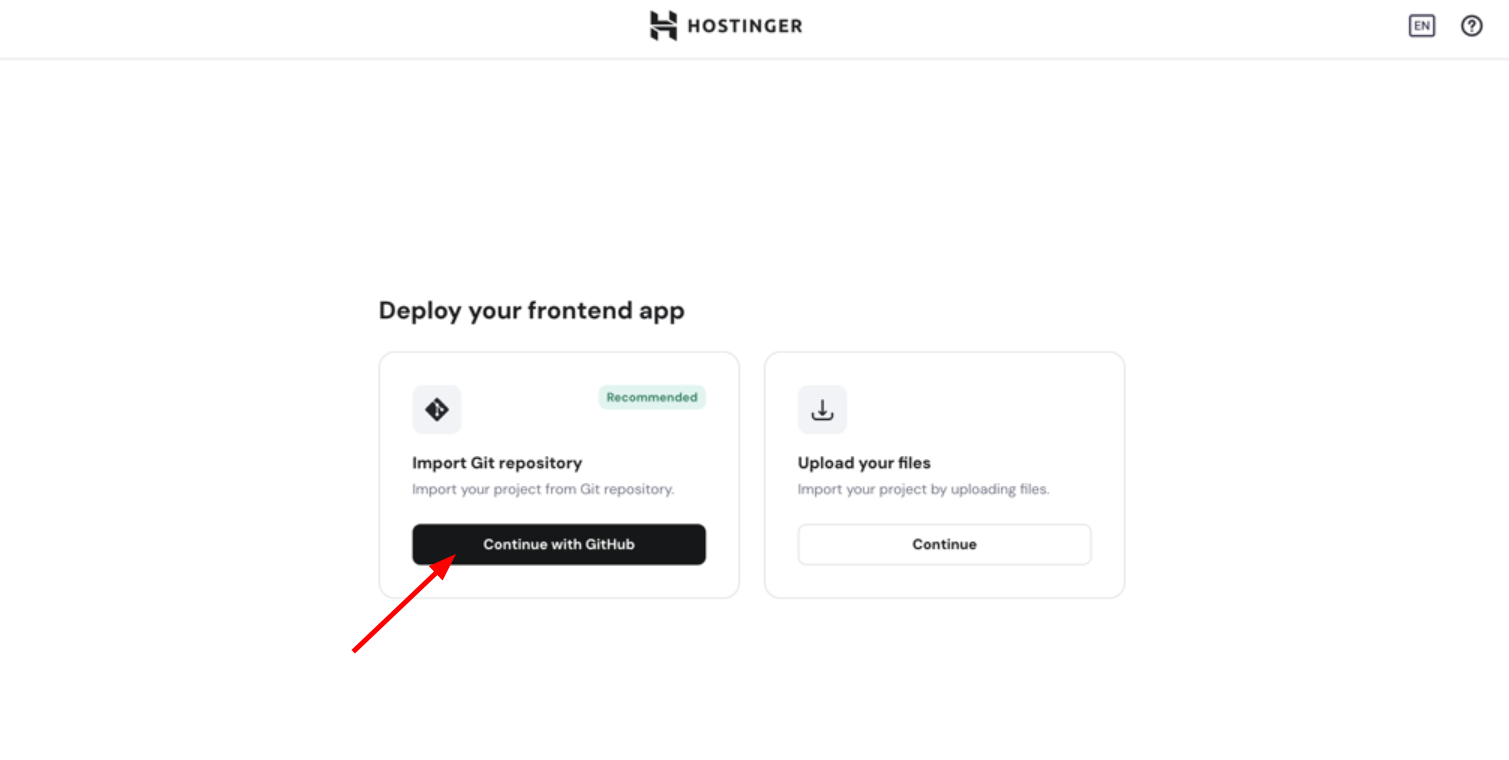
These steps help avoid downtime and keep your app running smoothly on Hostinger.
Credit: www.hostinger.com
Conclusion And Final Recommendations
Deploying a Node.js project on Hostinger offers a straightforward and efficient way to host your web applications. This section wraps up the essential points and provides clear advice to help you start your deployment journey with confidence.
Summary Of Key Takeaways For Deploying Node.js On Hostinger
- Set up a Git repository to manage your Node.js code efficiently.
- Configure Git on Hostinger to enable smooth deployment from GitHub.
- Use Hostinger’s VPS hosting for better control and performance.
- Modify the package.json file as needed to suit your app’s requirements.
- Deploy using GitHub Actions for automated and reliable updates.
- Check logs and use Hostinger’s hPanel to manage your app easily.
Final Thoughts On Hosting Speed And Reliability
Hostinger provides fast server response times that improve your app’s loading speed. Reliable uptime means your Node.js app stays online with minimal interruptions.
With scalable resources, Hostinger can handle traffic spikes without slowing down your application. The VPS environment offers dedicated resources, ensuring consistent performance.
Overall, Hostinger balances affordable pricing with solid hosting quality. This makes it a good choice for developers starting or growing their projects.
Encouragement To Start Your Node.js Deployment Journey Today
Start deploying your Node.js app on Hostinger now. Follow the simple steps to set up Git and configure your environment.
Experience how easy it is to keep your project live and updated. Take advantage of Hostinger’s tools and support to build your online presence.
Don’t wait. Launch your Node.js app and watch it perform reliably and quickly.

Credit: www.reddit.com
Frequently Asked Questions
How To Deploy A Node.js Project In Hostinger?
Upload your Node. js project files via SFTP or Git to Hostinger VPS. Install dependencies, configure environment variables, and run the app using a process manager like PM2. Use Hostinger’s hPanel to manage your server and domain settings for smooth deployment.
How Can I Deploy A Node.js Project?
Deploy a Node. js project by uploading files via Git, SFTP, or command line. Configure environment variables and start the app. Use VPS or hosting services like Hostinger for easy deployment.
How To Deploy A Project On Hostinger?
Upload your project files via Hostinger’s hPanel using SFTP, Git, or file manager. Then, configure your server and start the app.
Is Node.js Still Relevant In 2025?
Node. js remains highly relevant in 2025 due to its fast performance, scalability, and strong community support. Many developers prefer it for backend development and real-time applications. Its continuous updates and widespread use in web and server-side projects ensure its ongoing importance.
Conclusion
Deploying your Node.js project on Hostinger is simple and effective. Hostinger offers easy setup and reliable performance. You can upload files via Git, SFTP, or commands. This flexibility suits beginners and experienced developers alike. With clear steps, your app goes live quickly. Explore Hostinger’s affordable plans to find what fits your needs. Start hosting your Node.js app today and enjoy smooth deployment. Check out Hostinger here: Hostinger Hosting Plans.