Ready to take your Laravel project live with ease? Deploying your Laravel application doesn’t have to be a headache.
If you’re looking for a reliable, affordable, and beginner-friendly hosting provider, Hostinger has got you covered. With straightforward tools and powerful VPS options, Hostinger makes launching your Laravel project smooth and hassle-free. Whether you’re a newbie or experienced developer, you’ll find the step-by-step process simple to follow and quick to complete. Want to see how easy it is to get your Laravel app up and running? Check out Hostinger now and start deploying your project with confidence: Hostinger Hosting. Stick with me, and I’ll guide you through everything you need to know to deploy your Laravel project successfully on Hostinger.
Introduction To Deploying Laravel Projects On Hostinger
Deploying a Laravel project requires a hosting provider that supports its features. Hostinger offers several hosting options tailored to Laravel’s needs. This section explains Laravel’s hosting requirements and why Hostinger is a good choice. It also reviews the types of Hostinger hosting suitable for Laravel deployment.
Overview Of Laravel And Its Hosting Needs
Laravel is a popular PHP framework used to build web applications. It demands a hosting environment with specific features:
- Support for PHP 7.3 or higher
- Composer for managing dependencies
- MySQL or compatible databases
- Ability to run Artisan commands for project setup
- Access to configure Apache or Nginx web servers
Laravel projects often need control over the server environment. Shared hosting may limit this control, while VPS offers more flexibility.
Why Choose Hostinger For Laravel Deployment
Hostinger combines affordability with features needed for Laravel. Key benefits include:
- User-friendly hPanel for easy management
- Pre-installed Laravel application setup on VPS plans
- Access to SSH for running Artisan and Composer
- Strong support for PHP versions required by Laravel
- Affordable plans suitable for beginners and advanced users
Hostinger’s VPS hosting lets developers choose Laravel during OS installation, simplifying setup.
Types Of Hostinger Hosting Suitable For Laravel
| Hosting Type | Description | Laravel Suitability |
|---|---|---|
| Shared Hosting | Basic hosting for simple websites with limited resources. | Possible for small Laravel projects but with restrictions on SSH and server control. |
| VPS Hosting | Virtual Private Server offering full server control and root access. | Ideal for Laravel. Allows installation of dependencies, running Artisan, and configuring servers. |
| Cloud Hosting | Scalable hosting with high performance and uptime. | Good for large Laravel apps needing extra resources and scalability. |
VPS hosting stands out for Laravel developers needing full control. Shared hosting fits small or testing projects but may cause limitations.
Credit: www.hostinger.com
Key Features Of Hostinger For Laravel Deployment
Hostinger offers several features that simplify Laravel deployment. These features make managing Laravel projects easier and more efficient. From control panel tools to server optimizations, Hostinger covers the essential needs for Laravel developers.
User-friendly Hpanel For Easy Project Management
Hostinger’s hPanel is designed for simplicity. It provides a clean interface to manage your Laravel project files, domains, and databases. You can easily upload files, set permissions, and configure your environment without complex commands.
- Intuitive dashboard for quick access
- File manager with drag-and-drop support
- Domain and SSL management in one place
This control panel reduces the learning curve for new developers and saves time on routine tasks.
Ssh Access And Git Integration For Smooth Deployment
Hostinger supports SSH access, allowing you to connect securely to your server. This is essential for running Laravel commands like migrations and scheduling tasks. Git integration enables easy version control and deployment.
- Run Laravel artisan commands remotely
- Push updates directly from your local repository
- Automate deployment with Git hooks
These tools streamline the deployment process and help maintain clean project versions.
Optimized Vps Templates Tailored For Laravel
Hostinger offers VPS hosting with templates pre-configured for Laravel. These templates include the necessary software stack optimized for Laravel’s performance.
| Feature | Benefit |
|---|---|
| Pre-installed Web Server (Nginx/Apache) | Ready to serve Laravel apps out of the box |
| Optimized PHP version | Improved speed and compatibility with Laravel |
| Configured database support | Smooth integration with Laravel’s Eloquent ORM |
Support For Php And Composer For Dependency Management
Hostinger supports multiple PHP versions compatible with Laravel. It also allows easy installation of Composer, the PHP dependency manager.
- Select the PHP version that matches your Laravel project
- Use Composer to install and update Laravel packages
- Run Composer commands via SSH for full control
This support ensures your Laravel project has the right environment and dependencies.
Database Management With Mysql And Phpmyadmin
Hostinger provides MySQL databases and access to phpMyAdmin for database management. This makes handling Laravel’s database needs straightforward.
- Create and manage databases easily
- Run SQL queries directly through phpMyAdmin
- Backup and restore databases with a few clicks
These features help maintain your Laravel app’s data securely and efficiently.
Step-by-step Guide To Deploy Laravel On Hostinger
Deploying a Laravel project on Hostinger is straightforward with clear steps. This guide breaks down the process into easy tasks. Follow each step carefully for a smooth deployment. From preparing your project locally to testing it live, every action matters.
Preparing Your Laravel Project Locally
Start by ensuring your Laravel project works well on your local machine. Run these commands:
composer installto install dependenciesphp artisan migrateto prepare the databasephp artisan serveto test the app locally
Clear caches to avoid issues:
php artisan config:clear php artisan cache:clear php artisan route:clear php artisan view:clear Make sure the .env file is ready but exclude it from upload. You will configure it on the server.
Setting Up Hosting Environment On Hostinger Hpanel
Log in to your Hostinger hPanel. Select your hosting plan for Laravel deployment.
- Go to VPS or Shared Hosting depending on your plan.
- Access the File Manager and Database sections.
- Create a new MySQL database and user with full privileges.
- Note down the database name, username, and password for later use.
Set PHP version to 8.x or higher in the PHP Configuration for best Laravel support.
Uploading Laravel Files Via Ftp Or Git Repository
Use FTP client like FileZilla or Hostinger’s hPanel File Manager to upload files. Alternatively, deploy via Git for easier updates.
- Upload all Laravel files except vendor and .env folders if using FTP.
- If using Git, clone your repository directly inside the public folder or project root.
- Run
composer installon the server to install dependencies.
Place your Laravel project outside the public_html folder for security. Link the public folder to public_html if necessary.
Configuring Environment Variables And Database Connections
Create or upload the .env file on the server. Update these key settings:
| Variable | Description | Example |
|---|---|---|
APP_ENV | Application environment | production |
APP_DEBUG | Debug mode | false |
DB_CONNECTION | Database driver | mysql |
DB_HOST | Database host | localhost |
DB_PORT | Database port | 3306 |
DB_DATABASE | Database name | your_database |
DB_USERNAME | Database username | your_user |
DB_PASSWORD | Database password | your_password |
Save changes and upload the file to your project root.
Running Artisan Commands And Composer Updates On Server
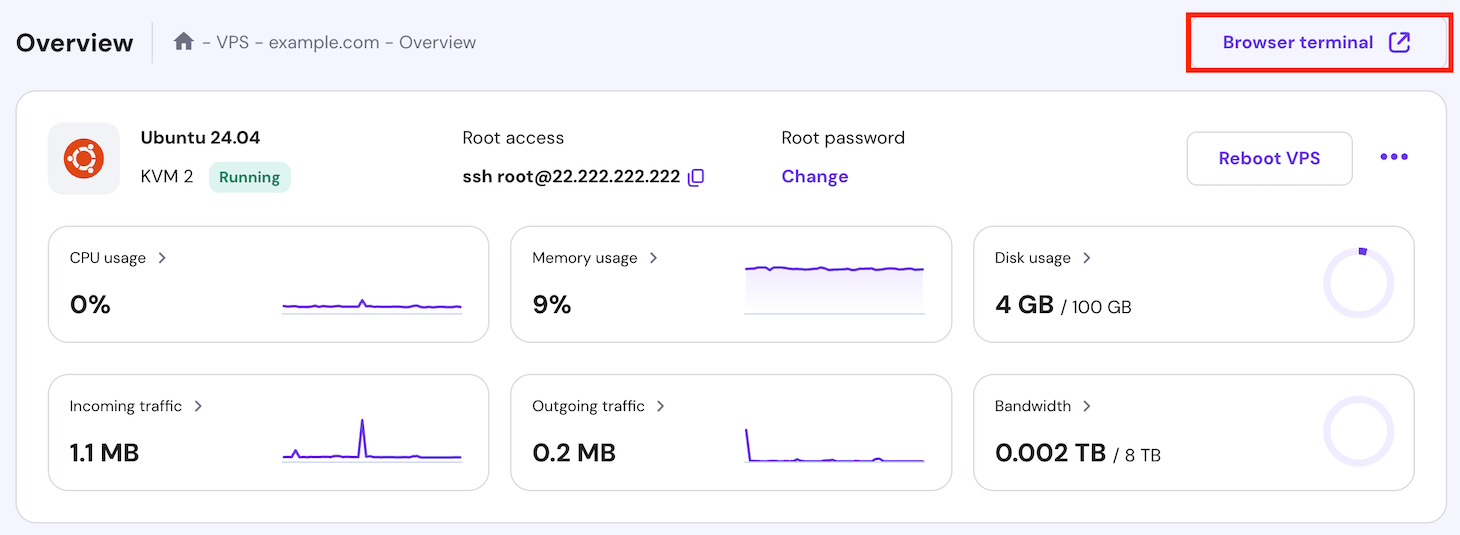
Access Hostinger’s SSH terminal or use the built-in console. Execute these commands:
composer install --no-dev --optimize-autoloaderto install dependenciesphp artisan migrate --forceto run database migrationsphp artisan config:cacheto cache configurationphp artisan route:cacheto cache routesphp artisan view:cacheto cache views
These commands optimize your Laravel app for production.
Testing And Troubleshooting Your Laravel Application
Open your domain in a browser. Check if the homepage loads correctly.
- Verify database connection and migrations.
- Check file permissions for storage and bootstrap/cache folders.
- Review Laravel logs in
storage/logs/laravel.logfor errors. - Use
php artisan config:clearif environment changes don’t reflect. - Set
APP_DEBUG=truetemporarily to see detailed errors.
Fix errors step-by-step. Clear caches and retry deployment commands as needed.
Credit: www.youtube.com
Pricing And Affordability Of Hostinger For Laravel Hosting
Hostinger offers budget-friendly solutions for hosting Laravel projects. It provides various plans tailored to different needs, balancing cost and performance. Understanding the pricing and what you get helps pick the right plan for your Laravel app.
Comparing Shared Hosting Vs Vps Plans For Laravel
Shared Hosting is the cheapest option. It shares server resources with other users, which can affect speed and control. Suitable for small Laravel projects or beginners.
VPS Hosting offers dedicated resources and full control. It suits larger Laravel apps needing better performance and customization.
| Feature | Shared Hosting | VPS Hosting |
|---|---|---|
| Price | From $1.99/month | From $3.95/month |
| Control | Limited | Full root access |
| Performance | Basic | High |
| Ease of Use | Easy | Requires technical skills |
Cost Breakdown And Value For Money
- Shared Hosting plans start at a low price with essential features.
- VPS plans cost more but provide better speed and flexibility.
- Most plans include free SSL certificates and a control panel.
- Hostinger offers a 30-day money-back guarantee, reducing risk.
The price suits those who want to launch quickly without high costs. VPS plans add value for growing Laravel projects needing power and control.
Scalability Options And Upgrade Paths
Hostinger makes it easy to upgrade from shared to VPS hosting. Plans can scale as your Laravel app grows.
- Start with shared hosting for basic needs.
- Move to VPS when traffic or requirements increase.
- Choose higher VPS tiers for more CPU, RAM, and storage.
Upgrades happen smoothly via the hPanel dashboard, with minimal downtime.
Additional Costs To Consider (domain, Ssl, Backups)
- Domain Name: Often sold separately, prices vary by extension.
- SSL Certificates: Free SSL included in most plans for security.
- Backups: Some plans include daily or weekly backups; others may charge extra.
- Email Hosting: Usually a paid add-on if required.
These extras impact the total monthly cost. Plan your budget to include these for a secure and reliable Laravel hosting setup.
Pros And Cons Of Using Hostinger For Laravel Projects
Hostinger offers a popular platform for hosting Laravel projects. It has key strengths and some notable limitations. Understanding these points helps developers decide if Hostinger fits their Laravel deployment needs.
Advantages: Ease Of Use, Cost-effectiveness, And Performance
- Ease of Use: Hostinger’s hPanel is user-friendly for beginners. Deploying Laravel is straightforward with options to install Laravel via OS & Panel settings on VPS plans.
- Cost-Effectiveness: Hostinger provides affordable plans, making it attractive for small projects or budgets. Shared hosting plans are budget-friendly for initial Laravel deployments.
- Performance: Hostinger delivers decent speed and uptime. VPS plans offer better resources, improving Laravel application performance over shared hosting.
Limitations: Shared Hosting Constraints And Potential Issues
- Shared Hosting Constraints: Shared plans have limited resources and restrictions that may hinder Laravel’s advanced features.
- Potential Issues: Laravel apps on shared hosting can face problems with dependencies, permissions, and running Artisan commands.
- VPS hosting is more suitable but requires technical skills to manage and configure properly.
Community And Support Resources Availability
Hostinger provides 24/7 support through live chat and tickets. Their knowledge base includes tutorials for Laravel deployment. Community forums and third-party guides also help resolve issues.
Support is responsive but may not cover complex Laravel-specific problems fully. Users often rely on Laravel’s official documentation and external developer communities.
Real-world User Experiences And Common Challenges
| User Feedback | Common Challenges |
|---|---|
| Many users find Hostinger easy to start with Laravel projects. | Shared hosting leads to issues with Artisan commands and Laravel package installations. |
| VPS hosting improves stability and performance but requires more setup time. | Users report occasional delays in support responses for Laravel-specific queries. |
| Good value for money, especially for small to medium Laravel applications. | Scaling Laravel apps might need migration to more powerful servers or cloud platforms. |
Ideal Use Cases And Recommendations For Hostinger Laravel Deployment
Hostinger offers flexible options for deploying Laravel projects. Choosing the right hosting type depends on your project size and performance needs. Understanding the best scenarios helps you avoid common issues and ensures smooth operation.
Hostinger’s shared hosting suits smaller projects with moderate traffic. For more control and power, VPS hosting is preferable. Laravel deployment requires specific server configurations, so matching your needs with Hostinger’s plans is key.
Best Scenarios For Shared Hosting Deployment
Shared hosting on Hostinger fits well for:
- Simple Laravel applications with low to medium traffic
- Learning and testing Laravel projects
- Small business websites or portfolios
Advantages include low cost and easy setup through Hostinger’s hPanel. It supports basic Laravel requirements like PHP and MySQL. Shared hosting may limit performance under heavy load or complex tasks.
When To Opt For Vps Hosting On Hostinger
Choose VPS hosting if your Laravel project needs:
- Higher performance and dedicated resources
- Custom server configurations and root access
- Handling large traffic or complex backend processes
- Running multiple Laravel applications simultaneously
Hostinger’s VPS allows installing Laravel with a ready-to-use application image, simplifying deployment. VPS suits developers requiring full control over the environment and better security.
Suitability For Small To Medium Projects Vs Large-scale Applications
| Project Size | Recommended Hosting | Reason |
|---|---|---|
| Small Projects | Shared Hosting | Cost-effective, easy setup, sufficient resources |
| Medium Projects | Shared Hosting or VPS | Depends on traffic; VPS for better performance |
| Large-Scale Applications | VPS Hosting | Dedicated resources, custom server setup |
Shared hosting is ideal for smaller or less demanding Laravel projects. VPS supports advanced needs, providing scalability and stability for larger apps.
Tips For Windows Users Deploying Laravel On Hostinger
Windows users can face specific challenges deploying Laravel on Hostinger. Follow these tips for smoother deployment:
- Install Composer on your Windows machine to manage Laravel dependencies.
- Use tools like WAMP or XAMPP to replicate the Linux environment locally.
- Compress your Laravel project files before uploading via Hostinger’s File Manager or FTP.
- Set correct
permissionson storage and bootstrap/cache folders after upload. - Run
php artisan migratevia SSH on Hostinger’s VPS or use database tools in hPanel. - Use UTF-8 encoding to avoid character issues during database import.
Windows users benefit from testing Laravel locally before deployment. This practice minimizes errors and ensures compatibility.
Conclusion And Final Tips For Seamless Laravel Hosting On Hostinger
Deploying a Laravel project on Hostinger can be smooth and efficient with the right approach. This section wraps up essential points and offers practical advice to keep your Laravel application running well. Follow these final tips to ensure your hosting experience is seamless and your application performs optimally.
Summary Of Key Takeaways For Successful Deployment
- Use Hostinger’s hPanel to manage your hosting environment easily.
- Choose VPS hosting for better control and performance over shared hosting.
- Install Laravel via the OS & Panel settings to simplify deployment.
- Configure web server and PHP correctly to support Laravel’s requirements.
- Upload your Laravel project files using FTP or the File Manager.
- Set correct permissions for storage and cache folders.
- Use Composer to manage dependencies on the server if possible.
- Set up your database and update your Laravel .env file accordingly.
Best Practices To Maintain And Scale Your Laravel Application
Maintaining a Laravel application on Hostinger needs regular attention. These best practices help keep your app stable and ready for growth:
- Regularly update Laravel and dependencies to improve security and features.
- Optimize database queries to reduce load times and server stress.
- Use caching wisely to speed up response times.
- Monitor server resources and upgrade hosting plans as needed.
- Back up your project and database frequently to avoid data loss.
- Implement error logging and debugging to catch issues early.
- Consider using a CDN to serve static assets faster.
- Scale your app horizontally by using multiple servers or load balancers if traffic grows.
Resources For Further Learning And Support
Learning more about Laravel and Hostinger hosting will help you manage your project better. Use these resources for guidance and help:
- Hostinger Tutorials: Official guides on Laravel deployment and server management at hostinger.com/tutorials.
- Laravel Documentation: Complete and clear Laravel docs at laravel.com/docs.
- Community Forums: Join Laravel and Hostinger forums for advice and troubleshooting.
- YouTube Channels: Channels like Web Tech Knowledge and The Codeholic offer step-by-step tutorials.
- Stack Overflow: Ask specific Laravel or hosting questions and find solutions.

Credit: www.hostinger.com
Frequently Asked Questions
How To Deploy A Laravel Project To Hostinger?
Log in to Hostinger hPanel and create a new website. Upload Laravel files via File Manager or FTP. Set up a MySQL database and update the. env file. Run Composer commands using SSH. Finally, configure permissions and visit your domain to verify deployment.
Is Hostinger Good For Laravel?
Hostinger supports Laravel deployment, especially via VPS plans with SSH access. Shared hosting may cause limitations for complex Laravel apps. Choose VPS for better performance and fewer issues. Hostinger’s Laravel templates simplify setup, making it a good option for Laravel projects with proper hosting plans.
How Do I Deploy My Laravel Project?
Deploy your Laravel project by setting up a web server and Composer. Upload files, configure the. env file, run migrations, and serve the application. Use SSH for VPS or hPanel for shared hosting to manage databases and domains efficiently.
How To Deploy A Php Project On Hostinger?
Activate your Hostinger hosting and add your domain. Upload PHP files via File Manager or FTP. Create a MySQL database in hPanel. Update your project’s configuration with database details. Use SSH or hPanel to set permissions and run Composer commands if needed.
Access your site to verify deployment.
Conclusion
Deploying your Laravel project on Hostinger is simple and effective. Hostinger offers tools to manage your files and databases easily. With clear steps, you can set up your environment quickly. Using Hostinger’s hosting service helps keep your Laravel app running smoothly. Start your deployment journey with Hostinger today by visiting Hostinger. This platform supports your project’s needs without complexity. Try it now and see the difference in your Laravel hosting experience.