


Looking to build a website but stuck between Hostinger AI Website Builder and WordPress? You’re not alone.
Choosing the right platform can make or break your online presence. You want something easy, fast, and powerful—something that fits your needs perfectly without endless headaches. You’ll discover the key differences, benefits, and drawbacks of both Hostinger’s AI Website Builder and WordPress. By the end, you’ll know exactly which one suits your goals and skill level. Ready to get started? Check out Hostinger here and see how simple building a site can be: Hostinger AI Website Builder. Keep reading to find out if WordPress might still be your best bet.
Credit: www.hostinger.com
Introduction To Hostinger Ai Website Builder And WordPress
Building a website is easier today than ever before. Two popular tools make this possible: Hostinger AI Website Builder and WordPress. Both serve different needs and users. Understanding their features helps you choose the best fit for your project.
Overview Of Hostinger Ai Website Builder And Its Purpose
Hostinger AI Website Builder is a tool designed to create websites quickly using artificial intelligence. It guides users through simple steps to build a site without coding skills.
- Uses AI to generate website layouts and content
- Offers drag-and-drop interface for easy customization
- Includes hosting as part of the package
- Ideal for beginners and small businesses
This builder focuses on speed and simplicity, making website creation accessible for everyone.
Overview Of WordPress And Its Popularity In Website Creation
WordPress is a powerful open-source platform used by millions worldwide. It allows users to create anything from blogs to online stores.
- Supports thousands of themes and plugins
- Highly flexible and customizable
- Requires hosting setup separately
- Preferred by bloggers, developers, and large businesses
WordPress is popular for its control and scalability, fitting many types of websites.
Why Compare Hostinger Ai Website Builder With WordPress In 2025?
The web grows fast. New tools like Hostinger AI Website Builder change how websites are made. WordPress remains a key player. Comparing them shows their strengths and limits.
- Hostinger offers ease and speed through AI automation.
- WordPress provides deep customization and plugin variety.
- Different user needs call for different tools.
- Understanding both helps pick the right platform in 2025.
This comparison guides users to choose a website builder that fits their skills and goals.
Credit: www.hostinger.com
Key Features Of Hostinger Ai Website Builder
Hostinger AI Website Builder combines smart technology and user-friendly tools. It helps create websites fast without coding skills. The platform suits beginners and small businesses. Its features focus on ease, speed, and performance.
Ai-powered Design Automation: Simplifying Website Creation
The AI design tool generates website layouts automatically. It uses your inputs to build a tailored design. This saves hours of manual setup. The builder suggests color schemes, fonts, and images that match your niche.
AI ensures your site looks professional and modern. It reduces guesswork for beginners. Editing remains simple, letting you tweak designs effortlessly.
User-friendly Interface: Accessibility For Beginners
The interface is clean and intuitive. Drag-and-drop tools make it easy to add elements. No coding or technical skills are needed. Menus and options are clear and well-organized.
New users can start building in minutes. The platform guides you step-by-step. This ease of use lowers the learning curve significantly.
Integrated Hosting And Domain Management: Convenience In One Platform
Hostinger combines website building with hosting and domain services. You manage everything from one dashboard. This integration avoids juggling multiple accounts.
| Feature | Benefit |
|---|---|
| Domain Registration | Easy domain purchase and setup |
| Web Hosting | Reliable servers included with the builder |
| SSL Certificate | Secure connections to protect visitors |
This all-in-one system simplifies website launch and maintenance.
Pre-built Templates And Customization Options: Balancing Speed And Personalization
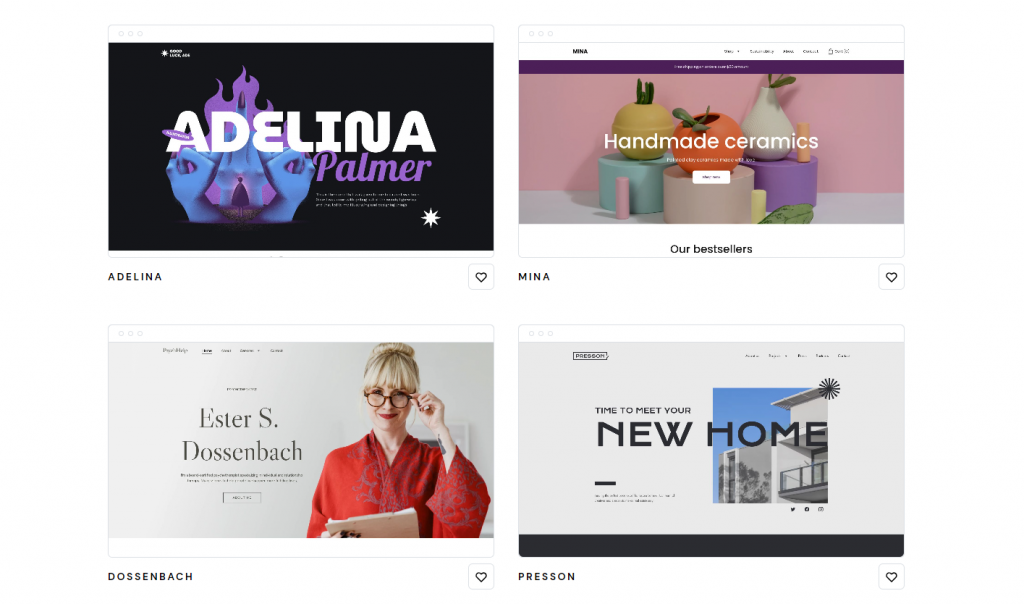
Hostinger offers many ready-made templates for various industries. Templates are modern and mobile-friendly. You can quickly pick one and start editing.
Customization allows you to change colors, fonts, images, and layouts. This ensures your site reflects your brand. Both speed and uniqueness are possible.
Seo And Performance Optimization Features: Enhancing Site Visibility
The builder includes tools to improve search engine rankings. You can edit meta titles, descriptions, and URLs easily. Fast loading speeds help reduce bounce rates.
- Automatic mobile optimization
- Image compression for quicker loading
- Clean code for better indexing
These features increase chances of higher Google rankings and more visitors.
Key Features Of WordPress
WordPress stands as one of the most popular platforms for building websites. It offers a powerful blend of flexibility, ease of use, and a rich set of tools. These features make it suitable for blogs, business sites, and online stores. Understanding its key features helps in comparing it with alternatives like Hostinger AI Website Builder.
Open-source Flexibility And Customization Potential
WordPress is an open-source platform. This means its source code is freely available to anyone. Users can modify and customize it to fit their needs. Themes and custom code allow full control over design and functionality.
The platform supports:
- Custom themes for unique website looks
- Editing of core files for advanced changes
- Ability to create child themes to preserve updates
Extensive Plugin Ecosystem: Expanding Functionality
WordPress offers over 58,000 plugins to extend its features. Plugins add new tools without coding. They cover areas such as:
- SEO optimization
- Security enhancements
- Social media integration
- E-commerce capabilities
- Performance optimization
This ecosystem allows websites to grow and adapt easily.
Robust Content Management System For Various Website Types
WordPress has a strong content management system (CMS). It supports:
- Blog posts and articles
- Pages and custom post types
- Media management for images and videos
It handles content scheduling, revisions, and user roles. This makes it fit for blogs, portfolios, business sites, and online shops.
Community Support And Continuous Updates
WordPress has a large global community. Developers and users contribute themes, plugins, and support. The platform receives regular updates for:
- Security patches
- Performance improvements
- New features
Forums, tutorials, and documentation help users solve problems quickly.
Seo Capabilities And Integration With Marketing Tools
WordPress is built with SEO-friendly features. Users can enhance SEO through plugins like Yoast SEO or All in One SEO. It supports:
- Custom meta tags and descriptions
- XML sitemaps
- Clean URL structures
- Integration with Google Analytics and marketing platforms
This makes WordPress a strong choice for improving website visibility and traffic.
Pricing And Affordability Breakdown
The cost of building a website plays a major role in choosing the right platform. Both Hostinger AI Website Builder and WordPress offer different pricing models. Understanding these costs helps pick the best option for budget and needs.
Hostinger Ai Website Builder Pricing Plans And Value For Money
Hostinger AI Website Builder offers simple, clear pricing. Plans usually include hosting, AI design tools, and support in one package. This all-in-one approach reduces extra fees.
| Plan | Price (per month) | Main Features |
|---|---|---|
| Starter | $3.99 | Basic AI website, SSL, 100 GB bandwidth |
| Premium | $5.99 | More templates, SEO tools, 200 GB bandwidth |
| Business | $9.99 | eCommerce support, unlimited bandwidth, priority support |
Value for money: Hostinger bundles hosting, design, and support. No need for extra purchases.
WordPress Cost Factors: Hosting, Themes, Plugins, And Maintenance
WordPress itself is free. Costs come from hosting, themes, plugins, and upkeep.
- Hosting: Shared hosting starts at $3-$10/month. Managed WordPress hosting can cost $20 or more.
- Themes: Free themes available. Premium themes range from $30 to $100 one-time.
- Plugins: Many free plugins exist. Paid plugins vary from $5 to $100 annually.
- Maintenance: Regular updates, backups, and security may need paid services or time investment.
Costs add up based on features and support level chosen.
Comparative Analysis Of Total Cost Of Ownership Over Time
| Cost Aspect | Hostinger AI Website Builder | WordPress |
|---|---|---|
| Initial Setup | Low, all-in-one plan | Free WordPress + hosting fee |
| Monthly Cost | $3.99 – $9.99 (fixed) | $3 – $20+ (variable) |
| Additional Fees | Minimal to none | Themes, plugins, maintenance |
| Maintenance | Included | Self-managed or paid service |
| Long Term Cost | Predictable, budget-friendly | Can increase with upgrades |
Hostinger offers simple, fixed pricing. WordPress costs vary based on customization and support.
Choosing depends on budget limits and technical comfort.
Pros And Cons Based On Real-world Usage
Choosing between Hostinger AI Website Builder and WordPress depends on user needs and experience. Both tools serve different purposes and audiences. This section breaks down the strengths and weaknesses based on actual usage.
Advantages Of Using Hostinger Ai Website Builder For Quick And Easy Site Launches
- Fast Setup: Hostinger AI Website Builder creates websites in minutes.
- User-Friendly: No coding or technical skills required.
- Template-Based: Offers ready-made designs tailored by AI.
- Integrated Hosting: Hosting and builder come as one package.
- Cost-Effective: Ideal for small businesses or personal sites.
This builder suits users who want to launch websites quickly without complexity.
Limitations Of Hostinger Ai Website Builder In Customization And Scalability
- Limited Customization: Design options are fixed within templates.
- Scaling Challenges: Not ideal for large or complex websites.
- Feature Constraints: Advanced plugins or integrations are unavailable.
- Less Control: Users cannot edit code or deeply customize features.
Users needing advanced features or unique designs may find these limits restrictive.
Strengths Of WordPress In Flexibility And Feature-rich Development
- Highly Customizable: Thousands of themes and plugins available.
- Full Control: Access to website code and server settings.
- Scalable: Suitable for blogs, e-commerce, portfolios, and large sites.
- Strong Community: Vast support and constant updates.
- SEO Friendly: Plugins and tools to boost search rankings.
WordPress suits users who want flexibility and advanced functionality.
Challenges With WordPress: Learning Curve And Maintenance Requirements
- Steep Learning Curve: Requires time to learn interface and tools.
- Regular Updates: Themes, plugins, and core need frequent updates.
- Security Risks: Requires active management to avoid vulnerabilities.
- Hosting Setup: Separate hosting service needed and configured by users.
- Possible Costs: Premium themes, plugins, and developer help can add expenses.
WordPress demands more effort and knowledge to maintain a secure, smooth site.
Ideal Users And Use Case Recommendations
Choosing the right website builder depends on your skills, goals, and project size. Both Hostinger AI Website Builder and WordPress serve different needs. Understanding who each platform suits best helps in making the right choice.
Who Should Choose Hostinger Ai Website Builder: Beginners And Small Businesses
Hostinger AI Website Builder is perfect for users with little or no web design experience. It offers an easy, fast way to create a website without coding.
- Beginners can build a site quickly using AI-generated templates.
- Small businesses benefit from simple tools to showcase products or services.
- No technical skills needed to manage hosting or design.
- Ideal for portfolios, local shops, freelancers, and startups.
Who Benefits Most From WordPress: Developers, Bloggers, And Large Enterprises
WordPress suits users who need full control and customization. It works well for complex projects with diverse requirements.
- Developers can build custom features using plugins and themes.
- Bloggers enjoy powerful content management and SEO tools.
- Large enterprises require scalable and secure websites.
- Supports e-commerce, memberships, forums, and more advanced functions.
Scenario-based Recommendations: When To Prefer One Over The Other
| Scenario | Choose Hostinger AI Website Builder | Choose WordPress |
|---|---|---|
| Need a simple website fast | Great for quick setup with minimal effort. | Setup takes longer, requires more learning. |
| Want full design control | Limited customization options. | Highly flexible with themes and plugins. |
| Running a blog or content site | Basic blogging possible but limited. | Built for content management and SEO. |
| Launching an online store | Good for small shops with basic needs. | Supports large e-commerce sites with many features. |
| Managing high traffic or complex sites | May struggle with scalability. | Designed for large, scalable projects. |
Conclusion: Making The Right Choice For Your Website In 2025
Choosing a website platform shapes your online presence and growth. Both Hostinger AI Website Builder and WordPress offer strong features. Your decision depends on your needs, skills, and future plans. Understanding their differences helps pick the best fit for your site in 2025.
Summary Of Key Differences And Strengths
| Feature | Hostinger AI Website Builder | WordPress |
|---|---|---|
| Ease of Use | Simple drag-and-drop with AI assistance | Steeper learning curve, requires setup and plugins |
| Customization | Limited templates and design options | Highly customizable with thousands of themes and plugins |
| Hosting | Integrated hosting with Hostinger plans | Requires separate hosting setup |
| SEO Capabilities | Basic SEO tools built-in | Advanced SEO plugins available |
| Cost | Affordable, all-in-one pricing | Costs vary by hosting and plugins |
| Support | 24/7 Hostinger support | Community forums and third-party support |
Final Thoughts On Selecting Between Hostinger Ai Website Builder And WordPress
Pick Hostinger AI Website Builder if you want a quick, easy site setup. It suits beginners and small projects. The AI helps create pages fast with minimal effort.
Choose WordPress for full control and growth potential. Ideal for blogs, stores, and complex sites. It demands more time but offers endless flexibility.
Consider your budget, technical skills, and site goals. Hostinger is budget-friendly and simple. WordPress suits those ready to invest time in learning and customizing.
Both platforms support mobile-friendly design and essential SEO. The choice depends on how much control and complexity you need for 2025.

Credit: www.youtube.com
Frequently Asked Questions
What Is Hostinger Ai Website Builder?
Hostinger AI Website Builder uses artificial intelligence to create websites quickly. It offers user-friendly templates and customization with minimal effort. It’s ideal for beginners seeking fast and simple website creation without coding knowledge.
How Does WordPress Differ From Hostinger Ai Builder?
WordPress is an open-source platform offering extensive customization and plugins. Hostinger AI builder focuses on automation and ease of use. WordPress suits complex sites, while Hostinger AI is best for quick, simple websites.
Which Platform Is Better For Seo Purposes?
Both platforms support SEO well, but WordPress offers more advanced SEO plugins and control. Hostinger AI builder provides basic SEO tools suitable for beginners. For in-depth SEO strategies, WordPress is preferred.
Can I Integrate E-commerce On Both Platforms?
Yes, WordPress supports various e-commerce plugins like WooCommerce for full-featured stores. Hostinger AI builder offers built-in e-commerce features suitable for small to medium online shops. Choose based on store complexity.
Conclusion
Choosing between Hostinger AI Website Builder and WordPress depends on your needs. Hostinger offers easy setup and AI tools for quick website creation. WordPress provides more customization but requires more time and skill. For beginners, Hostinger is simple and fast. For advanced users, WordPress offers flexibility. Both platforms support good hosting options. Explore Hostinger’s features and decide what fits your project best. Start building your site with Hostinger today by visiting Hostinger.






